Static ServiceAccount tokens in CI/CD pipelines are one of the most common credential leak vectors on Kubernetes. They turn up in public GitHub commits, misconfigured S3 buckets, and CI job logs every week. This post replaces them with dynamic, lease-bounded tokens issued on demand by OpenBao’s Kubernetes Secrets Engine, integrated end-to-end with GitLab CI/CD on OpenShift.
You know the pattern. Sprint pressure. Someone needs cluster access from a GitLab CI/CD job. You create a ServiceAccount, grab the token, paste it into a CI variable, and move on. It works. Nobody questions it.
Six months later, that token lives in three places you know about and two you don’t. It has no expiry. It has no audience binding. If it leaks, from a log line, an S3 bucket, a developer’s notes, a public repo commit, you won’t find out until something goes wrong. Rotating it means hunting down every consumer in the cluster, updating them in sequence, and hoping nothing breaks mid-deployment. This post closes that gap. By the end, no static cluster token exists anywhere at rest. A new one is generated at the start of each pipeline job, scoped tightly, expires automatically, and leaves nothing behind.
Table of Contents
Dynamic ServiceAccount Tokens on OpenShift with OpenBao Kubernetes Secrets Engine
In our previous post, we moved the static OCP_TOKEN out of GitLab CI/CD variables and into OpenBao KVv2 secrets engine. The runner job pod authenticates to OpenBao using its projected ServiceAccount token, receives a short-lived pipeline token, reads the credential from KVv2, and revokes the pipeline token immediately after. GitLab no longer holds a copy of the cluster token.
That was a meaningful improvement, but the token stored in KVv2 is still static. It was created once, stored at rest, and remains valid until someone manually revokes or rotates it. This post eliminates it entirely. By the end, no cluster token exists anywhere at rest. The Kubernetes Secrets Engine generates one on demand at the start of each pipeline job, it expires automatically, and nothing survives beyond the job that needed it.
The Blast Radius of a Leaked ServiceAccount Token
Static ServiceAccount tokens are not a “best practice” concern. They are a documented attack vector. They have appeared in public GitHub repositories. They have been extracted from misconfigured S3 buckets. They have been discovered in leaked CI/CD job logs. The blast radius when one is compromised is cluster-wide, the revocation path is manual and error-prone, and the audit trail is effectively nonexistent.
The better model: short-lived tokens issued on demand, scoped to the minimum required permissions, expires automatically, and centrally auditable. This is what OpenBao’s Kubernetes Secrets Engine gives you. Pair it with OpenShift’s projected token infrastructure and the Kubernetes auth method already configured in this series, and you have a complete, production-ready replacement for static credentials. No manual rotation. No credential sprawl. Instant revocation when a lease TTL expires.
How Static Tokens Work and Why They Fail
The Legacy Model: Secret-Based Tokens
Prior to Kubernetes 1.24 (and OpenShift 4.11), creating a ServiceAccount automatically triggered the creation of a corresponding kubernetes.io/service-account-token Secret. This Secret contained a JWT signed by the cluster’s service account signing key, with no expiry claim (exp field). The token was effectively immortal.
The JWT payload of a legacy token would look like:
{
  "iss": "kubernetes/serviceaccount",
  "kubernetes.io/serviceaccount/namespace": "<namespace>",
  "kubernetes.io/serviceaccount/secret.name": "<sa-token-xxxxx>",
  "kubernetes.io/serviceaccount/service-account.name": "<sa-acc-name>",
  "kubernetes.io/serviceaccount/service-account.uid": "<sa-uid>",
  "sub": "system:serviceaccount:my-namespace:<sa-acc-name>"
  // Note: no "exp" (expiry), no "aud" (audience)
}
The absence of exp and aud claims is the critical security gap. Any system that accepts a valid Kubernetes JWT, regardless of where or when it is used, will accept this token indefinitely until the Secret is explicitly deleted.
What Changed in Kubernetes 1.24 / OpenShift 4.11
Starting with Kubernetes 1.24 (OpenShift 4.11), the LegacyServiceAccountTokenNoAutoGeneration feature gate was promoted to beta and enabled by default. This stopped the automatic creation of Secret-based tokens for new ServiceAccounts.
OpenShift, starting with OCP 4.11, new ServiceAccounts no longer receive an auto-generated token Secret. Existing secrets from before the upgrade remain valid and are not deleted. OpenShift, starting with OCP 4.11, no longer auto-generates token Secrets for new ServiceAccounts. Existing pre-upgrade Secrets remain valid and are not deleted. Starting with OCP 4.16 (Kubernetes 1.29), LegacyServiceAccountTokenCleanUp became beta and enabled by default. It graduated to GA in OCP 4.17 (Kubernetes 1.30). Do not build new automation on legacy token Secrets.
Despite this, many teams still manually create long-lived tokens:
- Still works on OpenShift 4.11+ but is explicitly discouraged. Example way to create a token that expires in an years time!
oc create token my-serviceaccount --duration=8760h - Or by manually creating a Secret:
apiVersion: v1
kind: Secret
metadata:
  name: my-sa-static-token
  annotations:
    kubernetes.io/service-account.name: my-sa
type: kubernetes.io/service-account-token
oc create token does use the TokenRequest API and produces a time-bounded token, but the workflow is still manual, the token is stored externally, and there is no automatic revocation if it is compromised before expiry.
The Security Problems, Precisely:
- No
expclaim (legacy Secret tokens): Token remains valid indefinitely unless the Secret is manually deleted - No
audclaim: Token can be accepted by any service that validates Kubernetes JWTs - No revocation signal: Requires deleting the Secret and identifying every downstream consumer
- Credential sprawl: Token ends up stored in CI variables, Helm values, documentation, and chat tools like Slack
- No audit trail: No native way to trace which job or system used the token and when
How OpenShift Handles ServiceAccount Tokens Today
Projected Service Account Tokens (Bound Tokens)
The modern Kubernetes token model uses the TokenRequest API to generate time-bounded, audience-scoped JWTs, delivered to pods via a projected volume. The kubelet manages this automatically; requesting the token, writing it to the mount path, and rotating it before expiry.
In practice, you never have to configure this for standard in-cluster workloads. When OpenShift creates a pod, the ServiceAccount admission controller automatically injects a projected volume into the pod spec (this behavior was enhanced when the BoundServiceAccountTokenVolume feature was enabled). The kubelet then calls the TokenRequest API, gets a signed JWT scoped to that pod and ServiceAccount, and writes it to:
/var/run/secrets/kubernetes.io/serviceaccount/tokenYou do not write any volume config. You just reference a ServiceAccount in a Pod manifest and OpenShift handles the rest when you apply the manifest or create from CLI:
apiVersion: v1
kind: Pod
metadata:
  name: my-app
spec:
  serviceAccountName: my-sa
  containers:
  - name: app
    image: my-image:latest
The token written to that path (/var/run/secrets/kubernetes.io/serviceaccount/token) is a real bound JWT. Here is what its payload will look like:
{
  "aud": ["<KUBERNETES_API_AUDIENCE>"],
  "exp": <EXPIRATION_TIMESTAMP>,
  "iat": <ISSUED_AT_TIMESTAMP>,
  "iss": "<KUBERNETES_API_ISSUER>",
  "kubernetes.io": {
    "namespace": "<NAMESPACE>",
    "pod": {
      "name": "<POD_NAME>",
      "uid": "<POD_UID>"
    },
    "serviceaccount": {
      "name": "<SERVICE_ACCOUNT_NAME>",
      "uid": "<SERVICE_ACCOUNT_UID>"
    }
  },
  "sub": "system:serviceaccount:<NAMESPACE>:<SERVICE_ACCOUNT_NAME>"
}
To extract this from your own cluster:
oc exec -it <pod-name> -n <namespace> -- cat /var/run/secrets/kubernetes.io/serviceaccount/token \
  | cut -d. -f2 \
  | base64 -d 2>/dev/null \
  | jq .
Notice the audience is https://kubernetes.default.svc by default, scoped to the API server. The token has exp and aud, the two fields that were completely absent in the legacy Secret-based token from section 2.
Take for example even a pod created with the default namespace ServiceAccount:
oc exec my-app -- cat /var/run/secrets/kubernetes.io/serviceaccount/token \
  | cut -d. -f2 | base64 -d | jq .
Sample output;
{
  "aud": [
    "https://kubernetes.default.svc"
  ],
  "exp": 1807949804,
  "iat": 1776413804,
  "iss": "https://kubernetes.default.svc",
  "jti": "1fa55e2c-1fa2-4714-a002-f321be1eb64b",
  "kubernetes.io": {
    "namespace": "gitlab-runner",
    "node": {
      "name": "wk-02.ocp.comfythings.com",
      "uid": "7371c3d7-725e-4b6d-bb02-ef8b98e12f05"
    },
    "pod": {
      "name": "my-app",
      "uid": "7e02b619-71ab-4ded-9c1c-c258e252acd8"
    },
    "serviceaccount": {
      "name": "default",
      "uid": "446dc830-4a85-4e9e-a8b3-8a4a4b39f303"
    },
    "warnafter": 1776417411
  },
  "nbf": 1776413804,
  "sub": "system:serviceaccount:gitlab-runner:default"
}If you were paying attention to the decode command, you’ll notice we extracted the second field of the token string using cut -d. -f2. This is because a JWT is made of exactly three parts, separated by dots:
<header>.<payload>.<signature>- Header (
f1): base64-encoded JSON describing the token type and signing algorithm (e.g.RS256) - Payload (
f2): base64-encoded JSON containing the actual claims: who the token is for, when it expires, what it’s scoped to. This is what we decoded and inspected above. - Signature (
f3): the cryptographic signature the API server uses to verify the token hasn’t been tampered with. Not human-readable.
So cut -d. -f2 | base64 -d | jq . is just saying: split on dots, take the middle part, decode it, pretty-print it. The header and signature are intentionally ignored, they’re not useful for human inspection.
A few things to note from the real token output above:
nodeis included. OpenShift records the node the pod is scheduled on. This is identity context visible in audit logs but it is not a binding constraint by default. The token is validated against pod UID and ServiceAccount UID, not the node it came from.warnafteris set by the kubelet when it issues the projected token, typically to 24 hours after issuance (or earlier for shorter-lived tokens). It is not a Kubernetes spec field but an internal marker. After this timestamp, the API server logs warnings if the token is still being used, since the kubelet should have rotated it by then. It is a detection signal for stale tokens, not an expiry warning.jti(JWT ID) is a unique nonce per token. This allows the API server to track individual token issuances. Combined with the pod/node binding, it means you can’t reuse or replay this token after the pod is gone.issandaudreflect your cluster service account issuer. On this cluster it’shttps://kubernetes.default.svc, this is the OIDC issuer URL, and the audience must match what the API server is configured to accept. Some clusters use the full FQDN (kubernetes.default.svc.cluster.local); both are valid.- The subject (
sub) tells you exactly who this token speaks for:system:serviceaccount:gitlab-runner:default, thedefaultServiceAccount in thegitlab-runnernamespace. Even though no custom ServiceAccount was specified in the pod spec, OpenShift still issued a fully bound, audience-scoped token automatically.
When You Need the Explicit Form
The auto-injected token covers most in-cluster workloads. You write the explicit projected volume only when you need to deviate from the defaults: a custom audience for your own service, a shorter TTL, or a different mount path for an application that expects its token somewhere specific. In that case you define it yourself:
apiVersion: v1
kind: Pod
metadata:
  name: my-app
spec:
  serviceAccountName: my-sa
  containers:
  - name: app
    image: my-image:latest
    volumeMounts:
    - mountPath: /var/run/secrets/tokens
      name: app-token
  volumes:
  - name: app-token
    projected:
      sources:
      - serviceAccountToken:
          path: app-token
          expirationSeconds: 3600
          audience: https://my-target-svc
With such manifest, the token is now written to /var/run/secrets/tokens/app-token instead of the default path, scoped to my-target-svc instead of the API server. The resulting JWT:
{
  "aud": ["https://kubernetes.default.svc"],
  "exp": 1807949804,
  "iat": 1776413804,
  "iss": "https://kubernetes.default.svc",
  "kubernetes.io": {
    "namespace": "my-namespace",
    "pod": {
      "name": "my-app",
      "uid": "a3f1c9b2-6d4e-4f8a-9c21-7b5d2e8f1a90"
    },
    "serviceaccount": {
      "name": "my-sa",
      "uid": "5e7a2c14-9b3d-4c6f-8a11-2d9f0b7c3e45"
    }
  },
  "sub": "system:serviceaccount:my-namespace:my-sa"
}
To extract the token for this one:
oc exec -it my-app -n <namespace> -- cat /var/run/secrets/tokens/app-token \
  | cut -d. -f2 \
  | base64 -d 2>/dev/null \
  | jq .
Rotation Mechanics
The kubelet proactively rotates projected tokens when either condition is met first:
- The token has consumed more than 80% of its TTL. For a 3600s token, rotation begins after roughly 2880s.
- The token has been alive for more than 24 hours.
Whichever fires first wins. For tokens with TTL of 24 hours or less, the 80% rule always fires before the 24-hour rule, so in practice the 80% rule is the only one you observe. For long-lived tokens (TTL longer than 24 hours), the 24-hour rule kicks in well before 80%.
Note that the minimum allowed value for expirationSeconds is 600 seconds (10 minutes). Tokens requested with a shorter lifetime will be rejected by the API server.
Token Invalidation
Projected tokens become invalid when any of the following occur:
- The
exptimestamp is reached. - The pod the token was issued for is deleted.
- The ServiceAccount the token belongs to is deleted.
Pod deletion automatically invalidates all tokens issued for that pod, even before their TTL expires. This is what “bound” means. The pod and ServiceAccount UIDs are embedded in the signed JWT claims, and the API server validates at TokenReview time that those bound objects still exist. Delete the pod and every token issued to it is rejected on the next API call, regardless of remaining TTL.
This revocation is not instantaneous, however. Kubernetes treats a bound token as invalid 60 seconds after the pod’s .metadata.deletionTimestamp, which is normally set when the delete request is accepted and includes the pod’s termination grace period. In practice, deleting the pod causes its bound tokens to become unusable automatically, regardless of their remaining TTL, but there is a short post-deletion grace window before rejection is enforced.
The Gap: Tokens Outside of Pods
Projected tokens work well for in-cluster workloads. But many real-world patterns require tokens outside:
- GitLab CI/CD runners not running as in-cluster pods.
- External automation (Ansible, Terraform) accessing the cluster API.
- Cross-cluster operations where jobs on one cluster need tokens for another.
For these, you need a mechanism that issues short-lived tokens on demand, outside the pod context. This is exactly what OpenBao’s Kubernetes Secrets Engine is built for.
Dynamic Tokens with OpenBao: Architecture and Flow
What is a dynamic ServiceAccount token? A dynamic ServiceAccount token is a short-lived Kubernetes API credential issued on demand via the TokenRequest API. It is not created ahead of time or stored anywhere. It is generated when needed, scoped to a specific ServiceAccount, bound to a TTL, and automatically invalidated when that TTL expires or the lease is revoked.
In this model:
- No token exists at rest between requests
- Each pipeline run produces a new, unique token
- Tokens expire automatically at TTL, and explicit revocation shortens that window further.
- Access is enforced through RBAC on the target ServiceAccount
This is fundamentally different from static tokens, which are created once, stored externally, and remain valid until someone manually revokes them.
This flow relies on two distinct OpenBao components, which serve different roles.
- Kubernetes Auth Method (auth/kubernetes, Identity): This is how the workload proves who it is to OpenBao. The caller presents its projected ServiceAccount JWT. OpenBao validates it against the Kubernetes TokenReview API, checks the ServiceAccount name and namespace against the configured role, and if valid, issues a short-lived OpenBao token scoped to a policy.
This answers: who is asking? - Kubernetes Secrets Engine (kubernetes/, Credential Issuance): This is how OpenBao generates cluster credentials on demand. Once the caller holds a valid OpenBao token, it requests credentials from this engine. OpenBao calls the Kubernetes TokenRequest API, receives a time-bounded ServiceAccount token, and returns it to the caller with a lease. This answers: here is your credential. It expires in 15 minutes.
As such, it is important to avoid using tokens issued by the Kubernetes Secrets Engine to authenticate back to the Kubernetes Auth Method. This creates a feedback loop: each authentication attempt generates a new OpenBao identity, leases accumulate, and the system becomes unmanageable. Keep identity (auth method) and credential issuance (secrets engine) strictly separate.
How a Dynamic Token Is Requested and Used
The diagram below shows the full request flow from a caller pod authenticating to OpenBao through to receiving a dynamic OCP ServiceAccount token and using it against the OpenShift API. This is the in-cluster pattern, applicable when the caller runs as a pod inside the same OCP cluster as OpenBao.
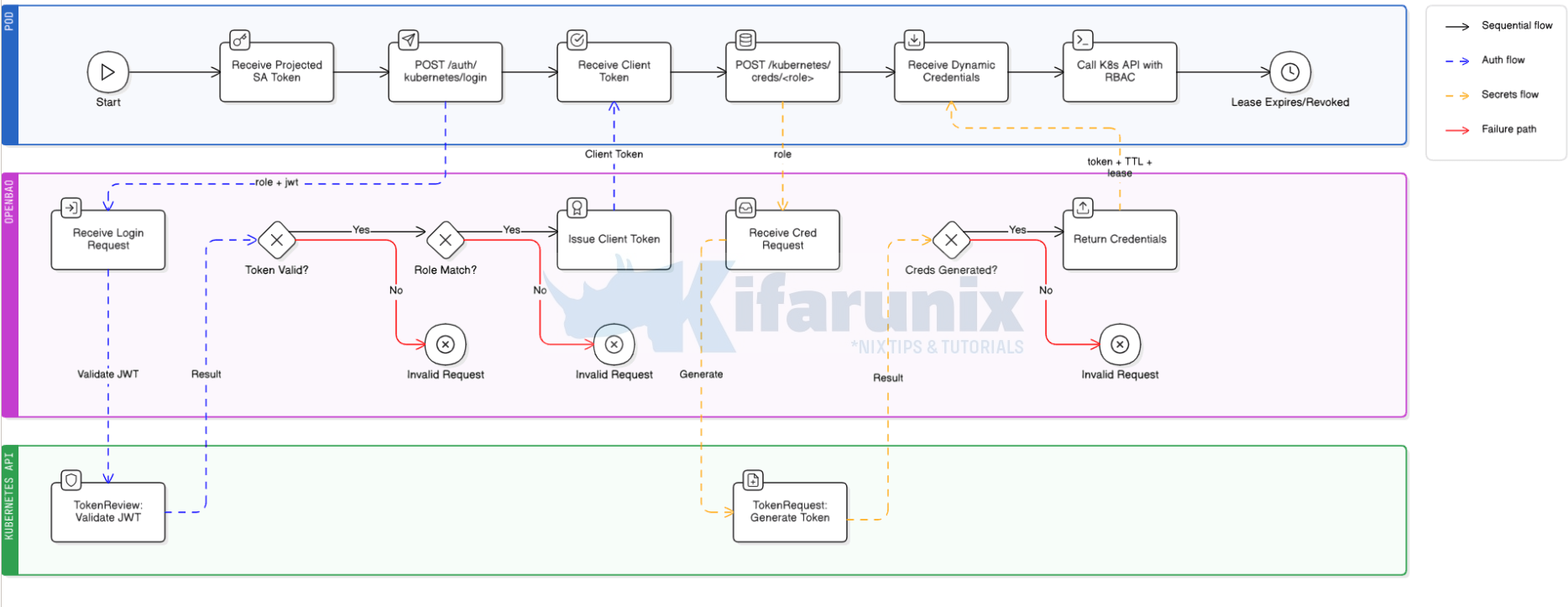
In essence, this is how this process flows:
Phase 1: Job Starts – Pod is Born
- For example, GitLab detects a pending pipeline job and signals the GitLab Runner Manager.
- The Runner Manager Pod, which is long-running and already exists inside OpenShift, calls the Kubernetes API to create a brand new ephemeral Job Pod.
- Kubernetes schedules the Job Pod onto a node.
- The kubelet on that node sees the pod spec, notes the configured
serviceAccountName(e.g.<runner-job-sa>), and before the job script runs a single line, calls the Kubernetes TokenRequest API internally. - Kubernetes issues a projected ServiceAccount token, time-bounded, audience-scoped, and pod-bound, and the kubelet writes it to the pod filesystem at
/var/run/secrets/kubernetes.io/serviceaccount/token. - The job script begins executing. The token is already there. The job did nothing to create it.
Phase 2: Job Pod Authenticates to OpenBao
- The job script reads the projected token from the mounted path.
- It then POSTs to OpenBao’s Kubernetes auth endpoint over the in-cluster service DNS. No external network hop required:
POST https://<openbao-service>.<openbao-namespace>.svc.cluster.local/v1/auth/kubernetes/login
Body: { "jwt": "<projected-token>", "role": "<auth-role>" }
- OpenBao receives the request and does not validate the JWT itself. It delegates entirely to Kubernetes.
- OpenBao calls the Kubernetes TokenReview API:
POST /apis/authentication.k8s.io/v1/tokenreviews
- The Kubernetes API server inspects the JWT, verifies the signature against the cluster’s signing key, checks it has not expired, and returns the token’s identity:
system:serviceaccount:<runner-namespace>:<runner-job-sa>
authenticated: true
- OpenBao receives the TokenReview result (runner service account an namespace) and checks it against the
<auth-role>definition:- Does
<runner-job-sa>matchbound_service_account_names? Yes or hard stop. - Does
<runner-namespace>matchbound_service_account_namespaces? Yes or hard stop.
- Does
- Both checks pass. OpenBao issues a short-lived OpenBao client token (e.g. 15m TTL) and returns it to the job pod.
- The job pod stores this OpenBao token in memory. It is not a Kubernetes token. It is an OpenBao token that grants the right to request Kubernetes credentials.
Phase 3: Job Pod Requests Dynamic Kubernetes Credentials
- The job POSTs to OpenBao’s Kubernetes Secrets Engine credentials endpoint, passing the OpenBao client token in the header:
POST https://<openbao-service>.<openbao-namespace>.svc.cluster.local/v1/kubernetes/creds/<secrets-engine-role>
Header: X-Vault-Token: <openbao-client-token>
Body: { "kubernetes_namespace": "<target-namespace>" }
- OpenBao receives the request and checks the client token’s attached policy. Does
<policy-name>allowcreate/updateonkubernetes/creds/<secrets-engine-role>? Yes or hard stop. - OpenBao looks up the
<secrets-engine-role>definition. Target ServiceAccount is<target-sa>, namespace is<target-namespace>, TTL is<configured-ttl>. - OpenBao calls the Kubernetes TokenRequest API using its own pod’s ServiceAccount credentials, not the job pod’s:
POST /api/v1/namespaces/<target-namespace>/serviceaccounts/<target-sa>/token
expirationSeconds: <configured-ttl-in-seconds>
- Kubernetes checks that OpenBao’s ServiceAccount has permission to create tokens for
<target-sa>, and that OpenBao’s SA holds at least every permission<target-sa>holds. This is the Kubernetes privilege escalation guard, and it is why Step 2 binds OpenBao’s SA to the same Role as<service-account>. If OpenBao’s SA lacks any permission<target-sa>has, the TokenRequest call returns 403 here. - Kubernetes generates a brand new, time-bounded ServiceAccount token for
<target-sa>, cryptographically signed, withexpandaudclaims set. - Kubernetes returns the token to OpenBao.
- OpenBao wraps the token in a lease, records the lease in its storage, and returns the full response to the job pod:
{
  "lease_id": "kubernetes/creds/<secrets-engine-role>/<lease-uuid>",
  "lease_duration": <configured-ttl-in-seconds>,
  "data": {
    "service_account_token": "<dynamic-k8s-token>",
    "service_account_name": "<target-sa>",
    "service_account_namespace": "<target-namespace>"
  }
}
Phase 4: Job Pod Uses the Dynamic Token
- The job pod extracts
service_account_tokenfrom the response. - The job authenticates to the OpenShift API using that token:
oc login --token="<dynamic-k8s-token>" --server="https://api.<cluster-domain>:6443"
- The OpenShift API server validates the token via TokenReview. It checks signature, expiry, audience, and that
<target-sa>still exists. - Access is granted strictly according to the RBAC RoleBinding on
<target-sa>in<target-namespace>. Nothing more, nothing less. - The job executes its deployment operations within those RBAC boundaries.
Phase 5: Cleanup – Nothing Manual Required
- The job script explicitly calls
revoke-selfon the OpenBao token as the last step. - OpenBao receives the revocation, marks the lease as expired, and the Kubernetes token remains valid until its exp timestamp.
- If revocation is skipped, the OpenBao lease TTL expires naturally. Same outcome, slightly delayed.
- GitLab marks the job complete and signals the Runner Manager to destroy the Job Pod.
- Kubernetes terminates the Job Pod. The projected token that started the whole flow is also invalidated since it was pod-bound to a pod that no longer exists.
- Nothing persists. No token survives. No manual rotation needed. No credential sprawl. The next job run starts this entire flow from zero.
Why explicit revocation matters? If the job script crashes before reaching its cleanup, or skips revocation entirely, the OpenBao lease still expires at TTL and the dynamic Kubernetes token still becomes invalid at its exp. So nothing leaks indefinitely either way. Explicit revocation just shrinks the window: the difference between “token dead the moment the job ends” and “token dead in 15 minutes.” For pipelines that produce many concurrent jobs or run on shared runners, that window matters. Revoke explicitly.
If the caller runs outside the cluster, for example an external Ansible controller, a GitLab runner on a VM, or a Terraform executor, it has no projected ServiceAccount token and cannot use the Kubernetes Auth Method.
Pick one of these alternatives based on what the caller is:
- JWT auth method with OIDC tokens. Use this for GitLab SaaS shared runners, GitHub Actions, or any CI system that issues OIDC tokens per job. The CI platform signs a short-lived JWT with embedded claims (project, branch, ref), OpenBao validates the signature against the platform’s public key, and binds the auth role to specific claim values. No long-lived secret on either side.
- AppRole with response wrapping. Use this for long-running external systems like Ansible Tower, a standalone Terraform host, or a bare-metal scheduler. AppRole issues a
role_idandsecret_idpair. Response wrapping ensures thesecret_idis delivered through a one-time-use token so it cannot be intercepted in transit. Rotation is manual but bounded.
Both are out of scope for this post but will be covered in follow-ups.
Step-by-Step: Configuring OpenBao Kubernetes Secrets Engine on OpenShift
By the end of this section, OpenBao will be issuing dynamic, time-bounded OCP ServiceAccount tokens on demand to any authorized in-cluster caller.
Prerequisites
- OpenShift cluster with
cluster-adminaccess. We are on OCP 4.20. - OpenBao deployed in the cluster and unsealed.
- Kubernetes Auth Method already enabled and configured.
baoCLI configured withBAO_ADDRand a validBAO_TOKEN.ocCLI authenticated to the OpenShift cluster.
Before proceeding, verify that OpenBao has been granted permission to review Kubernetes tokens via the system:auth-delegator ClusterRoleBinding. Without this binding, all Kubernetes authentication login attempts will fail.
oc get clusterrolebinding openbao-token-reviewer-binding \
  -o jsonpath='{.subjects[*].namespace}/{.subjects[*].name}'
Expected output:
openbao/openbaoIf it is missing, recreate it before continuing:
oc create clusterrolebinding openbao-token-reviewer-binding \
  --clusterrole=system:auth-delegator \
  --serviceaccount=openbao:openbao
Step 1: Create the Target ServiceAccount and RBAC
CI/CD jobs often run in a different namespace from the workloads they deploy. In this guide, runner job pods run in the gitlab-runner namespace while applications being deployed by the CI live in the application namespace called infrawatch-dev.
When a pipeline job needs to deploy:
- It authenticates to OpenBao using its own ServiceAccount in the runner namespace
- OpenBao returns a temporary Kubernetes token to the job
- That token belongs to a ServiceAccount in the target application namespace, this is what gives the pipeline its permissions there.
In essence, the Kubernetes Secrets Engine issues tokens that impersonate a specific ServiceAccount. That ServiceAccount must live in the namespace your pipeline deploys to, not the namespace your runner job pods run in.
Your runner job pods authenticate to OpenBao using their own projected ServiceAccount token in the runner namespace. The dynamic token OpenBao issues back impersonates the SA created here. Every registry push, manifest apply, and rollout command OCP sees will come from this SA in the application namespace.
Therefore, create a dedicated ServiceAccount for CI/CD operations. Do not reuse any of the application runtime ServiceAccounts already in the namespace. CI/CD identity and application runtime identity are separate concerns with separate lifecycles and separate blast radii.
Now create a dedicated ServiceAccount in your application (target) namespace. This is the ServiceAccount that will be impersonated during deployments.
Replace the placeholders with your actual values:
<service-account>: name of the CI/CD ServiceAccount<application-namespace>: namespace where your app is deployed
cat <<EOF | oc apply -f -
apiVersion: v1
kind: ServiceAccount
metadata:
  name: <service-account>
  namespace: <application-namespace>
  labels:
    managed-by: openbao
    purpose: ci-deployment
EOF
The managed-by and purpose labels are not functional. They document intent: this ServiceAccount’s tokens are issued dynamically by OpenBao and it should never be granted long-lived tokens manually.
We are using ci-deploy-sa as our CI/CD service account.
Hence, our service account creation command would look like:
cat <<EOF | oc apply -f -
apiVersion: v1
kind: ServiceAccount
metadata:
  name: ci-deploy-sa
  namespace: infrawatch-dev
  labels:
    managed-by: openbao
    purpose: ci-deployment
EOF
Next, grant the permissions the pipeline needs to the just created SA. Adjust the verbs and resources used in the below role manifest to match what your specific pipeline does. The Role below covers the common case:
- image push to the OCP internal registry,
- manifest apply,
- deployment and statefulset rollouts,
- pod exec for migrations, and
- service management.
Replace all <placeholders> in both manifests and commands below with values from your environment before executing.
cat <<EOF | oc apply -f -
apiVersion: rbac.authorization.k8s.io/v1
kind: Role
metadata:
  name: <role-name>
  namespace: <application-namespace>
rules:
- apiGroups: ["apps"]
  resources: ["deployments", "statefulsets"]
  verbs: ["get", "list", "create", "patch", "update"]
- apiGroups: ["apps"]
  resources: ["deployments/status", "statefulsets/status"]
  verbs: ["get"]
- apiGroups: ["apps"]
  resources: ["replicasets"]
  verbs: ["get", "list"]
- apiGroups: [""]
  resources: ["pods"]
  verbs: ["get", "list"]
- apiGroups: [""]
  resources: ["pods/exec"]
  verbs: ["create"]
- apiGroups: [""]
  resources: ["services"]
  verbs: ["get", "list", "create", "delete"]
- apiGroups: [""]
  resources: ["configmaps"]
  verbs: ["get", "list", "create", "patch", "update"]
- apiGroups: ["route.openshift.io"]
  resources: ["routes"]
  verbs: ["get", "list", "create", "patch", "update"]
- apiGroups: ["route.openshift.io"]
  resources: ["routes/custom-host"]
  verbs: ["create", "patch", "update"]
EOF
For example:
cat <<EOF | oc apply -f -
apiVersion: rbac.authorization.k8s.io/v1
kind: Role
metadata:
  name: ci-deploy-role
  namespace: infrawatch-dev
rules:
- apiGroups: ["apps"]
  resources: ["deployments", "statefulsets"]
  verbs: ["get", "list", "create", "patch", "update"]
- apiGroups: ["apps"]
  resources: ["deployments/status", "statefulsets/status"]
  verbs: ["get"]
- apiGroups: ["apps"]
  resources: ["replicasets"]
  verbs: ["get", "list"]
- apiGroups: [""]
  resources: ["pods"]
  verbs: ["get", "list"]
- apiGroups: [""]
  resources: ["pods/exec"]
  verbs: ["create"]
- apiGroups: [""]
  resources: ["services"]
  verbs: ["get", "list", "create", "delete"]
- apiGroups: [""]
  resources: ["configmaps"]
  verbs: ["get", "list", "create", "patch", "update"]
- apiGroups: ["route.openshift.io"]
  resources: ["routes"]
  verbs: ["get", "list", "create", "patch", "update"]
- apiGroups: ["route.openshift.io"]
  resources: ["routes/custom-host"]
  verbs: ["create", "patch", "update"]
EOF
Next, bind the role to the CI/CD service account.
cat <<EOF | oc apply -f -
apiVersion: rbac.authorization.k8s.io/v1
kind: RoleBinding
metadata:
  name: <rolebinding-name>
  namespace: <application-namespace>
roleRef:
  apiGroup: rbac.authorization.k8s.io
  kind: Role
  name: <role-name>
subjects:
- kind: ServiceAccount
  name: <service-account>
  namespace: <application-namespace>
EOF
For example:
cat <<EOF | oc apply -f -
apiVersion: rbac.authorization.k8s.io/v1
kind: RoleBinding
metadata:
  name: ci-deploy-role-binding
  namespace: infrawatch-dev
roleRef:
  apiGroup: rbac.authorization.k8s.io
  kind: Role
  name: ci-deploy-role
subjects:
- kind: ServiceAccount
  name: ci-deploy-sa
  namespace: infrawatch-dev
EOF
If your pipeline pushes images to the OCP internal registry, grant the system:image-builder ClusterRole to your deployment service account, for example ci-deploy-sa in this setup. This ClusterRole grants both push and pull access to imagestreams in the target namespace. The image lands in an imagestream in <application-namespace>, which is why this grant is scoped there and not in the runner namespace:
oc policy add-role-to-user system:image-builder \
  system:serviceaccount:<application-namespace>:<service-account> \
  -n <application-namespace>
For example:
oc policy add-role-to-user system:image-builder \
  system:serviceaccount:infrawatch-dev:ci-deploy-sa \
  -n infrawatch-dev
Step 2: Grant OpenBao Permission to Issue Tokens
In our previous post, we granted OpenBao permission to validate incoming ServiceAccount tokens via the TokenReview API. That covered authentication into OpenBao. This step grants a separate permission: the ability to call the Kubernetes TokenRequest API to generate new ServiceAccount tokens on demand. These are two distinct API calls serving opposite directions. Without this grant, OpenBao can authenticate callers but cannot issue cluster credentials for them.
Hence, copy the command below, replace <clusterrole-name> with your actual value and apply:
cat <<EOF | oc apply -f -
apiVersion: rbac.authorization.k8s.io/v1
kind: ClusterRole
metadata:
  name: <clusterrole-name>
rules:
- apiGroups: [""]
  resources: ["serviceaccounts/token"]
  verbs: ["create"]
- apiGroups: [""]
  resources: ["serviceaccounts"]
  verbs: ["get"]
EOF
For example:
cat <<EOF | oc apply -f -
apiVersion: rbac.authorization.k8s.io/v1
kind: ClusterRole
metadata:
  name: openbao-token-req
rules:
- apiGroups: [""]
  resources: ["serviceaccounts/token"]
  verbs: ["create"]
- apiGroups: [""]
  resources: ["serviceaccounts"]
  verbs: ["get"]
EOF
The serviceaccounts/token create verb is the only permission strictly required by the Kubernetes Secrets Engine when using a pre-existing ServiceAccount. The serviceaccounts get verb is not required by the engine but is recommended. It allows OpenBao to verify the target ServiceAccount exists before calling the TokenRequest API, which produces a cleaner error if the ServiceAccount is missing rather than a generic TokenRequest failure.
Next, bind the ClusterRole to OpenBao’s ServiceAccount:
cat <<EOF | oc apply -f -
apiVersion: rbac.authorization.k8s.io/v1
kind: ClusterRoleBinding
metadata:
  name: <clusterrolebinding-name>
roleRef:
  apiGroup: rbac.authorization.k8s.io
  kind: ClusterRole
  name: <clusterrole-name-created-above>
subjects:
- kind: ServiceAccount
  name: <openbao-sa>
  namespace: <openbao-namespace>
EOF
For example:
cat <<EOF | oc apply -f -
apiVersion: rbac.authorization.k8s.io/v1
kind: ClusterRoleBinding
metadata:
  name: openbao-token-req-binding
roleRef:
  apiGroup: rbac.authorization.k8s.io
  kind: ClusterRole
  name: openbao-token-req
subjects:
- kind: ServiceAccount
  name: openbao
  namespace: openbao
EOF
Privilege escalation constraint (Kubernetes-enforced)
OpenBao’s ServiceAccount must hold at least the same permissions as any ServiceAccount it issues tokens for. This is how Kubernetes prevents privilege escalation via the TokenRequest API, as documented in the Kubernetes RBAC documentation and confirmed by the OpenBao Kubernetes Secrets Engine documentation. If OpenBao’s SA does not hold those permissions, the TokenRequest call returns 403 Forbidden. Granting these permissions to OpenBao’s SA does not mean OpenBao will use them directly. It satisfies the Kubernetes requirement that a caller cannot issue tokens for a ServiceAccount with more authority than it holds itself.
Hence, bind OpenBao’s ServiceAccount to the same Role created in Step 1 (<role-name>). This gives OpenBao’s SA the same permissions as CI/CD <service-account>, satisfying the Kubernetes privilege escalation constraint:
cat <<EOF | oc apply -f -
apiVersion: rbac.authorization.k8s.io/v1
kind: RoleBinding
metadata:
  name: <openbao-rolebinding-name>
  namespace: <application-namespace>
roleRef:
  apiGroup: rbac.authorization.k8s.io
  kind: Role
  name: <role-name>
subjects:
- kind: ServiceAccount
  name: <openbao-sa>
  namespace: <openbao-namespace>
EOF
For example:
cat <<EOF | oc apply -f -
apiVersion: rbac.authorization.k8s.io/v1
kind: RoleBinding
metadata:
  name: openbao-ci-deploy-permissions
  namespace: infrawatch-dev
roleRef:
  apiGroup: rbac.authorization.k8s.io
  kind: Role
  name: ci-deploy-role
subjects:
- kind: ServiceAccount
  name: openbao
  namespace: openbao
EOF
If you granted system:image-builder to CI/CD <service-account>, grant it to OpenBao’s SA as well:
oc policy add-role-to-user system:image-builder \
  system:serviceaccount:<openbao-namespace>:<openbao-sa> \
  -n <application-namespace>
E.g:
oc policy add-role-to-user system:image-builder \
  system:serviceaccount:openbao:openbao \
  -n infrawatch-dev
Every permission on CI/CD <service-account>‘s Role must also exist on OpenBao’s ServiceAccount, or the TokenRequest call will fail. Plan this at design time, not during an incident.
Step 3: Enable and Configure the Kubernetes Secrets Engine
Enable the Kubernetes Secrets Engine and configure it to connect to the OCP API server.
bao secrets enable kubernetesExpected output: Success! Enabled the kubernetes secrets engine at: kubernetes/
Next, configure OpenBao kubernetes secrets engine. When OpenBao runs inside the cluster, an empty config for the engine is sufficient. It auto-detects the API host and uses its own pod’s CA cert and token.
Hence, run the command below to configure it:
bao write -f kubernetes/configExpected output: Success! Data written to: kubernetes/config
If OpenBao is outside the cluster, provide the values explicitly:
bao write kubernetes/config \
  kubernetes_host="https://<ocp-api-url>:6443" \
  kubernetes_ca_cert=@/path/to/cluster-ca.crt \
  service_account_jwt=@/path/to/openbao-sa-token
The @ prefix tells the bao CLI to read the value from a file rather than treating the string literally. Without @, it would pass the literal string /path/to/cluster-ca.crt as the certificate value. With @, it reads the file contents and passes the actual certificate PEM data.
Verify the auto-detected configuration:
bao read kubernetes/configSample output;
Key                     Value
---                     -----
disable_local_ca_jwt    false
kubernetes_ca_cert      n/a
kubernetes_host         n/a
kubernetes_ca_cert and kubernetes_host show n/a because OpenBao is running inside the cluster and auto-detects both from its own pod environment. disable_local_ca_jwt: false confirms it is reading its own pod’s ServiceAccount token and CA cert automatically.
Step 4: Create an OpenBao Role for the Secrets Engine
A role in OpenBao is a named configuration that defines the boundaries of what a Kubernetes service account is allowed to do when it authenticates with OpenBao. Think of it as a policy binding, it answers three key questions:
- Who can use this role? (which Kubernetes namespace and service account: identity)
- What does OpenBao generate? (a short-lived Kubernetes token)
- How long is that token valid? (TTL settings)
When your CI/CD pipeline later requests credentials, it will reference this role by name. OpenBao checks the request against the role’s constraints and, if everything matches, issues a scoped, time-limited token, nothing broader, nothing permanent.
bao write kubernetes/roles/<role-name> \
  allowed_kubernetes_namespaces="<application-namespace>" \
  service_account_name="<service-account>" \
  token_default_ttl="15m" \
  token_max_ttl="30m"
For example:
bao write kubernetes/roles/ci-deploy-role \
  allowed_kubernetes_namespaces="infrawatch-dev" \
  service_account_name="ci-deploy-sa" \
  token_default_ttl="15m" \
  token_max_ttl="30m"
Verify:
bao read kubernetes/roles/<role-name>E.g;
bao read kubernetes/roles/ci-deploy-roleSample output:
Key                                      Value
---                                      -----
allowed_kubernetes_namespace_selector    n/a
allowed_kubernetes_namespaces            [infrawatch-dev]
extra_annotations                        <nil>
extra_labels                             <nil>
generated_role_rules                     n/a
kubernetes_role_name                     n/a
kubernetes_role_type                     Role
name                                     ci-deploy-role
name_template                            n/a
service_account_name                     ci-deploy-sa
token_default_audiences                  <nil>
token_default_ttl                        15m
token_max_ttl                            30m
token_default_ttl="15m" is sufficient for most CI/CD jobs. token_max_ttl="30m" is a hard ceiling. Never leave this unset. Note that Kubernetes enforces a hard minimum token lifetime of 10 minutes (600 seconds) for tokens issued via the TokenRequest API. Any request with a shorter expirationSeconds is rejected by the API server. If your OpenBao TTL is shorter than the API server’s minimum, the issued JWT’s exp claim will reflect the longer API-enforced lifetime. The OpenBao lease still expires at your configured TTL, so the token is invalidated by OpenBao on schedule even if the underlying JWT would technically still be valid against the API server.
Never use "*" in allowed_kubernetes_namespaces. Without a namespace constraint, the role is not scoped, any caller with access to this role can request tokens for CI/CD <service-account> in any namespace where that SA exists, or any namespace if the SA is automatically created.
Step 5: Create an OpenBao Policy
If the role defines who can authenticate and what gets generated, the policy defines who is authorized to trigger that generation. These are two separate layers of control in OpenBao.
A policy is a set of path-based access rules. Every token in OpenBao has one or more policies attached to it, and those policies determine exactly which API paths that token can call and with what capabilities.
In this step we’re writing a policy that says: “whoever holds a token with this policy is permitted to call the Kubernetes secrets engine and request a credential for the ci-deploy-role.” Without this policy, even a successfully authenticated CI job would be denied, authentication and authorization are intentionally decoupled in OpenBao.
The create and update capabilities are both required here because the Kubernetes secrets engine internally uses an HTTP POST to generate credentials (create) and may need to renew or update the lease (update). A read-only capability would not be sufficient.
bao policy write <policy-name> - <<EOF
# Allow the caller to generate dynamic Kubernetes ServiceAccount tokens.
# create and update are both required by the Kubernetes Secrets Engine
# for credential generation.
path "kubernetes/creds/<role-name>" {
  capabilities = ["create", "update"]
}
# Allow explicit lease revocation; without it, cleanup waits for TTL expiry.
path "sys/leases/revoke" {
  capabilities = ["update"]
}
EOF
For example (with no comment lines):
bao policy write gitlab-ci-ocp-token-issuer - <<EOF
path "kubernetes/creds/ci-deploy-role" {
  capabilities = ["create", "update"]
}

path "sys/leases/revoke" {
  capabilities = ["update"]
}
EOF
Sample output: Success! Uploaded policy: gitlab-ci-ocp-token-issuer
Later, you’ll attach this policy to an auth method so that when your CI pipeline authenticates, it automatically receives a token scoped to exactly this permission, nothing more.
Step 6: Update the Kubernetes Auth Role
The Kubernetes Auth Method is already configured in our previous posts. The runner job pod’s auth role needs to carry the new policy.
This step updates the Kubernetes Auth Method role for the runner job pods. This is not the same as the Kubernetes Secrets Engine role created in Step 4.
To be clear on the distinction:
kubernetes/roles/<role-name>is the Secrets Engine role created in Step 4. It tells OpenBao which ServiceAccount to issue tokens for and in which namespace.auth/kubernetes/role/<runner-role>is the Auth Method role created in our previous posts. It controls which workloads can authenticate to OpenBao and what policies they receive.
Therefore, we are updating the Auth Method role (auth/kubernetes/role/<runner-role>) to carry the new policy created in Step 5, replacing the existing policy that granted read access to the KVv2 OCP_TOKEN path.
Check the current role configuration first:
bao read auth/kubernetes/role/<runner-role>You can list Auth roles using the command below;
bao list auth/kubernetes/roleFor example, in this setup the auth role for the GitLab runner is gitlab-infrawatch:
bao read auth/kubernetes/role/gitlab-infrawatchSample output;
Key                                         Value
---                                         -----
alias_name_source                           serviceaccount_name
audience                                    https://kubernetes.default.svc
bound_service_account_names                 [gitlab-runner]
bound_service_account_namespace_selector    n/a
bound_service_account_namespaces            [gitlab-runner]
policies                                    [gitlab-infrawatch]
token_bound_cidrs                           []
token_explicit_max_ttl                      0s
token_max_ttl                               30m
token_no_default_policy                     false
token_num_uses                              0
token_period                                0s
token_policies                              [gitlab-infrawatch]
token_strictly_bind_ip                      false
token_ttl                                   15m
token_type                                  default
Note the current policies value. We will replace the Auth role policy with the new policy. If the runner reads other secrets from KVv2 that are not being replaced in this post, pass a comma-separated list instead of replacing.
Hence:
bao write auth/kubernetes/role/<runner-role> \
  bound_service_account_names="<runner-sa>" \
  bound_service_account_namespaces="<runner-namespace>" \
  policies="<policy-name>" \
  audience="https://kubernetes.default.svc" \
  token_ttl="15m" \
  token_max_ttl="30m" \
  alias_name_source="serviceaccount_name"
For example:
bao write auth/kubernetes/role/gitlab-infrawatch \
  bound_service_account_names="gitlab-runner" \
  bound_service_account_namespaces="gitlab-runner" \
  policies="gitlab-ci-ocp-token-issuer" \
  audience="https://kubernetes.default.svc" \
  token_ttl="15m" \
  token_max_ttl="30m" \
  alias_name_source="serviceaccount_name"
Expected output:
Success! Data written to: auth/kubernetes/role/<runner-role>Verify:
bao read auth/kubernetes/role/<runner-role>Step 7: Verify Credential Generation
Test credential generation end-to-end from the CLI before writing a single line of pipeline YAML. If this does not work, the pipeline will not work.
Generate a short-lived token for the runner SA to simulate how the runner job pod authenticates, then export the resulting OpenBao token so it is used for subsequent commands.
Simulate the runner job pod’s authentication:
RUNNER_JWT=$(oc create token <runner-sa> -n <runner-namespace> --duration=10m)export BAO_TOKEN=$(bao write -field=token auth/kubernetes/login \
role="<runner-role>" \
jwt="${RUNNER_JWT}")For example:
RUNNER_JWT=$(oc create token gitlab-runner -n gitlab-runner --duration=10m)export BAO_TOKEN=$(bao write -field=token auth/kubernetes/login \
role="gitlab-infrawatch" jwt="${RUNNER_JWT}")Request a dynamic Kubernetes token:
bao write kubernetes/creds/<role-name> kubernetes_namespace=<application-namespace>For example:
bao write kubernetes/creds/ci-deploy-role kubernetes_namespace=infrawatch-devExpected output:
Key                          Value
---                          -----
lease_id                     kubernetes/creds/ci-deploy-role/SdPO0K1gQrq9lmpfF0BsWO8q
lease_duration               14m59s
lease_renewable              false
service_account_name         ci-deploy-sa
service_account_namespace    infrawatch-dev
service_account_token        eyJhbGciOiJSUzI1NiIsImtpZCI6IlQ3V0tXOTRTQTVqcS1CWVN...
Test the token against the OpenShift API:
TOKEN=$(bao write -field=service_account_token kubernetes/creds/<role-name> \
  kubernetes_namespace=<application-namespace>)
oc --token="${TOKEN}" --server="https://<ocp-api-url>:6443" get pods -n <application-namespace>Expected output:
NAME                                   READY   STATUS    RESTARTS   AGE
<app-pod>                              1/1     Running   0          1d
Do not proceed to the pipeline until this step passes cleanly.
GitLab CI/CD Integration
Authentication Pattern: Kubernetes Auth for In-Cluster Runners
When your GitLab runner job pods run inside the same OCP cluster as OpenBao, the correct authentication path is the Kubernetes Auth Method, not JWT/OIDC. Every runner job pod already has a projected ServiceAccount token mounted at /var/run/secrets/kubernetes.io/serviceaccount/token. OpenBao validates this token against the OCP TokenReview API.
This approach requires no credentials to be stored in GitLab CI variables, the platform itself provides the identity.
If your runners run outside the cluster, on external VMs, a dedicated CI host, or GitLab SaaS shared runners, they have no projected ServiceAccount token. In that case, use GitLab’s id_tokens with OpenBao’s JWT auth method.
What Changes and What Stays the Same
My pipeline uses a .openbao-auth anchor in before_script that does the following:
- Reads the runner job pod’s projected ServiceAccount token
- Authenticates to OpenBao via the Kubernetes Auth Method, receives a short-lived pipeline token
- Uses the pipeline token to read
OCP_TOKENfrom KVv2 atsecret/data/${BAO_SECRET_PATH} - Revokes the pipeline token immediately after
Here is my current CI/CD pipeline openbao anchor:
stages:
  - lint
  - test
  - sast
  - secret-detection
  - dependency-scan
  - iac-scan
  - build
  - scan
  - push
  - deploy
  - dast

variables:
  IMAGE_NAME: "collector"
  IMAGE_TAG:  "${CI_COMMIT_SHORT_SHA}"
  GOPATH:     "${CI_PROJECT_DIR}/.go"
  GOCACHE:    "${CI_PROJECT_DIR}/.go/cache"
  # OpenBao configuration
  BAO_ROLE:        "gitlab-infrawatch"
  BAO_INTERNAL:    "https://openbao.openbao.svc.cluster.local:8200"
  BAO_SECRET_PATH: "gitlab/infrawatch/credentials"

.go-cache: &go-cache
  before_script:
    - mkdir -p .go/pkg/mod .go/cache
    - export GOPATH="${CI_PROJECT_DIR}/.go"
    - export GOCACHE="${CI_PROJECT_DIR}/.go/cache"
  cache:
    key:
      files:
        - go.sum
    paths:
      - .go/pkg/mod/
      - .go/cache/
# OpenBao
.openbao-auth: &openbao-auth
  before_script:
    - |
      JWT=$(cat /var/run/secrets/kubernetes.io/serviceaccount/token)

      LOGIN_RESPONSE=$(curl -sf \
        --cacert /etc/openbao-ca/ca.crt \
        --request POST \
        --header "Content-Type: application/json" \
        --data "{\"jwt\":\"${JWT}\",\"role\":\"${BAO_ROLE}\"}" \
        "${BAO_INTERNAL}/v1/auth/kubernetes/login")

      if [ $? -ne 0 ]; then
        echo "ERROR: OpenBao login request failed."
        echo "Check that BAO_INTERNAL is reachable and TLS is valid."
        exit 1
      fi

      PIPELINE_TOKEN=$(echo "${LOGIN_RESPONSE}" | \
        python3 -c \
        "import sys,json; print(json.load(sys.stdin)['auth']['client_token'])" \
        2>/dev/null)

      if [ -z "${PIPELINE_TOKEN}" ]; then
        echo "ERROR: OpenBao authentication failed. Response:"
        echo "${LOGIN_RESPONSE}"
        exit 1
      fi

      SECRET_RESPONSE=$(curl -sf \
        --cacert /etc/openbao-ca/ca.crt \
        --header "X-Vault-Token: ${PIPELINE_TOKEN}" \
        "${BAO_INTERNAL}/v1/secret/data/${BAO_SECRET_PATH}")

      export OCP_TOKEN=$(echo "${SECRET_RESPONSE}" | \
        python3 -c \
        "import sys,json; print(json.load(sys.stdin)['data']['data']['OCP_TOKEN'])" \
        2>/dev/null)

      if [ -z "${OCP_TOKEN}" ]; then
        echo "ERROR: Failed to fetch OCP_TOKEN from OpenBao."
        echo "Verify the path: ${BAO_SECRET_PATH}"
        curl -sf \
          --cacert /etc/openbao-ca/ca.crt \
          --header "X-Vault-Token: ${PIPELINE_TOKEN}" \
          --request POST \
          "${BAO_INTERNAL}/v1/auth/token/revoke-self" > /dev/null || true
        exit 1
      fi

      curl -sf \
        --cacert /etc/openbao-ca/ca.crt \
        --header "X-Vault-Token: ${PIPELINE_TOKEN}" \
        --request POST \
        "${BAO_INTERNAL}/v1/auth/token/revoke-self" > /dev/null || true

      echo "OCP_TOKEN fetched and pipeline token revoked."

# ── lint ──────────────────────────────────────────────────────────────────────
lint:
The push and deploy job scripts that consume OCP_TOKEN.
...
# ── push ──────────────────────────────────────────────────────────────────────
push:
  stage: push
  image: registry.redhat.io/ubi9/skopeo:latest
  tags: [ocp]
  needs: [scan, build]
  variables:
    GIT_STRATEGY: none
  <<: *openbao-auth
  script:
    - |
      if [ "$CI_COMMIT_BRANCH" = "main" ]; then
        export DEPLOY_NS="infrawatch-prod"
      else
        export DEPLOY_NS="infrawatch-dev"
      fi
      echo "Pushing to: ${OCP_REGISTRY}/${DEPLOY_NS}/${IMAGE_NAME}:${IMAGE_TAG}"
    - |
      skopeo copy \
        --src-tls-verify=false \
        --dest-tls-verify=false \
        --dest-creds "serviceaccount:${OCP_TOKEN}" \
        "docker-archive:infrawatch-image.tar" \
        "docker://${OCP_REGISTRY}/${DEPLOY_NS}/${IMAGE_NAME}:${IMAGE_TAG}"
    - |
      skopeo copy \
        --src-tls-verify=false \
        --dest-tls-verify=false \
        --dest-creds "serviceaccount:${OCP_TOKEN}" \
        "docker-archive:infrawatch-image.tar" \
        "docker://${OCP_REGISTRY}/${DEPLOY_NS}/${IMAGE_NAME}:latest"
  rules:
    - if: '$CI_COMMIT_BRANCH == "develop"'
    - if: '$CI_COMMIT_BRANCH == "main"'

# ── deploy:dev ────────────────────────────────────────────────────────────────
deploy:dev:
  stage: deploy
  image: registry.redhat.io/openshift4/ose-cli:latest
  tags: [ocp]
  needs: [push]
  variables:
    GIT_STRATEGY: fetch
    KUBECONFIG:   /tmp/.kube/config
  <<: *openbao-auth
  script:
    - oc login "${OCP_SERVER}" --token="${OCP_TOKEN}" --insecure-skip-tls-verify
    - oc delete service infrawatch-postgres -n infrawatch-dev 2>/dev/null || true
    - oc apply -f deployments/ocp/postgres/postgres.yaml
    - oc rollout status statefulset/infrawatch-postgres
        -n infrawatch-dev --timeout=180s
    - oc exec -n infrawatch-dev infrawatch-postgres-0 --
        sh -c 'psql -U "$POSTGRES_USER" -d "$DB_NAME"' < migrations/001_init.sql
    - oc apply -f deployments/ocp/collector/collector.yaml
    - oc set image deployment/infrawatch-collector
        collector="image-registry.openshift-image-registry.svc:5000/infrawatch-dev/${IMAGE_NAME}:${IMAGE_TAG}"
        -n infrawatch-dev
    - oc rollout status deployment/infrawatch-collector
        -n infrawatch-dev --timeout=180s
  environment:
    name: dev
    url: https://infrawatch-dev.apps.ocp.comfythings.com
  rules:
    - if: '$CI_COMMIT_BRANCH == "develop"'...
The token variable name stays the same. Skopeo still uses --dest-creds "serviceaccount:${OCP_TOKEN}". oc login still uses --token="${OCP_TOKEN}". The rest of the pipeline is untouched.
The only change is inside the .openbao-auth anchor. We will replace the KVv2 read block with a call to the Kubernetes Secrets Engine. Instead of fetching a stored static token, the anchor now requests a fresh dynamic token on demand.
Two variables change in the pipeline variables block:
- We remove
BAO_SECRET_PATHsince we are no longer reading from KVv2 - Add
BAO_OCP_ROLE, the Kubernetes Secrets Engine role name created in Step 4
As such, here is my updated .openbao-auth Anchor
stages:
  - lint
  - test
  - sast
  - secret-detection
  - dependency-scan
  - iac-scan
  - build
  - scan
  - push
  - deploy
  - dast

variables:
  IMAGE_NAME: "collector"
  IMAGE_TAG: "${CI_COMMIT_SHORT_SHA}"
  GOPATH: "${CI_PROJECT_DIR}/.go"
  GOCACHE: "${CI_PROJECT_DIR}/.go/cache"

  # OpenBao configuration
  BAO_ROLE: "gitlab-infrawatch"
  BAO_INTERNAL: "https://openbao.openbao.svc.cluster.local:8200"
  BAO_OCP_ROLE: "ci-deploy-role"

.go-cache: &go-cache
  before_script:
    - mkdir -p .go/pkg/mod .go/cache
    - export GOPATH="${CI_PROJECT_DIR}/.go"
    - export GOCACHE="${CI_PROJECT_DIR}/.go/cache"
  cache:
    key:
      files:
        - go.sum
    paths:
      - .go/pkg/mod/
      - .go/cache/

# OpenBao Authentication Anchor
.openbao-auth: &openbao-auth
  before_script:
    - |
      JWT=$(cat /var/run/secrets/kubernetes.io/serviceaccount/token)

      LOGIN_RESPONSE=$(curl -s \
        --cacert /etc/openbao-ca/ca.crt \
        --request POST \
        --header "Content-Type: application/json" \
        --data "{\"jwt\":\"${JWT}\",\"role\":\"${BAO_ROLE}\"}" \
        "${BAO_INTERNAL}/v1/auth/kubernetes/login")

      PIPELINE_TOKEN=$(echo "${LOGIN_RESPONSE}" | python3 -c \
        "import sys,json; print(json.load(sys.stdin)['auth']['client_token'])" 2>/dev/null || echo "")

      if [ -z "${PIPELINE_TOKEN}" ]; then
        echo "ERROR: OpenBao authentication failed."
        echo "Response: ${LOGIN_RESPONSE}"
        exit 1
      fi

      if [ "$CI_COMMIT_BRANCH" = "main" ]; then
        DEPLOY_NS="${CI_PROJECT_NAME}-prod"
      else
        DEPLOY_NS="${CI_PROJECT_NAME}-dev"
      fi

      CREDS_RESPONSE=$(curl -s \
        --cacert /etc/openbao-ca/ca.crt \
        --request POST \
        --header "X-Vault-Token: ${PIPELINE_TOKEN}" \
        --data "{\"kubernetes_namespace\":\"${DEPLOY_NS}\"}" \
        "${BAO_INTERNAL}/v1/kubernetes/creds/${BAO_OCP_ROLE}")

      export OCP_TOKEN=$(echo "${CREDS_RESPONSE}" | python3 -c \
        "import sys,json; print(json.load(sys.stdin)['data']['service_account_token'])" 2>/dev/null || echo "")

      export LEASE_ID=$(echo "${CREDS_RESPONSE}" | python3 -c \
        "import sys,json; print(json.load(sys.stdin)['lease_id'])" 2>/dev/null || echo "")

      if [ -z "${OCP_TOKEN}" ] || [ -z "${LEASE_ID}" ]; then
        echo "ERROR: Failed to obtain dynamic OCP token from Kubernetes Secrets Engine."
        echo "Response: ${CREDS_RESPONSE}"
        curl -s \
          --cacert /etc/openbao-ca/ca.crt \
          --header "X-Vault-Token: ${PIPELINE_TOKEN}" \
          --request POST \
          "${BAO_INTERNAL}/v1/auth/token/revoke-self" > /dev/null || true
        exit 1
      fi

      echo "${PIPELINE_TOKEN}" > /tmp/.bao_token
      echo "${LEASE_ID}" > /tmp/.bao_lease

      echo "Dynamic OCP token acquired. Lease: ${LEASE_ID}"

# ── lint ──────────────────────────────────────────────────────────────────────
lint:
We have also added a lease revocation to our after_script in each job that uses the anchor. Since OCP_TOKEN is now lease-backed, we will revoke both the lease and the pipeline token when the job ends, whether it succeeds or fails:
...
# ── push ──────────────────────────────────────────────────────────────────────
push:
  stage: push
  image: registry.redhat.io/ubi9/skopeo:latest
  tags: [ocp]
  needs: [scan, build]
  variables:
    GIT_STRATEGY: none
  <<: *openbao-auth
  script:
    - |
      if [ "$CI_COMMIT_BRANCH" = "main" ]; then
        export DEPLOY_NS="infrawatch-prod"
      else
        export DEPLOY_NS="infrawatch-dev"
      fi
      echo "Pushing to: ${OCP_REGISTRY}/${DEPLOY_NS}/${IMAGE_NAME}:${IMAGE_TAG}"
    - |
      skopeo copy \
        --src-tls-verify=false \
        --dest-tls-verify=false \
        --dest-creds "serviceaccount:${OCP_TOKEN}" \
        "docker-archive:infrawatch-image.tar" \
        "docker://${OCP_REGISTRY}/${DEPLOY_NS}/${IMAGE_NAME}:${IMAGE_TAG}"
    - |
      skopeo copy \
        --src-tls-verify=false \
        --dest-tls-verify=false \
        --dest-creds "serviceaccount:${OCP_TOKEN}" \
        "docker-archive:infrawatch-image.tar" \
        "docker://${OCP_REGISTRY}/${DEPLOY_NS}/${IMAGE_NAME}:latest"
  after_script:
    - |
      PIPELINE_TOKEN=$(cat /tmp/.bao_token 2>/dev/null)
      LEASE_ID=$(cat /tmp/.bao_lease 2>/dev/null)
      if [ -n "${LEASE_ID}" ]; then
        curl -v \
          --cacert /etc/openbao-ca/ca.crt \
          --request POST \
          --header "X-Vault-Token: ${PIPELINE_TOKEN}" \
          --data "{\"lease_id\":\"${LEASE_ID}\"}" \
          "${BAO_INTERNAL}/v1/sys/leases/revoke" > /dev/null || true
        echo "OCP token lease revoked."
      fi
      if [ -n "${PIPELINE_TOKEN}" ]; then
        curl -v \
          --cacert /etc/openbao-ca/ca.crt \
          --request POST \
          --header "X-Vault-Token: ${PIPELINE_TOKEN}" \
          "${BAO_INTERNAL}/v1/auth/token/revoke-self" > /dev/null || true
        echo "Pipeline token revoked."
      fi
      rm -f /tmp/.bao_token /tmp/.bao_lease
      unset OCP_TOKEN PIPELINE_TOKEN LEASE_ID JWT
  rules:
    - if: '$CI_COMMIT_BRANCH == "develop"'
    - if: '$CI_COMMIT_BRANCH == "main"'

# ── deploy:dev ────────────────────────────────────────────────────────────────
deploy:dev:
  stage: deploy
  image: registry.redhat.io/openshift4/ose-cli:latest
  tags: [ocp]
  needs: [push]
  variables:
    GIT_STRATEGY: fetch
    KUBECONFIG: /tmp/.kube/config
  <<: *openbao-auth
  script:
    - oc login "${OCP_SERVER}" --token="${OCP_TOKEN}" --insecure-skip-tls-verify
    - oc delete service infrawatch-postgres -n infrawatch-dev 2>/dev/null || true
    - oc apply -f deployments/ocp/postgres/postgres.yaml
    - oc rollout status statefulset/infrawatch-postgres -n infrawatch-dev --timeout=180s
    - oc exec -n infrawatch-dev infrawatch-postgres-0 -- sh -c 'psql -U "$POSTGRES_USER" -d "$DB_NAME"' < migrations/001_init.sql
    - oc apply -f deployments/ocp/collector/collector.yaml
    - oc set image deployment/infrawatch-collector collector="image-registry.openshift-image-registry.svc:5000/infrawatch-dev/${IMAGE_NAME}:${IMAGE_TAG}" -n infrawatch-dev
    - oc rollout status deployment/infrawatch-collector -n infrawatch-dev --timeout=180s
  after_script:
    - |
      PIPELINE_TOKEN=$(cat /tmp/.bao_token 2>/dev/null)
      LEASE_ID=$(cat /tmp/.bao_lease 2>/dev/null)
      if [ -n "${LEASE_ID}" ]; then
        curl -v \
          --cacert /etc/openbao-ca/ca.crt \
          --request POST \
          --header "X-Vault-Token: ${PIPELINE_TOKEN}" \
          --data "{\"lease_id\":\"${LEASE_ID}\"}" \
          "${BAO_INTERNAL}/v1/sys/leases/revoke" > /dev/null || true
        echo "OCP token lease revoked."
      fi
      if [ -n "${PIPELINE_TOKEN}" ]; then
        curl -v \
          --cacert /etc/openbao-ca/ca.crt \
          --request POST \
          --header "X-Vault-Token: ${PIPELINE_TOKEN}" \
          "${BAO_INTERNAL}/v1/auth/token/revoke-self" > /dev/null || true
        echo "Pipeline token revoked."
      fi
      rm -f /tmp/.bao_token /tmp/.bao_lease
      unset OCP_TOKEN PIPELINE_TOKEN LEASE_ID JWT
  environment:
    name: dev
    url: https://infrawatch-dev.apps.ocp.comfythings.com
  rules:
    - if: '$CI_COMMIT_BRANCH == "develop"'...
After updating my pipeline with the anchor above and triggering a pipeline run, the following snippets show the output from a successful run.
Push job (step_script):
$ JWT=$(cat /var/run/secrets/kubernetes.io/serviceaccount/token) # collapsed multi-line command
Dynamic OCP token acquired. Lease: kubernetes/creds/ci-deploy-role/M87XXr9KPCdNq95Wn3oQ0M13
$ if [ "$CI_COMMIT_BRANCH" = "main" ]; then # collapsed multi-line command
Pushing to: default-route-openshift-image-registry.apps.ocp.comfythings.com/infrawatch-dev/collector:5875131e
$ skopeo copy \ # collapsed multi-line command
Getting image source signatures
...
Writing manifest to image destination
Push job (after_script):
$ PIPELINE_TOKEN=$(cat /tmp/.bao_token 2>/dev/null) # collapsed multi-line command
OCP token lease revoked.
Pipeline token revoked.
Deploy job (step_script):
$ JWT=$(cat /var/run/secrets/kubernetes.io/serviceaccount/token) # collapsed multi-line command
Dynamic OCP token acquired. Lease: kubernetes/creds/ci-deploy-role/HzkEWjbRg4B6mzROkc87zSKx
$ oc login "${OCP_SERVER}" --token="${OCP_TOKEN}"
Logged into "https://api.ocp.comfythings.com:6443" as "system:serviceaccount:infrawatch-dev:ci-deploy-sa" using the token provided.
$ oc apply -f deployments/ocp/postgres/postgres.yaml
configmap/postgres-initdb unchanged
service/infrawatch-postgres created
statefulset.apps/infrawatch-postgres configured
$ oc rollout status statefulset/infrawatch-postgres -n infrawatch-dev --timeout=180s
partitioned roll out complete: 1 new pods have been updated...
$ oc apply -f deployments/ocp/collector/collector.yaml
deployment.apps/infrawatch-collector configured
service/infrawatch-collector unchanged
route.route.openshift.io/infrawatch-collector unchanged
$ oc set image deployment/infrawatch-collector ...
deployment.apps/infrawatch-collector image updated
$ oc rollout status deployment/infrawatch-collector -n infrawatch-dev --timeout=180s
deployment "infrawatch-collector" successfully rolled out
Deploy job (after_script):
$ PIPELINE_TOKEN=$(cat /tmp/.bao_token 2>/dev/null) # collapsed multi-line command
OCP token lease revoked.
Pipeline token revoked.
Validation and Testing
Confirm the Token Is Dynamic and Time-Bounded
Decode the JWT returned by OpenBao. You should see exp and aud claims. Proof this is a bound token, not a legacy static one.
TOKEN=$(bao write -field=service_account_token \
  kubernetes/creds/<role-name> kubernetes_namespace=<application-namespace>)
Decode the JWT payload (second segment)
echo $TOKEN | cut -d. -f2 | base64 -d 2>/dev/null | jq .What you should see:
{
  "aud": [
    "https://kubernetes.default.svc"
  ],
  "exp": 1777487750,
  "iat": 1777486850,
  "iss": "https://kubernetes.default.svc",
  "jti": "0d7e14b6-7345-44ac-b80c-10db521b25fe",
  "kubernetes.io": {
    "namespace": "infrawatch-dev",
    "serviceaccount": {
      "name": "ci-deploy-sa",
      "uid": "690c4018-ae8d-4d0f-97fe-de9e5dfa0b43"
    }
  },
  "nbf": 1777486850,
  "sub": "system:serviceaccount:infrawatch-dev:ci-deploy-sa"
}
Human-readable expiry:
echo $TOKEN | cut -d. -f2 | base64 -d 2>/dev/null | \
  python3 -c "import json,sys,datetime; d=json.load(sys.stdin); \
  print('Expires:', datetime.datetime.utcfromtimestamp(d['exp']))"
Sample output;
Expires: 2026-04-29 18:35:50Confirm Token Is Rejected After TTL Expiry
Generate a token and capture both the JWT and lease ID:
RESULT=$(bao write -format=json kubernetes/creds/<role-name> kubernetes_namespace=<application-namespace>)TOKEN=$(echo $RESULT | jq -r '.data.service_account_token')LEASE_ID=$(echo $RESULT | jq -r '.lease_id')Confirm it works immediately:
oc --token="${TOKEN}" --server="https://<ocp-api-url>:6443" get pods -n <application-namespace>Expected: pod list returned.
Revoke the lease:
bao lease revoke ${LEASE_ID}Expected: All revocation operations queued successfully!
Lease revocation removes OpenBao's tracking of the token. The underlying Kubernetes ServiceAccount token remains valid until its TTL expires. TokenRequest-issued tokens cannot be revoked early by Kubernetes. For a 15-minute TTL, the maximum exposure window after lease revocation is 15 minutes.
This is still fundamentally different from a static token which never expires. A leaked dynamic token from a pipeline job is dead within 15 minutes with no manual intervention. A leaked static token requires manual discovery, revocation, and rotation across every consumer.
So, after the lease time expires, check that the token is dead!
oc --token="${TOKEN}" --server="https://<ocp-api-url>:6443" get pods -n <application-namespace>Expected: error: You must be logged in to the server (Unauthorized).
Verify Token Issuance in the OpenShift Audit Log
Every call OpenBao makes to the TokenRequest API appears in the OCP audit log. This is the per-job audit trail the static KVv2 token could never provide.
Check your current profile:
oc get apiserver cluster -o jsonpath='{.spec.audit.profile}'If it returns Default or empty, you have two options:
Option A: Custom policy targeting only TokenRequest (recommended for production)
Save the following as token-audit-policy.yaml and create a ConfigMap in openshift-config:
apiVersion: audit.k8s.io/v1
kind: Policy
rules:
  - level: RequestResponse
    verbs: ["create"]
    resources:
      - group: ""
        resources: ["serviceaccounts/token"]
  - level: None
    verbs: ["get", "list", "watch"]
    resources:
      - group: ""
        resources: ["secrets", "configmaps", "serviceaccounts"]
  - level: Metadata
oc create configmap token-audit-policy \
-n openshift-config \
--from-file=policy.yaml=token-audit-policy.yamloc patch apiserver cluster --type=merge \
-p '{"spec":{"audit":{"profile":"None","customRules":[{"policyConfigMapRef":{"name":"token-audit-policy"}}]}}}'Option B: Cluster-wide WriteRequestBodies (staging or short-lived audit windows only)
⚠️ This patch triggers a kube-apiserver rollout. On non-HA clusters the API server will be unreachable for several minutes. On HA clusters pods roll one at a time, allow 5–15 minutes. WriteRequestBodies also substantially increases audit log volume and control-plane I/O. Do not leave this enabled long-term in production.
oc patch apiserver cluster --type=merge \
  -p '{"spec":{"audit":{"profile":"WriteRequestBodies"}}}'
Wait until the rollout completes before running the audit query:
oc get co kube-apiserver
# Available=True, Progressing=False, Degraded=False
oc adm node-logs --role=master --path=kube-apiserver/audit.log 2>/dev/null | \
grep '/serviceaccounts/<service-account>/token"' | \
sed 's/^[^ ]* //' | \
tail -5 | \
jq '{verb, requestURI, user: .user.username, code: .responseStatus.code, ts: .requestReceivedTimestamp}'For example:
oc adm node-logs --role=master --path=kube-apiserver/audit.log 2>/dev/null | \
  grep '/serviceaccounts/ci-deploy-sa/token"' | \
  sed 's/^[^ ]* //' | \
  tail -5 | \
  jq '{verb, requestURI, user: .user.username, code: .responseStatus.code, ts: .requestReceivedTimestamp}'
Sample output:
{
  "verb": "create",
  "requestURI": "/api/v1/namespaces/infrawatch-dev/serviceaccounts/ci-deploy-sa/token",
  "user": "system:serviceaccount:openshift-infra:serviceaccount-pull-secrets-controller",
  "code": 201,
  "ts": "2026-04-30T16:14:08.001893Z"
}
{
  "verb": "create",
  "requestURI": "/api/v1/namespaces/infrawatch-dev/serviceaccounts/ci-deploy-sa/token",
  "user": "system:serviceaccount:openbao:openbao",
  "code": 201,
  "ts": "2026-04-30T16:00:04.379480Z"
}
{
  "verb": "create",
  "requestURI": "/api/v1/namespaces/infrawatch-dev/serviceaccounts/ci-deploy-sa/token",
  "user": "system:serviceaccount:openbao:openbao",
  "code": 201,
  "ts": "2026-04-30T16:02:10.320488Z"
}
Inspect Active Leases in OpenBao
Active leases only exist while a credential is in flight. By default, every pipeline job revokes its lease at the end of after_script, and any unrevoked lease expires automatically at TTL. So bao list will return empty unless you catch one mid-flight.
To verify the lease tracking works, generate a credential and inspect it before it expires:
RESULT=$(bao write -format=json kubernetes/creds/<role-name> kubernetes_namespace=<application-namespace>)LEASE_ID=$(echo $RESULT | jq -r '.lease_id')bao list sys/leases/lookup/kubernetes/creds/<role-name>Expected output (lease IDs are truncated to their suffix):
Keys
----
3d1a7b2c-...
Look up the metadata for a specific lease:
bao write sys/leases/lookup lease_id="${LEASE_ID}"Expected output:
Key             Value
---             -----
expire_time     2026-04-30T16:38:09.698002867Z
id              kubernetes/creds/ci-deploy-role/2w71AIKawwMZrLeAngoLi3xT
issue_time      2026-04-30T16:23:09.698002536Z
last_renewal    <nil>
renewable       false
ttl             14m6s
renewable: false is correct. Dynamic Kubernetes tokens issued by the Secrets Engine are not renewable by design. When the lease TTL expires, the token is gone. The next job will request a new one.
Run:
bao lease revoke ${LEASE_ID}and re-run the list, the lease disappears immediately: No value found at sys/leases/lookup/kubernetes/creds/<role-name>
If you see leases accumulating across pipeline runs, your after_script revocation is broken. Check the runner logs for revoke responses other than HTTP 204.
Conclusion
Static ServiceAccount tokens are an active liability. The attack surface is well-documented, the exploitation patterns are real, and the cleanup after a compromise is slow and painful.
The combination of OpenShift's projected token infrastructure and OpenBao's Kubernetes Secrets Engine removes this liability cleanly. A leaked token expires in 15 minutes without manual intervention. An offboarded project's OpenBao role is deleted and credentials stop being issued immediately. An audit question is answered with a timestamped log entry showing exactly which role issued which token for which job.
The implementation here covers the most common use case: a CI/CD job that needs dynamic cluster access. The same pattern applies to any external automation that needs to authenticate to OCP: Ansible, Terraform, Tekton, or anything else that currently holds a static token somewhere.
If your setup includes other static credentials, database passwords, API keys, or other secrets currently sitting in KVv2, those follow the same progression. OpenBao's Database Secrets Engine applies the same demand-issuance model to database credentials: no stored password, generated per request, expired automatically. That is the next post in this series.
Static tokens are the path of least initial resistance. Dynamic secrets are the path of least operational risk. On a long enough timeline, the difference is measured in incidents.