
Static secrets in GitLab CI/CD pipelines are one of the most persistent security risks on OpenShift. A service account token stored as a masked variable, reused across push and deploy stages, valid indefinitely, revocable only by someone remembering it exists. I have seen this firsthand in production: credentials shared across projects, silently reused in ways that violate least-privilege, exposed through debug logs or misconfigured artifacts. GitLab masking hides the exact token string in job logs, trace uploads, and artifacts by replacing it with [MASKED]. It does not actually protect the token. The token is loaded as a plaintext environment variable into the runner at job start, and every command in the job can read it freely. Masking only redacts matching values in supported log paths. It does not stop job code from reading, transforming, writing, or exfiltrating the value. A single echo "$TOKEN" | base64 turns the masked value into something masking will not catch.
In this guide, I will show you how to remove static credentials from GitLab CI/CD variables entirely, using OpenBao’s Kubernetes auth method. Each CI job pod authenticates to OpenBao using the ServiceAccount token that OpenShift mounts automatically into every pod, no credentials stored in GitLab, no bootstrap secrets, no pre-shared keys. OpenBao validates the token against the OpenShift TokenReview API, returns a short-lived scoped pipeline token, the pipeline uses that token to read the credential from OpenBao, and the pipeline token is revoked immediately after. The underlying credential still lives in OpenBao’s KVv2 store, but it is no longer exposed to GitLab, and its lifecycle is now managed in one place.
A follow-up post will replace the KVv2 credential itself with dynamically-generated ServiceAccount tokens using OpenBao’s Kubernetes secrets engine.
This is part three of the series:
- Deploy OpenBao on OpenShift with HA Raft and TLS
- OpenBao Kubernetes Auth on OpenShift: Eliminate Static Secrets from Your Workloads
Table of Contents
Eliminate Static Secrets from GitLab CI/CD with OpenBao on OpenShift
The Problem: Static Credentials in GitLab CI/CD
A common pattern in GitLab CI/CD pipelines on OpenShift: a service account token is stored as a masked CI/CD variable. Take for a example:
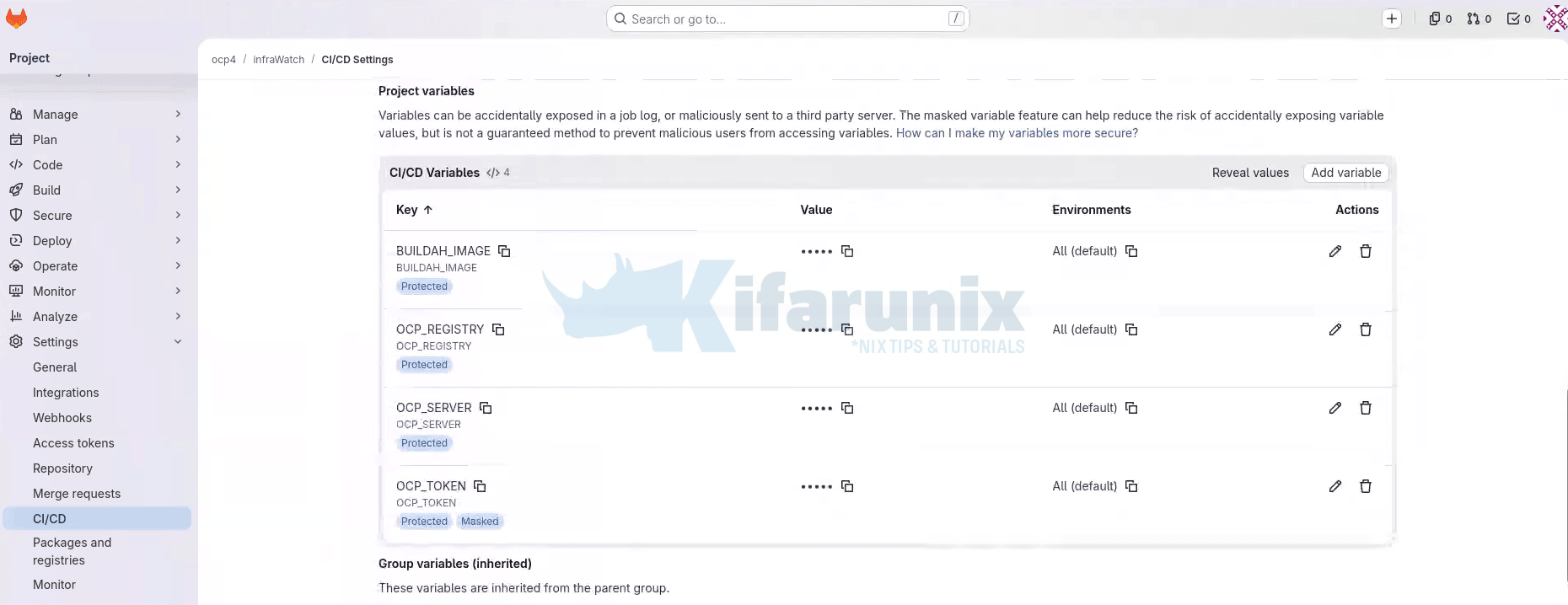
The push stage in a pipeline uses the variables values, for example OCP_TOKEN, to authenticate to the OCP internal registry. The deploy stages use the value of the same variable to run oc login against the cluster. One token, covering both image push and production deployment access created once, never rotated, valid for as long as the pipeline exists.
Sample push stage in the CICD pipeline:
# push stage: static token authenticates to the OCP registry
...
push:
  stage: push
...
  script:
    - |
      if [ "$CI_COMMIT_BRANCH" = "main" ]; then
        export DEPLOY_NS="infrawatch-prod"
      else
        export DEPLOY_NS="infrawatch-dev"
      fi
      echo "Pushing to: ${OCP_REGISTRY}/${DEPLOY_NS}/${IMAGE_NAME}:${IMAGE_TAG}"
    - |
      skopeo copy \
        --src-tls-verify=false \
        --dest-tls-verify=false \
        --dest-creds "serviceaccount:${OCP_TOKEN}" \
        "docker-archive:infrawatch-image.tar" \
        "docker://${OCP_REGISTRY}/${DEPLOY_NS}/${IMAGE_NAME}:${IMAGE_TAG}"
Sample deploy stage in CICD pipeline:
# deploy stage dev: same static token authenticates to the cluster API
deploy:dev:
  stage: deploy
...
  variables:
    GIT_STRATEGY: fetch
    KUBECONFIG:   /tmp/.kube/config
  script:
    - oc login "${OCP_SERVER}" --token="${OCP_TOKEN}"
    - oc delete service infrawatch-postgres -n infrawatch-dev 2>/dev/null || true
    - oc apply -f deployments/ocp/postgres/postgres.yaml
    - oc rollout status statefulset/infrawatch-postgres
        -n infrawatch-dev --timeout=180s
More fundamentally: a static token with production namespace access is a standing risk. It does not expire. It does not rotate. A compromised runner, a misconfigured artifact, an overly verbose debug log, any of these can expose a token whose validity window is unbounded until someone manually revokes it.
The correct answer is not better masking. It is removing the static credential from GitLab entirely.
How the Dynamic Credential Flow Works
OpenShift mounts a ServiceAccount JWT into every pod automatically, at:
/var/run/secrets/kubernetes.io/serviceaccount/tokenThis token is signed by the cluster’s API server, bound to the pod’s lifetime, audience-restricted, and rotated automatically by the kubelet before expiry. It is a cryptographically verifiable platform identity, the cluster vouching for the pod.
OpenBao’s Kubernetes auth method uses this identity. When a job pod sends its ServiceAccount JWT to OpenBao’s login endpoint, OpenBao calls the Kubernetes TokenReview API to validate it. If the ServiceAccount is bound to an OpenBao role, OpenBao returns a short-lived scoped token. The pipeline uses that token to fetch whatever credentials it needs from the KVv2 secrets engine.
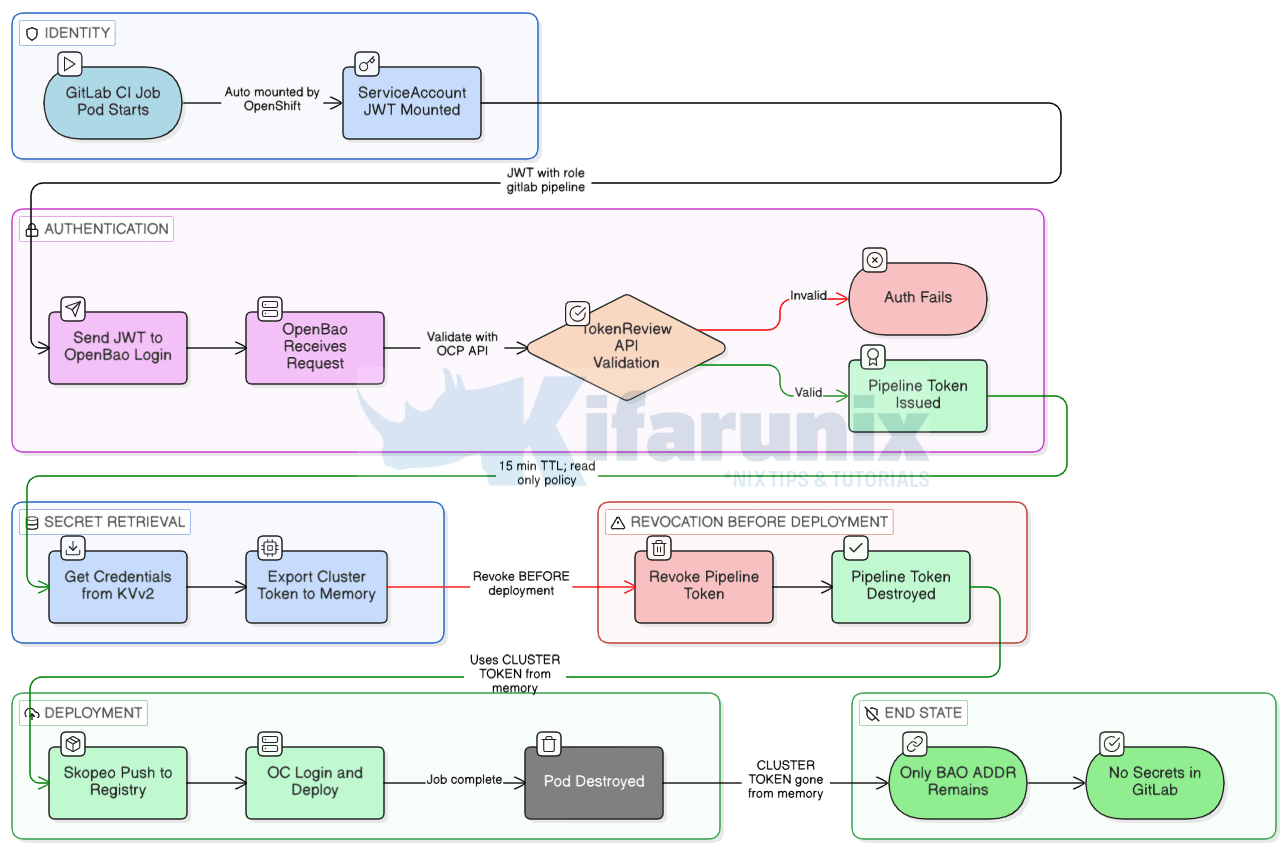
The only value stored in GitLab is the OpenBao endpoint URL. That is not a secret.
Choosing the Right OpenBao Auth Pattern for GitLab
OpenBao supports three auth patterns that fit GitLab CI/CD on OpenShift. Each one solves a different problem. Pick based on where your runners run and what your policy model needs to see.
Kubernetes auth
Use this when your GitLab runners run inside the same OpenShift or Kubernetes cluster as OpenBao. Every pod in the cluster is automatically given a ServiceAccount JWT by the kubelet. OpenBao validates that token against the Kubernetes TokenReview API and issues a short-lived credential in return. Nothing needs to be stored in GitLab. The platform provides the identity.
This is the simplest pattern to set up when your runners are in-cluster and your policies only need to know which runner, in which namespace. It is the pattern this guide walks through in full.
What it cannot do: the ServiceAccount JWT contains no information about the GitLab project, branch, or environment. If you need policies like “only pipelines on the main branch of project X can read this secret,” Kubernetes auth has no way to see that. Every pipeline using the same runner ServiceAccount gets the same level of access.
JWT auth with GitLab id_tokens
Use this when you need richer policies than Kubernetes auth can support, or when you want a single auth method that works the same way for in-cluster and external runners.
GitLab can act as OpenID Connect Identity Provider and issue an OIDC ID token to any pipeline job using the id_tokens keyword. OpenBao’s JWT auth method validates that token against GitLab’s OIDC discovery endpoint. The token carries GitLab-native claims: project_id, project_path, ref, ref_protected, environment, user_login, and more. You can write OpenBao policies that bind directly to those claims.
For example: a policy that only grants access to production secrets when the pipeline is running on a protected main branch, targeting the production environment, in a specific project. Kubernetes auth cannot express any of that because ServiceAccount JWTs do not carry those claims.
The trade-off is setup complexity. JWT auth needs GitLab’s OIDC issuer URL, JWKS configuration, and careful claim-to-role mapping. For most in-cluster runner setups where the policy model is straightforward, Kubernetes auth is enough. If you outgrow it, JWT auth is the next step up. A dedicated guide on JWT auth with id_tokens is planned as a follow-up to this series.
AppRole with response wrapping
Use this when your runners cannot present either a ServiceAccount JWT or a GitLab OIDC token. In practice, this means older GitLab versions without id_tokens support, runners in environments where the OIDC issuer is not reachable from OpenBao, or situations where JWT auth is not an option for operational reasons.
AppRole does not eliminate static credentials from GitLab. It reduces the footprint to one deliberately-scoped bootstrap token that can only generate wrapped SecretIDs, nothing else. Every other pattern on this list is better if you can use it. AppRole is covered at the end of this guide as a fallback.
Which one applies to your setup
In this guide, the runners run inside the cluster, and the policy model is “the GitLab runner in the gitlab-runner namespace can read secrets for its project.” Kubernetes auth is the right fit.
To confirm you are in the in-cluster case, check the ServiceAccount your runner pods use:
oc -n <runner-namespace> get pods \
  -o jsonpath='{range .items[*]}{.metadata.name}{"\t"}{.spec.serviceAccountName}{"\n"}{end}'
For example, my GitLab runner is deployed in the gitlab-runner namespace:
oc -n gitlab-runner get pods \
  -o jsonpath='{range .items[*]}{.metadata.name}{"\t"}{.spec.serviceAccountName}{"\n"}{end}'
Sample output:
infrawatch-runner-runner-6bf5957ff6-8kg2f gitlab-runner-app-saThat is the runner manager pod, not a job pod. The manager pod is always running. Job pods are ephemeral, spawned per pipeline job and gone when the job finishes. The ServiceAccount shown here (gitlab-runner-app-sa) belongs to the manager and is not used for OpenBao authentication.
The ServiceAccount that job pods actually use is configured in the runner’s config.toml via the service_account field. That value, not the manager’s, is what you bind in the OpenBao role’s bound_service_account_names. Step 5 covers this in detail.
If your runners are outside the cluster, skip to the AppRole Fallback for External Runners section at the end of this guide. If you need branch or environment-scoped policies, this guide is still useful for the foundation, but plan to migrate to JWT auth once you have the basics working.
Environment Reference
All commands use the following values. Substitute where indicated.
| Component | Value | Notes |
|---|---|---|
| OCP version | 4.20 | Affects default token audience |
| OpenBao version | 2.5.2 | Released 2026-03-25, latest stable |
| GitLab Runner Operator | v1.47 | Ships with GitLab Runner v18.10.1 |
| Runner namespace | gitlab-runner | Substitute with yours |
| Job pod ServiceAccount | gitlab-runner | Verify. See note below |
| OpenBao namespace | openbao | Substitute yours |
| OpenBao ServiceAccount | openbao | Created by Helm chart |
| OpenBao internal service | openbao.openbao.svc.cluster.local | Always routes to active leader |
| Token audience (OCP 4.20) | https://kubernetes.default.svc | Verify |
Always verify the ServiceAccount your job pods actually use. The GitLab Runner Operator creates gitlab-runner-app-sa for the runner manager pod. Job pods use whatever is set in service_account in the runner’s config.toml, which may be different. Check before proceeding:
oc -n <runner-namespace> get configmap <runner-config-name> \
  -o jsonpath='{.data.config\.toml}' | grep service_account
The value returned is what must be bound to the OpenBao role.
Sample output for my setup:
oc get cm -n gitlab-runner infrawatch-runner-config \
  -o jsonpath='{.data.config\.toml}' | grep service_account
service_account = "gitlab-runner"
service_account_overwrite_allowed = "buildah-.*"service_account = "gitlab-runner" is what gets mounted into every job pod and therefore what you bind in the OpenBao role’s bound_service_account_names.
Step 1: Grant OpenBao Permission to Call the TokenReview API
The reason most Kubernetes auth setups fail with a permission denied error and no useful diagnostic output is because OpenBao has no permissions to call the TokenReview API.
When a job pod authenticates to OpenBao by presenting its ServiceAccount JWT, OpenBao does not trust the JWT on its own. It calls the Kubernetes TokenReview API to verify the token, confirming if it is genuine, unexpired, and belongs to a ServiceAccount that exists in the cluster. To make that call, OpenBao itself must be authenticated to the Kubernetes API.
When running in-cluster, OpenBao uses its own pod’s mounted ServiceAccount JWT for that authentication. That JWT belongs to the openbao ServiceAccount in the openbao namespace. Without system:auth-delegator cluster role, the TokenReview call is rejected, and every login attempt fails silently.
We already addressed this in the previous guide by applying the openbao-token-reviewer-binding ClusterRoleBinding. Verify if it is still in place:
oc get clusterrolebinding openbao-token-reviewer-bindingExpected output:
NAME                              ROLE                               AGE
openbao-token-reviewer-binding    ClusterRole/system:auth-delegator  5d
If you haven’t created it yet then you can create it as follows (Replace the names accordingly):
oc create clusterrolebinding openbao-token-reviewer-binding \
  --clusterrole=system:auth-delegator \
  --serviceaccount=openbao:openbao
Or:
cat <<EOF | oc apply -f -
apiVersion: rbac.authorization.k8s.io/v1
kind: ClusterRoleBinding
metadata:
  name: openbao-token-reviewer-binding
roleRef:
  apiGroup: rbac.authorization.k8s.io
  kind: ClusterRole
  name: system:auth-delegator
subjects:
  - kind: ServiceAccount
    name: openbao
    namespace: openbao
EOF
Verify:
oc get clusterrolebinding openbao-token-reviewer-binding \
  -o jsonpath='{.subjects[*].namespace}/{.subjects[*].name}{"\n"}'
Expected output: openbao/openbao
Step 2: Enable and Configure Kubernetes Auth
Before OpenBao can authenticate any pod, it needs to know how to talk to the Kubernetes API server so it can validate incoming ServiceAccount tokens. This is done by enabling the Kubernetes auth method and pointing it at the cluster API. If you have not done this yet, the full setup is covered in the previous guide, Enable and Configure Kubernetes Auth in OpenBao. Follow that section and return here once it is complete.
To confirm that the OpenBao Kubernetes auth is in place before proceeding, run:
bao read auth/kubernetes/configSample output:
Key                       Value
---                       -----
disable_iss_validation    true
disable_local_ca_jwt      false
issuer                    n/a
kubernetes_ca_cert        n/a
kubernetes_host           https://172.30.0.1:443
pem_keys                  []
token_reviewer_jwt_set falsekubernetes_host:
From inside the OpenBao pod (exec into it first):
oc -n openbao exec -it openbao-0 -- sh
bao write auth/kubernetes/config \
  kubernetes_host="https://$KUBERNETES_SERVICE_HOST:$KUBERNETES_SERVICE_PORT"
This resolves to the Kubernetes API server’s ClusterIP (for example, https://172.30.0.1:443).
From outside the pod (using the bao CLI with BAO_ADDR and BAO_TOKEN set):
bao write auth/kubernetes/config \
  kubernetes_host="https://kubernetes.default.svc:443"
Both forms target the same in-cluster API server. The kubernetes_host value you write here is stored in OpenBao’s config and resolved by the OpenBao pod at runtime, not by wherever you run bao write from. That is why kubernetes.default.svc works even when you execute the command from your workstation, your laptop never resolves that name, the OpenBao pod does.
$KUBERNETES_SERVICE_HOST and $KUBERNETES_SERVICE_PORT are injected by the kubelet into pods by default, so they are only set once you have exec’d into the OpenBao pod. They won’t exist in your workstation shell. From outside the pod, prefer the DNS name, and note that the ClusterIP may differ between clusters, so hardcoding it is not portable.
The bao read output confirms everything is correct:
disable_iss_validation: true: default for new mounts, no issuer validation neededdisable_local_ca_jwt: false: OpenBao reads its own SA token and CA cert automatically from the pod filesystemkubernetes_ca_cert: n/a: not set manually, read from/var/run/secrets/kubernetes.io/serviceaccount/ca.crtat runtimetoken_reviewer_jwt_set: false: not set manually, OpenBao uses its own mounted SA token at runtimepem_keys: []: not needed for in-cluster TokenReview validation
The n/a values for kubernetes_ca_cert and issuer don’t mean they’re missing. It means they weren’t set explicitly because OpenBao reads them from the pod’s mounted secrets automatically. That’s the expected behaviour when disable_local_ca_jwt is false.
Important clarification: In this configuration, OpenBao authenticates to the Kubernetes API using its own ServiceAccount token mounted in the pod. The ServiceAccount JWT sent by the job pod is not used as the reviewer token. OpenBao uses its own identity to call the TokenReview API and validate the client token.
This is the standard in-cluster Kubernetes auth mode and is what this guide uses.
Step 3: Store Pipeline Credentials in OpenBao KVv2
With OpenBao deployed and the Kubernetes auth method configured, the next step is to move the static credentials out of GitLab and into OpenBao. Instead of storing the cluster token as a GitLab CI/CD variable, it will live in OpenBao’s KVv2 secrets engine, where it is centrally managed, auditable, and rotatable from one place. GitLab pipelines will fetch it at runtime rather than carrying it as a baked-in variable.
First, verify KVv2 is enabled:
bao secrets listIf secret/ is not listed with type kv version 2, enable it:
bao secrets enable -path=secret kv-v2Once KVv2 is confirmed enabled, go to your GitLab project, navigate to Settings > CI/CD > Variables, find the static credential, reveal its value, and copy it. Then write it to OpenBao:
bao kv put secret/gitlab/<project-name>/credentials \
  <VARIABLE_NAME>="<current-static-token-value>"
The path structure secret/gitlab/<project-name>/credentials is a convention used in this guide to organize secrets by CI system and project. You can adapt it to match your environment, but keep it consistent across policies and pipeline configuration.
Additional credentials for the same project can be stored under the same path without restructuring.
For example, to store the OCP_TOKEN for the infrawatch-dev project:
bao kv put secret/gitlab/infrawatch-dev/credentials \
  OCP_TOKEN="eyJhbGciOiJSUzI1NiIsImtpZCI6IlQ3V0tXOTRTQTVqcS1CWVNuVWhUajVYc29..."
You can add more credentials to the same path. For example:
bao kv put secret/gitlab/<project-name>/credentials \
  ocp_token="<token>" \
  registry_password="<password>"
Verify the write:
bao kv get secret/gitlab/<project-name>/credentialsFor example:
bao kv get secret/gitlab/infrawatch-dev/credentialsSample expected:
====== Secret Path ======
secret/data/gitlab/<project-name>/credentials

======= Metadata =======
created_time    2026-04-12T10:00:00Z
version         1

====== Data ======
Key              Value
---              -----
OCP_TOKEN <token value>When using the bao kv CLI:
- You write to paths under
secret/... - OpenBao internally stores data under
secret/data/...
- CLI commands use:
secret/gitlab/... - Policies must use:
secret/data/gitlab/... - Metadata paths use:
secret/metadata/...
The CLI abstracts the /data/ path automatically.
Moving the static token from GitLab to OpenBao KVv2 is an improvement on several fronts: the credential is now centralized, auditable, and rotatable from one place. GitLab no longer holds a copy, which is the main goal of this post.
It is worth being clear about what this does and does not achieve. The credential stored in KVv2 is still a long-lived ServiceAccount token. If someone reads it from OpenBao, they have a working token valid until it is manually revoked or rotated. What has changed is who can read it and how that access is recorded. GitLab jobs authenticate to OpenBao with platform-issued identity, access is logged in the OpenBao audit device, and rotation happens in one place instead of being scattered across GitLab CI/CD variables.
In our next blog, we will see how to replace the stored token entirely with dynamically-issued ServiceAccount tokens using OpenBao’s Kubernetes secrets engine. At that point the credential itself is short-lived and no long-standing secret exists anywhere in the system. This post is a prerequisite for that setup.
Step 4: Write the Pipeline Policy
OpenBao policies control exactly what a token can access. The pipeline token must be scoped strictly to its own project path. It must not have access to other project paths, write capabilities, or any administrative endpoints. A policy that is too permissive defeats the entire purpose of this setup.
Save the sample policy below as gitlab-pipeline-policy.hcl:
secret/data/...) rather than the CLI path (secret/...).cat gitlab-pipeline-policy.hcl# CI job pods can read credentials for their specific project.
# Cannot write. Cannot list. Cannot access any other project path.
# Cannot access sys/, auth/, or any administrative path.
path "secret/data/gitlab/<project-name>/credentials" {
capabilities = ["read"]
}
# Allow reading metadata to check secret version if needed.
path "secret/metadata/gitlab/<project-name>/credentials" {
capabilities = ["read"]
}This policy:
- enforces least privilege for GitLab CI job pods. It grants read-only access to a single project’s credentials under
secret/data/gitlab/<project-name>/credentials: no write, no list, no access to other projects. - The second block allows the pod to read secret metadata only (e.g. version number) via the KV v2
metadata/path, without exposing the actual secret value. All administrative paths (sys/,auth/) and other project paths are implicitly denied. If the pod is compromised, the blast radius is limited to one project’s secrets only.
Apply:
bao policy write gitlab-<project-name> gitlab-pipeline-policy.hclVerify the policy boundary before proceeding by creating a short-lived test token:
TEST_TOKEN=$(bao token create \
  -policy="gitlab-<project-name>" \
  -ttl="5m" \
  -field=token)
Verify that the token can read only its assigned project secret:
BAO_TOKEN=$TEST_TOKEN bao kv get secret/gitlab/<project-name>/credentialsVerify that access to other project paths is denied:
BAO_TOKEN=$TEST_TOKEN bao kv get secret/gitlab/some-other-project/credentialsRevoke the test token:
BAO_TOKEN=$TEST_TOKEN bao token revoke -selfDo not proceed until the out-of-scope read consistently returns permission denied.
Step 5: Create the Kubernetes Auth Role
The role ties everything together. It binds the Kubernetes auth method to a specific ServiceAccount in a specific namespace and assigns the policy created above. When a job pod authenticates, OpenBao checks whether the pod’s ServiceAccount and namespace match this role. If they do, OpenBao issues a token scoped to the attached policy.
Verify the token audience before running this command. On OCP 4.x, the default is https://kubernetes.default.svc. Remember, the audience is a cluster-wide default applied to all service account tokens. It is not specific to any individual ServiceAccount. You can therefore verify it by inspecting the token of any running pod in the runner namespace, including the manager pod. Job pods are ephemeral and only exist during pipeline execution, so the manager pod is the practical proxy here:
oc -n <runner-namespace> exec <pod-name> -- \
  cat /var/run/secrets/kubernetes.io/serviceaccount/token | \
  cut -d. -f2 | base64 -d 2>/dev/null | jq .
Sample output for my setup
{
  "aud": [
    "https://kubernetes.default.svc"
  ],
  "exp": 1807735474,
  "iat": 1776199474,
  "iss": "https://kubernetes.default.svc",
  "jti": "8bdb6516-9619-45d5-bd61-6963527b9a75",
  "kubernetes.io": {
    "namespace": "gitlab-runner",
    "node": {
      "name": "wk-02.ocp.comfythings.com",
      "uid": "7371c3d7-725e-4b6d-bb02-ef8b98e12f05"
    },
    "pod": {
      "name": "infrawatch-runner-runner-6bf5957ff6-8kg2f",
      "uid": "b1644378-ed0c-4dab-9025-500cae74b6ea"
    },
    "serviceaccount": {
      "name": "gitlab-runner-app-sa",
      "uid": "cbba7100-1ba4-4de4-87a4-dc8cf6a5a701"
    },
    "warnafter": 1776203081
  },
  "nbf": 1776199474,
  "sub": "system:serviceaccount:gitlab-runner:gitlab-runner-app-sa"
}
Use the exact value returned in the audience (aud) field below. Note that an audience mismatch produces a silent JWT validation failure. The login returns permission denied with no indication of the actual cause, hence:
bao write auth/kubernetes/role/gitlab-<project-name> \
  bound_service_account_names="<job-pod-serviceaccount>" \
  bound_service_account_namespaces="<runner-namespace>" \
  policies="gitlab-<project-name>" \
  audience="https://kubernetes.default.svc" \
  token_ttl="15m" \
  token_max_ttl="30m" \
  token_num_uses=3 \
  alias_name_source="serviceaccount_name"
Parameter rationale:
bound_service_account_names: Only pods using this exact ServiceAccount can authenticate. Use the ServiceAccount configured for job pods (service_account in the GitLab Runner config), not the runner manager’s ServiceAccount.bound_service_account_namespaces: Restricts authentication to an exact namespace. A pod in a different namespace using the same ServiceAccount name cannot authenticate against this role. Never use*in production.audience: Must match theaudclaim in the JWT the job pod presents. Getting this wrong is the most common cause of silent authentication failures.token_ttl="15m": The pipeline token expires after 15 minutes. Sufficient for most CI jobs. After expiry, even if a token were obtained by an attacker, it is useless.token_max_ttl="30m": Hard ceiling. The token cannot be renewed beyond this regardless of renewal settings.token_num_uses=3: The token can be used at most three times before it becomes invalid, regardless of how much TTL remains. The pipeline uses it for exactly two API calls: read the secret from KVv2, and revoke itself. The third use is a buffer for an optional renewal or retry. If a compromised pipeline script tries to reuse the token for anything else, the fourth call fails. This is a second layer of protection on top of the TTL: even inside the 15-minute window, the token is useless after it has done its job.alias_name_source="serviceaccount_name": Audit log entries show<namespace>/<serviceaccount-name>as the identity alias instead of a UID. This makes audit entries readable and tied to a specific runner configuration. One trade-off to be aware of: if you delete a ServiceAccount and recreate one with the same name in the same namespace, OpenBao treats the new one as the same identity as the old one. All the old entity history carries over. For a CI runner ServiceAccount, this is fine and usually what you want. If you are using OpenBao’s Identity features to attach per-entity policies or track usage per ServiceAccount generation, useserviceaccount_uidinstead. Audit logs will show a UID rather than a readable name, but each ServiceAccount generation is tracked separately.
Verify:
bao read auth/kubernetes/role/gitlab-<project-name>Sample output in my setup:
Key                                         Value
---                                         -----
alias_name_source                           serviceaccount_name
audience                                    https://kubernetes.default.svc
bound_service_account_names                 [gitlab-runner]
bound_service_account_namespace_selector    n/a
bound_service_account_namespaces            [gitlab-runner]
policies                                    [gitlab-infrawatch]
token_bound_cidrs                           []
token_explicit_max_ttl                      0s
token_max_ttl                               30m
token_no_default_policy                     false
token_num_uses                              3
token_period                                0s
token_policies                              [gitlab-infrawatch]
token_strictly_bind_ip                      false
token_ttl                                   15m
token_type                                  default
Each project should have its own role to prevent cross-project authentication and enforce strict isolation between pipelines.
Step 6: Remove Static Credentials from GitLab CI/CD Variables
With the OpenBao side fully configured (policy, role, credentials stored), GitLab must no longer remain a source of truth for secrets.
Start in a test pipeline or non-production branch before making this change in production.
Go to the GitLab project under Settings > CI/CD > Variables.
For each credential that has been migrated to OpenBao, temporarily remove the GitLab variable or replace it with an invalid value, then run the pipeline.
If the pipeline fails, it is still relying on GitLab CI/CD variables.
If the pipeline succeeds, the credential is being retrieved from OpenBao as intended.
Once confirmed, permanently delete every credential variable that has been migrated to OpenBao: service account tokens, passwords, and API keys.
Non-sensitive configuration values such as BAO_ADDR, registry URLs, server addresses, image names, and build parameters can remain. The goal is to remove credentials, not every variable.
Do not keep duplicate sources of truth. Leaving the same credential in both GitLab and OpenBao defeats the purpose of centralized secret management and makes troubleshooting harder.
Step 7: Update the Pipeline
This step modifies your existing pipeline to fetch credentials from OpenBao at runtime instead of reading them from GitLab CI/CD variables. Three things change:
- the static credential variable is removed from GitLab,
- an OpenBao authentication block is added to the pipeline, and
- every job that previously used the static credential variable is updated to use the dynamically fetched value instead.
Some of the additional variables to add to the Gitlab CI pipeline are:
BAO_ROLE:        "<your-role-name>"
BAO_INTERNAL:    "https://openbao.openbao.svc.cluster.local:8200"
BAO_SECRET_PATH: "<path/to/your/secrets>"
BAO_ROLE and BAO_SECRET_PATH must match what you created in Steps 4 and 3 respectively. BAO_INTERNAL is typically the internal cluster service address for OpenBao. Adjust it if your runners are external or running outside the cluster. Also, be sure to use the right port to match your OpenBao Service definition.
Your other existing GitLab CI/CD variables stay as they are. Only the static credential variable is removed from GitLab under Settings > CI/CD > Variables. For example, in our setup, we will remove our OCP_TOKEN variable from the Gitlab CICD variables.
Add the OpenBao authentication anchor before your first job. Here is my sample anchor:
.openbao-auth: &openbao-auth
  before_script:
    - |
      set -eo pipefail

      JWT=$(cat /var/run/secrets/kubernetes.io/serviceaccount/token)
      CA=/var/run/secrets/kubernetes.io/serviceaccount/ca.crt

      HTTP_CODE=$(curl -sS --cacert "$CA" \
        -o /tmp/login.json -w '%{http_code}' \
        --request POST \
        --header "Content-Type: application/json" \
        --data "{\"jwt\":\"${JWT}\",\"role\":\"${BAO_ROLE}\"}" \
        "${BAO_INTERNAL}/v1/auth/kubernetes/login")

      if [ "$HTTP_CODE" != "200" ]; then
        echo "ERROR: OpenBao login failed with HTTP $HTTP_CODE"
        cat /tmp/login.json
        rm -f /tmp/login.json
        exit 1
      fi

      PIPELINE_TOKEN=$(python3 -c \
        "import sys,json; print(json.load(open('/tmp/login.json'))['auth']['client_token'])")
      rm -f /tmp/login.json

      HTTP_CODE=$(curl -sS --cacert "$CA" \
        -o /tmp/secret.json -w '%{http_code}' \
        --header "X-Vault-Token: ${PIPELINE_TOKEN}" \
        "${BAO_INTERNAL}/v1/secret/data/${BAO_SECRET_PATH}")

      if [ "$HTTP_CODE" != "200" ]; then
        echo "ERROR: Secret fetch failed with HTTP $HTTP_CODE"
        rm -f /tmp/secret.json
        curl -sS --cacert "$CA" \
          --header "X-Vault-Token: ${PIPELINE_TOKEN}" \
          --request POST \
          "${BAO_INTERNAL}/v1/auth/token/revoke-self" > /dev/null || true
        exit 1
      fi

      export OCP_TOKEN=$(python3 -c \
        "import sys,json; print(json.load(open('/tmp/secret.json'))['data']['data']['OCP_TOKEN'])")
      rm -f /tmp/secret.json

      curl -sS --cacert "$CA" \
        --header "X-Vault-Token: ${PIPELINE_TOKEN}" \
        --request POST \
        "${BAO_INTERNAL}/v1/auth/token/revoke-self" > /dev/null || true

      echo "Credential fetched and pipeline token revoked."
Two things to substitute before using this anchor:
- Replace
<your-secret-key>with the key name you used when writing the secret to OpenBao in Step 3. For example, in Step 3 we ran:
Sobao kv put secret/gitlab/infrawatch-dev/credentials OCP_TOKEN="eyJhbGciOiJSUzI1NiIsImtpZCI6IlQ3V0tXOTRTQTVqcS1CWVNuVWhUajVYc29.."OCP_TOKENis the key. That is what goes in place of<your-secret-key>. - Replace
MY_CREDENTIALwith whatever variable name your pipeline jobs already reference. For example, if you stored the secret asOCP_TOKENin Step 3 and your pipeline jobs reference$OCP_TOKEN, the export line becomes:export OCP_TOKEN=$(echo "${SECRET_RESPONSE}" | python3 -c "import sys,json; print(json.load(sys.stdin)['data']['data']['OCP_TOKEN'])" 2>/dev/null)
This means your existing job script blocks do not need to change, as long as the exported variable name matches what the job already expects.
Attach the anchor to every job that uses the static credential:
Find every job in your pipeline that references the static credential variable. Add <<: *openbao-auth to each of those jobs:
your-job:
  stage: your-stage
  image: your-image
  <<: *openbao-auth
  script:
    # your existing script unchanged
If a job already has its own before_script, do not use the anchor. GitLab will not merge two before_script blocks. Instead, copy the OpenBao authentication steps directly into that job’s existing before_script, appended after the existing steps:
your-job:
  before_script:
    # your existing before_script steps stay here
    - your-existing-step-1
    - your-existing-step-2
    # OpenBao steps appended below
    - |
      set -eo pipefail

      JWT=$(cat /var/run/secrets/kubernetes.io/serviceaccount/token)
      CA=/var/run/secrets/kubernetes.io/serviceaccount/ca.crt

      HTTP_CODE=$(curl -sS --cacert "$CA" \
        -o /tmp/login.json -w '%{http_code}' \
        --request POST \
        --header "Content-Type: application/json" \
        --data "{\"jwt\":\"${JWT}\",\"role\":\"${BAO_ROLE}\"}" \
        "${BAO_INTERNAL}/v1/auth/kubernetes/login")

      if [ "$HTTP_CODE" != "200" ]; then
        echo "ERROR: OpenBao login failed with HTTP $HTTP_CODE"
        cat /tmp/login.json
        rm -f /tmp/login.json
        exit 1
      fi

      PIPELINE_TOKEN=$(python3 -c \
        "import sys,json; print(json.load(open('/tmp/login.json'))['auth']['client_token'])")
      rm -f /tmp/login.json

      HTTP_CODE=$(curl -sS --cacert "$CA" \
        -o /tmp/secret.json -w '%{http_code}' \
        --header "X-Vault-Token: ${PIPELINE_TOKEN}" \
        "${BAO_INTERNAL}/v1/secret/data/${BAO_SECRET_PATH}")

      if [ "$HTTP_CODE" != "200" ]; then
        echo "ERROR: Secret fetch failed with HTTP $HTTP_CODE"
        rm -f /tmp/secret.json
        curl -sS --cacert "$CA" \
          --header "X-Vault-Token: ${PIPELINE_TOKEN}" \
          --request POST \
          "${BAO_INTERNAL}/v1/auth/token/revoke-self" > /dev/null || true
        exit 1
      fi

      export OCP_TOKEN=$(python3 -c \
        "import sys,json; print(json.load(open('/tmp/secret.json'))['data']['data']['OCP_TOKEN'])")
      rm -f /tmp/secret.json

      curl -sS --cacert "$CA" \
        --header "X-Vault-Token: ${PIPELINE_TOKEN}" \
        --request POST \
        "${BAO_INTERNAL}/v1/auth/token/revoke-self" > /dev/null || true
  script:
    # your existing script unchanged
The anchor uses python3 for JSON parsing, which is present in the UBI-based images used in this pipeline (ubi9/skopeo, openshift4/ose-cli). If your job image is minimal (e.g., Alpine without Python), either switch to a UBI variant or add Python3 to the image. Do not fall back to grep/sed for JSON parsing, it silently mishandles escaped characters and unexpected whitespace.
Finally, delete the static credential variable from GitLab under Settings > CI/CD > Variables. It is now stored in OpenBao and fetched dynamically at runtime.
Commit your changes, run the pipeline and confirm that all jobs succeed without any credential variables defined in GitLab.
If authentication fails, check the following:
- ServiceAccount mismatch between job pod and role
- Incorrect audience value
- Wrong secret path
- Policy not attached to role
Most failures will return permission denied without detailed context.
Verifying the Full Flow
After the first successful pipeline run, confirm two things:
- the pipeline authenticated dynamically, and
- every access is recorded in the OpenBao audit log.
1. Confirm the pipeline fetched credentials dynamically.
Open the GitLab project, navigate to Build > Jobs, and click the push or deploy job. In the job log, find the Executing “step_script” section. Look for the log line indicating that the credential was fetched and the pipeline token was revoked (for example: “Credential fetched and pipeline token revoked.”). If you see that, then it confirms the job pod authenticated to OpenBao, fetched the credential from KVv2, and revoked the pipeline token before deployment commands ran.
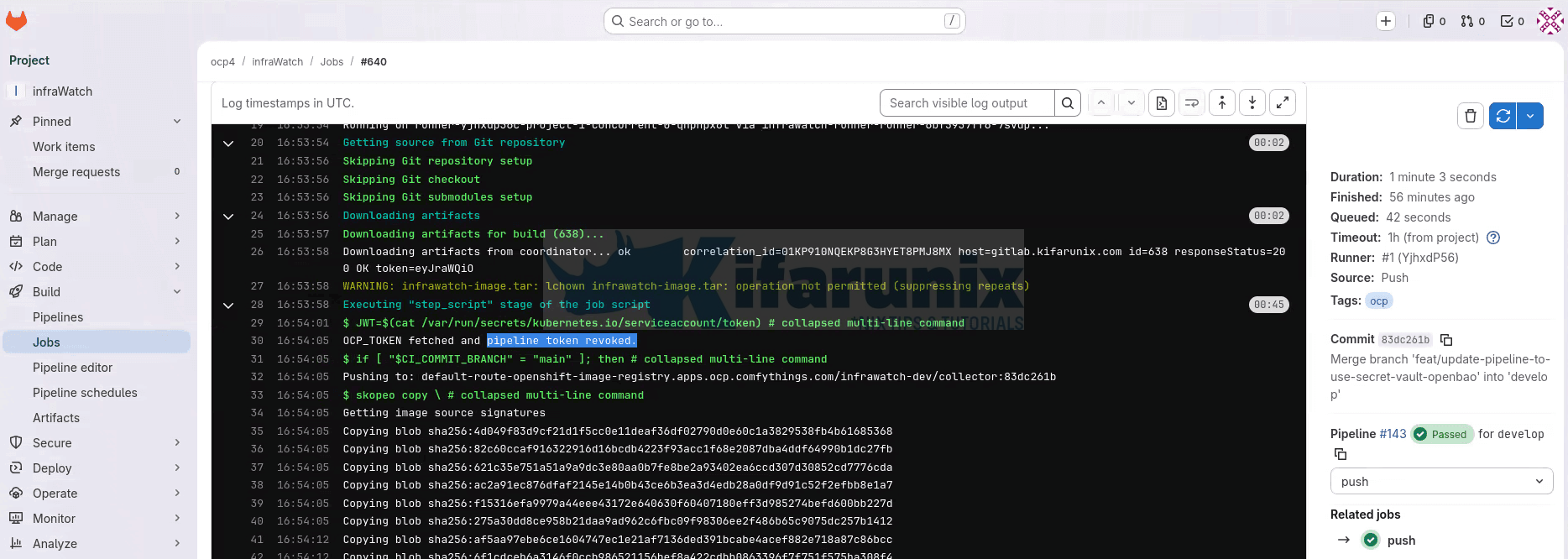
If this line is missing, the before_script did not complete successfully. The log output above it will contain an ERROR: message identifying the specific cause (missing JWT, audience mismatch, wrong ServiceAccount, or unreachable endpoint).
2. Confirm the OpenBao audit log records authentication and token revocation.
First, verify that at least one audit device is enabled:
bao audit list -detailedExpected output:
Path           Type    Description    Replication    Options
----           ----    -----------    -----------    -------
file-audit/    file    n/a            replicated     file_path=stdout prefix=AUDIT:
If the list is empty, your declarative audit stanza is not being applied. Check the audit block syntax in your Helm values, verify the Helm chart is passing it through to the rendered config, and confirm your pods are running the 2.5.2 image. An earlier beta had a bug where declarative audit devices were ignored at boot (GitHub issue #2168), but this was fixed before the 2.5.0 GA release.
With audit logging active, check the OpenBao pod logs for pipeline access entries. Filter specifically for the runner ServiceAccount used by your job pods:
oc -n openbao logs openbao-0 | \
  grep "gitlab-runner" | \
  grep -E "auth/kubernetes/login|auth/token/revoke-self" | tail -6
Two types of entries should appear per pipeline job:
auth/kubernetes/login(the authentication request and response) andauth/token/revoke-self(immediate token revocation). Each entry includes a timestamp and thedisplay_name, which ties the access back to the runner’s ServiceAccount.
If no audit entries appear, confirm that the job pod is actually reaching OpenBao and that the role, policy, and ServiceAccount bindings are correct.
Why not grep for the KVv2 secret path? OpenBao audit logs hash most strings using HMAC-SHA256 to prevent secrets from appearing in plaintext. The KVv2 path is hashed in the audit output, so grepping for it will not return results. The auth/kubernetes/login and auth/token/revoke-self paths are system paths that appear unhashed and are the reliable fields to filter on.
At this point, you have verified the full flow: authentication is dynamic, credentials are not stored in GitLab, and every access is auditable.
AppRole Fallback for External Runners
If GitLab runners run outside the OCP cluster, e.g on external VMs, a dedicated CI host, or GitLab SaaS shared runners, job pods do not receive an OCP ServiceAccount JWT. Kubernetes auth does not apply. AppRole with response wrapping is the correct pattern.
AppRole requires one static credential in GitLab: a bootstrap token. Its scope is deliberately minimal, it can only generate single-use, time-limited SecretIDs for the specific AppRole. It cannot read secrets, modify policies, or perform any other operation. The blast radius is bounded, but it is not zero-static-secret.
Tooling note: The AppRole flow requires the bao CLI. The registry.redhat.io/ubi9/skopeo:latest and registry.redhat.io/openshift4/ose-cli:latest images used in the push and deploy stages do not include bao. For external runner pipelines, use openbao/openbao:2.5.2 in a dedicated auth stage, or install the bao binary into a custom base image.
Enable AppRole:
bao auth enable approleCreate the bootstrap policy (gitlab-bootstrap-policy.hcl):
cat gitlab-bootstrap-policy.hcl# This token can ONLY generate SecretIDs for this specific AppRole.
# Cannot read secrets. Cannot modify policies. Cannot authenticate as the pipeline.
# min_wrapping_ttl and max_wrapping_ttl force the caller to request response wrapping.
path "auth/approle/role/gitlab-<project-name>/secret-id" {
capabilities = ["create", "update"]
min_wrapping_ttl = "10s"
max_wrapping_ttl = "90s"
}What these two parameters do:
- the policy rejects any call to this endpoint that does not include a
-wrap-ttlflag (orX-Vault-Wrap-TTLheader) between 10 and 90 seconds. - A caller that tries to generate a SecretID without wrapping gets a permission denied response, not an unwrapped SecretID. This is the enforcement mechanism, not a default. The pipeline below uses
-wrap-ttl=60s, which falls inside the window.
The minimum is set to 10 seconds rather than 1. A 1-second floor does not meaningfully protect against anything, since an attacker calling the endpoint can simply request a 1-second wrap and unwrap immediately. Ten seconds is still short enough that an intercepted wrapping token is useless in practice but high enough to be a meaningful floor.
Then apply:
bao policy write gitlab-bootstrap gitlab-bootstrap-policy.hclCreate the AppRole:
bao write auth/approle/role/gitlab-<project-name> \
  token_policies="gitlab-<project-name>" \
  token_ttl="15m" \
  token_max_ttl="30m" \
  secret_id_ttl="10m" \
  secret_id_num_uses="1" \
  bind_secret_id=true
Get the RoleID (not sensitive, this is not a secret):
bao read auth/approle/role/gitlab-<project-name>/role-idCreate the bootstrap token. Set the period to 90 days. This forces you to renew the token regularly, which keeps your rotation process in working order instead of letting it go stale:
bao token create \
  -policy="gitlab-bootstrap" \
  -period="2160h" \
  -display-name="gitlab-bootstrap-external" \
  -renewable=true
A periodic token has no maximum lifetime. As long as you renew it before the 90 days run out, it keeps working. If renewal stops, the token expires and the pipeline fails. That is the behaviour you want. A failed pipeline tells you the rotation job is broken. A token that silently keeps working for years tells you nothing.
Set up a job to rotate it automatically. A CronJob that runs every 30 days should do three things:
- Log in to OpenBao using a separate identity, not the bootstrap token itself.
- Either renew the bootstrap token by calling
auth/token/renew-self, or create a new bootstrap token and update theBAO_BOOTSTRAP_TOKENvalue in GitLab CI/CD variables through the GitLab API. - Revoke the old token once the new one is confirmed working.
The bootstrap token is still limited in what it can do. It can only generate wrapped SecretIDs, nothing else. But rotating it every 90 days means it never sits around unchanged long enough to become a risk.
Some of the GitLab CI/CD variables you can use for AppRole:
- Variable: BAO_ADDR
- Value:
https://openbao.apps.<cluster-domain> - Protected: Yes
- Masked: No
- Value:
- Variable: BAO_ROLE_ID
- Value: <role_id>
- Protected: Yes
- Masked: No
- Variable: BAO_BOOTSTRAP_TOKEN
- Value: <bootstrap token>
- Protected: Yes
- Masked: Yes
AppRole auth fragment (use with openbao/openbao:2.5.2 image):
.approle-auth: &approle-auth
  before_script:
    - |
      # Generate a wrapped SecretID. The bootstrap token can ONLY do this.
      # The -wrap-ttl flag means the SecretID is not returned directly.
      # Only a single-use wrapping token with a 60-second TTL is returned.
      WRAP_TOKEN=$(BAO_TOKEN=$BAO_BOOTSTRAP_TOKEN \
        bao write \
          -wrap-ttl=60s \
          -field=wrapping_token \
          -f auth/approle/role/gitlab-<project-name>/secret-id)

      # Unwrap, one-time use, 60-second TTL.
      # If this fails, the wrapping token was expired or already consumed.
      # That is a signal worth investigating.
      SECRET_ID=$(BAO_TOKEN=$WRAP_TOKEN bao unwrap -field=secret_id)

      if [ -z "$SECRET_ID" ]; then
        echo "ERROR: Unwrap failed. Token may have been intercepted or expired."
        exit 1
      fi

      PIPELINE_TOKEN=$(bao write \
        -field=token \
        auth/approle/login \
        role_id="$BAO_ROLE_ID" \
        secret_id="$SECRET_ID")

      if [ -z "$PIPELINE_TOKEN" ]; then
        echo "ERROR: AppRole authentication failed."
        exit 1
      fi

      export OCP_TOKEN=$(BAO_TOKEN=$PIPELINE_TOKEN \
        bao kv get -field=ocp_token \
          secret/gitlab/<project-name>/credentials)

      BAO_TOKEN=$PIPELINE_TOKEN bao token revoke -self
If authentication fails, verify:
- The bootstrap token has the correct policy attached
- The AppRole name matches exactly
- The wrapping token has not expired before unwrap
- The SecretID has not already been used (single-use enforcement)
Hardening: Least-Privilege Service Accounts
The pattern described in this guide removes the static credential from GitLab. The credential itself, the cluster service account token, still carries whatever permissions the original token had. In most setups, one token covers both image push and deployment access. That violates least-privilege.
The correct next step is splitting into two scoped service accounts:
Registry push: A ServiceAccount with system:image-builder role scoped to the target namespace. Can push images. Cannot deploy, scale, or access any other resource.
oc -n myapp-prod create serviceaccount myapp-image-pusher
oc -n myapp-prod policy add-role-to-user system:image-builder \
-z myapp-image-pusherDeployment: A ServiceAccount with the edit role scoped to the target namespace. Can apply manifests and trigger rollouts. Cannot push images or access other namespaces.
oc -n myapp-prod create serviceaccount myapp-deployer
oc -n myapp-prod policy add-role-to-user edit \
  -z myapp-deployer
Each gets its own token stored at a separate KVv2 path, its own OpenBao policy, and its own Kubernetes auth role. The push stage fetches the registry credential. The deploy stage fetches the deployment credential. Neither can access the other’s token.
Troubleshooting
Authentication returns permission denied immediately.
Work through these in order:
1. Does the ClusterRoleBinding exist?
oc get clusterrolebinding <cluster-role>2. Is it bound to the correct ServiceAccount?
oc get clusterrolebinding <cluster-role> \
  -o jsonpath='{.subjects[*].namespace}/{.subjects[*].name}'
Expected output:
openbao/openbao3. What ServiceAccount do job pods actually use?
oc -n <runner-namespace> get pods \
  -o jsonpath='{range .items[*]}{.metadata.name}{"\t"}{.spec.serviceAccountName}{"\n"}{end}'
4. Check OpenBao logs for TokenReview errors
oc -n openbao logs openbao-0 | \
  grep -iE "tokenreview|permission|error" | tail -20
ClusterRoleBinding is correct but authentication still fails.
The most likely cause is an audience mismatch. Verify the aud claim in the actual token the job pod presents.
Exec into a job pod during a run, or any pod using the runner ServiceAccount:
oc -n <runner-namespace> exec <pod-name> -- \
  cat /var/run/secrets/kubernetes.io/serviceaccount/token | \
  cut -d. -f2 | base64 -d 2>/dev/null | \
  python3 -c "import sys,json; d=json.load(sys.stdin); print(d.get('aud'))"
Compare to the audience field on the OpenBao role:
bao read auth/kubernetes/role/gitlab-<project-name> | grep audienceIf they do not match, update the role with the correct audience value.
curl to the OpenBao internal endpoint returns a TLS error
The before_script uses /var/run/secrets/kubernetes.io/serviceaccount/ca.crt to validate OpenBao TLS certificates. This works when OpenBao certificates are issued by cert-manager using the cluster CA. If OpenBao uses a different CA, pass the insecure flag temporarily to isolate whether TLS is the issue, then mount the correct CA certificate into the job pod.
Credential fetch succeeds but skopeo push or oc login returns unauthorized.
The token stored in OpenBao may have been revoked or expired. Update it:
bao kv put secret/gitlab/<project-name>/credentials \
  ocp_token="<fresh-token>"
Confirm the token has the required permissions on the target namespace:
oc policy who-can update imagestreamtags -n myapp-prod | grep <serviceaccount>
oc policy who-can update deployments -n myapp-prod | grep <serviceaccount>
No audit log entries appear after a pipeline run.
First run bao audit list -detailed to confirm an audit device is active. If the list is empty, see the audit device verification in Verifying the Full Flow. The most common cause of missing audit entries on a correctly-configured cluster is that the pipeline ran successfully but the audit grep did not match, the KVv2 path is HMAC-hashed in audit output, so grep for the auth endpoints (auth/kubernetes/login, auth/token/revoke-self), not the secret path.
Security Hardening Checklist
Kubernetes auth configuration:
system:auth-delegatorClusterRoleBinding exists and targets the OpenBao ServiceAccount — verified withoc get clusterrolebinding- Role
bound_service_account_namesis an exact name, not* - Role
bound_service_account_namespacesis an exact namespace, not* audienceverified by inspecting the actual token in a job pod, matches exactlytoken_ttlset to the minimum realistic job durationtoken_max_ttlno more than twicetoken_ttltoken_num_usesset to the minimum needed for the pipeline (typically 2–3), so a compromised token cannot be reused even within its TTLalias_name_source="serviceaccount_name"set for readable audit attribution
Pipeline policy:
- Policy grants
readonly on the specific project credential path - Out-of-scope read test returns
permission denied, verified before deploying - Policy cannot access
sys/,auth/, or any administrative path
GitLab CI/CD variables:
- No tokens, passwords, or API keys remain in GitLab variables
BAO_ADDRis the only OpenBao-related variable- All remaining variables are non-sensitive configuration
Pipeline behaviour:
- Pipeline token revoked immediately after credential fetch
- Each stage authenticates independently, no credential passed between stages
- JWT path check in
before_script, pipeline fails fast with diagnostic output if JWT is missing - Authentication failure produces a diagnostic message identifying the likely cause
Audit:
bao audit listshows at least one active audit device- Audit entries flow to the cluster log aggregation stack
- After a pipeline run:
auth/kubernetes/login,secret/dataread, andauth/token/revoke-selfall appear - Revoke-self entry appears within seconds of the secret read
OpenBao operational:
- Root token revoked after initial setup
- Auto-unseal configured and verified (part one of this series)
- Unseal key stored in OCP Secret with RBAC restricted to the
openbaonamespace
Conclusion
Static credentials in GitLab CI/CD variables are a pattern inherited from an era before platform-native identity was available. On OpenShift, that era is over. Every job pod already carries a cryptographically signed, platform-issued identity token. There is no reason to maintain a separate static credential in GitLab alongside it.
With this setup, the credential lifecycle is centralized in OpenBao. Every access is logged with a timestamp and an attributable identity. Rotating a credential means updating one KVv2 entry, every subsequent pipeline run picks up the new value automatically. No pipeline changes. No GitLab variable updates. No manual coordination across teams.
The credential stored in OpenBao is still a long-lived token. The next post in this series replaces it with dynamically-generated, short-lived ServiceAccount tokens using OpenBao’s Kubernetes secrets engine, which removes the last standing credential from the system. This post is the foundation that setup builds on.
The pipeline does not carry secrets. GitLab does not store them. The platform manages identity, and OpenBao manages the credentials.