Follow through to learn how to automate Red Hat Satellite content view publish and promote after syncing the repositories. If you run Red Hat Satellite, your sync plan is probably already automated. But every time it completes, someone still has to log in, click Publish, and manually promote through each lifecycle environment before hosts see a single new package.
This guide shows you how to eliminate that entirely.
If you are running Red Hat Satellite 6.18 or later, you may not need this automation at all. Satellite 6.18 introduced Rolling Content Views, a new content view type that automatically reflects the latest synchronized content from its repositories without requiring a publish or promote step. When your sync plan completes, hosts consuming a Rolling Content View receive the updated content immediately.
If Rolling Content Views fit your use case, see the official documentation for setup details.
This guide applies to Satellite 6.16 and earlier, or to any environment on 6.18+ where standard or composite content views are still preferred, for example, when you rely on content filters, errata pinning, or staged lifecycle promotion (Dev > Test > Production).
Table of Contents
Automate Red Hat Satellite Content View Publish and Promote After a Sync Plan
If you don’t have Satellite installed and running, check the link below;
How to Install Red Hat Satellite on RHEL 9
The Problem Nobody Talks About
If you have been running Red Hat Satellite for any length of time, you have likely set up a sync plan. It runs at 2 AM, pulls the latest packages and errata from the Red Hat CDN, and finishes cleanly. You check the repository sync history the next morning and everything looks green.
But your hosts are still not getting the latest patches.
The reason is that a sync plan only updates the raw repository content inside Satellite. It neither publishes a new Content View version nor promotes one through any lifecycle environment. Your hosts, registered to a lifecycle environment like Dev, Test, or Production, are still consuming the previous Content View version, which does not include any of the packages that just synced.
This is what it looks like in the Satellite web UI after a sync completes:
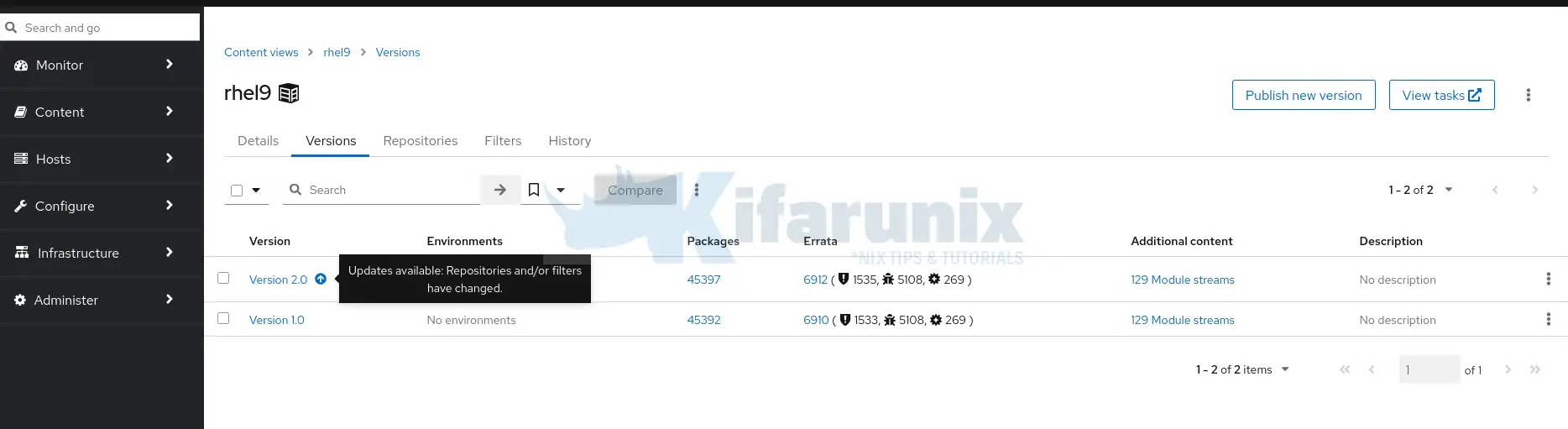
You open your Content View, go to the Versions tab, and see the tooltip on the latest version: “Updates available: Repositories and/or filters have changed.”
That tooltip is Satellite telling you that new content exists in the synced repos but has not yet been published into a Content View version. Nothing new will reach your registered hosts until you click Publish new version, and then promote through every lifecycle environment manually.
Red Hat’s own documentation acknowledges this gap. The official KnowledgeBase solution (Solution 3293571) classifies automatic publish and promote as a wontfix feature request. The workaround suggested is a hammer script scheduled with cron, but no complete, production-ready example exists.
This guide fills that gap. You will build a script that:
- Waits for sync to complete by polling Satellite task status every 5 minutes
- Publishes a new Content View version
- Promotes it through your full lifecycle environment path automatically
- Handles single and multiple Content Views
- Logs every action with timestamps for auditability
By the end, your Satellite content pipeline will be fully hands-off from sync through publish.
How Satellite Content Lifecycle Actually Works
When a sync plan runs, Satellite pulls updated packages and errata into the raw repository storage. This is the Library, the raw, unfiltered pool of content. Content Views are snapshots taken from the Library at a point in time. They are what your registered hosts actually consume.
The lifecycle is:
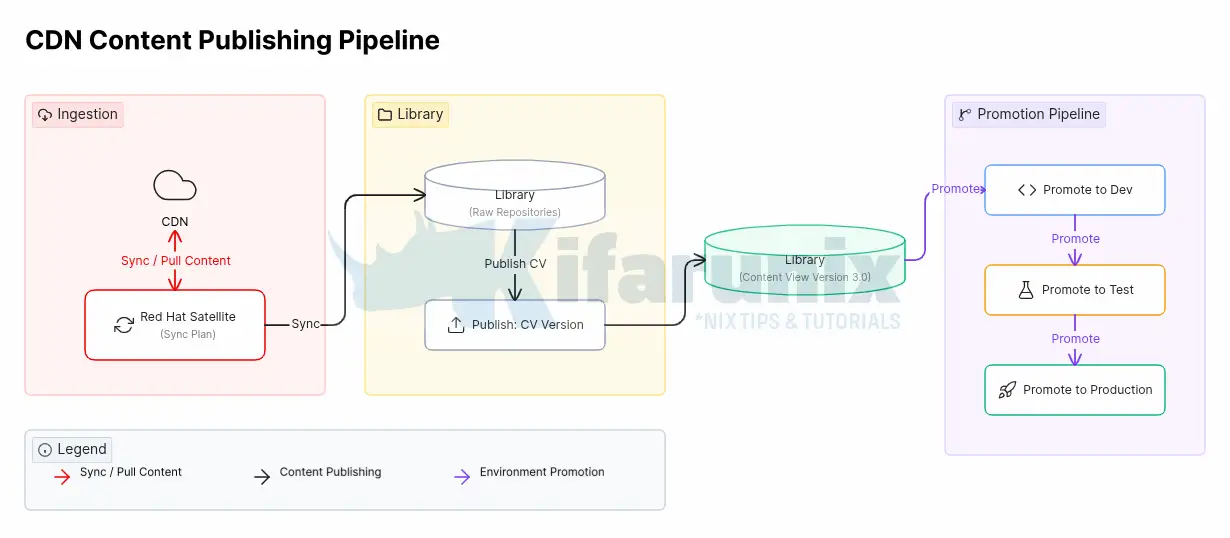
Every step after [Sync Plan] is manual by default. This guide automates everything from [Publish] onward.
Content View Types
There are two main types of Content Views used in Satellite:
- Standard Content Views and
- Composite Content Views.
A Standard Content View is the most common type. It contains one or more repositories that belong together and are managed as a single unit.
For example, you might create:
- a Content View for RHEL 8 BaseOS
- another for RHEL 8 AppStream
- or a combined Content View that includes both BaseOS and AppStream repositories for RHEL 8 systems
You can also organize Content Views by operating system version or purpose. Common examples include:
rhel6contains RHEL 6 base repositories and optional extrasrhel7contains RHEL 7 repositoriesrhel8contains RHEL 8 BaseOS and AppStream contentrhel9contains RHEL 9 repositories
A Composite Content View combines multiple Standard Content Views into a single publishable view.
This is especially useful when systems require content from several sources at the same time. A common use case is supporting LEAPP in-place upgrades, where systems need both their current RHEL repositories and upgrade-related content.
For example:
rhel7_leappmight combine:- the standard RHEL 7 Content View
- RHEL 8 BaseOS and AppStream repositories
- This allows a RHEL 7 system to access both RHEL 7 content (its current operating system) and the RHEL 8 content required for the upgrade.
rhel8_leappmight combine:- the standard RHEL 8 Content View
- RHEL 9 BaseOS and AppStream repositories
- This provides a RHEL 8 system with access to both its existing repositories and the RHEL 9 repositories needed for the in-place upgrade.
Composite Content Views behave slightly differently from Standard Content Views. Before publishing a Composite CV, all component Content Views must already be published and promoted to the Library environment. After any component Content View is updated, the Composite Content View must also be republished so it includes the latest versions.
In this guide, the demo environment uses official RHEL repositories only with a single Library lifecycle. There is no Dev, Test, or Production promotion path in this setup. Hosts are registered directly to the Library Content View and see new content as soon as a new version is published.
If your environment has multiple lifecycle environments (Dev, Test, Production), publishing to Library is still the first step. Promotion to downstream environments is covered in the Extending to Lifecycle Environments section.
Prerequisites
Before proceeding, confirm the following on your Satellite server:
Hammer CLI Authentication:
Check your Satellite version:
sudo rpm -q satelliteExample output;
satellite-6.16.7-1.el9sat.noarchFor Satellite 6.3 and later, if you ran the Satellite installer with --foreman-initial-admin-username and --foreman-initial-admin-password, your credentials are already stored in $HOME/.hammer/cli.modules.d/foreman.yml and hammer will not prompt for credentials.
Verify hammer connects cleanly:
hammer pingExample output:
database:
    Status:          ok
    Server Response: Duration: 1ms
cache:
    servers:
     1) Status:          ok
        Server Response: Duration: 1ms
candlepin:
    Status:          ok
    Server Response: Duration: 41ms
candlepin_auth:
    Status:          ok
    Server Response: Duration: 31ms
candlepin_events:
    Status:          ok
    message:         72 Processed, 0 Failed
    Server Response: Duration: 0ms
katello_events:
    Status:          ok
    message:         52 Processed, 0 Failed
    Server Response: Duration: 1ms
pulp3:
    Status:          ok
    Server Response: Duration: 104ms
pulp3_content:
    Status:          ok
    Server Response: Duration: 122ms
foreman_tasks:
    Status:          ok
    Server Response: Duration: 4ms
If hammer prompts for credentials, add them manually to ~/.hammer/cli.modules.d/foreman.yml:
:foreman:
  :username: 'admin'
  :password: 'password'
This file contains credentials in plaintext. Ensure it is owned and readable only by root (chmod 600 ~/.hammer/cli.modules.d/foreman.yml) and use a dedicated service account with minimum required Satellite roles rather than the admin account.
Verify your organization name:
hammer organization list---|------------|------------|-------------
ID | NAME | LABEL | DESCRIPTION
---|------------|------------|-------------
1 | kifarunix | kifarunix |
---|------------|------------|-------------List your Content Views:
hammer content-view list --organization "<YOUR_ORG>"Example:
hammer content-view list --organization "kifarunix"Example output:
----|--------------|---------|--------|-----|-------|--------|--------
ID  | NAME         | LABEL   | REPOS  | ... | COMPO | LATEST | LCENVS
----|--------------|---------|--------|-----|-------|--------|--------
3   | rhel9        | rhel9   | 4      | ... | false | 2.0    | ...
5   | rhel8        | rhel8   | 4      | ... | false | 1.0    | ...
7   | rhel7        | rhel7   | 3      | ... | false | 1.0    | ...
9   | rhel7_leapp  | rhel7.. | 0      | ... | true  | 1.0    | ...
11  | rhel8_leapp  | rhel8.. | 0      | ... | true  | 1.0    | ...
----|--------------|---------|--------|-----|-------|--------|--------
List your lifecycle environments:
hammer lifecycle-environment list --organization "<YOUR_ORG>"Example:
hammer lifecycle-environment list --organization "kifarunix"---|---------|------
ID | NAME | PRIOR
---|---------|------
1 | Library |
---|---------|------Get your sync plan ID:
hammer sync-plan list --organization "kifarunix"---|-------|---------------------|----------|---------|-----------------|-------------------
ID | NAME | START DATE | INTERVAL | ENABLED | CRON EXPRESSION | RECURRING LOGIC ID
---|-------|---------------------|----------|---------|-----------------|-------------------
1 | daily | 2026/05/05 22:00:00 | daily | yes | | 14
---|-------|---------------------|----------|---------|-----------------|-------------------Note the numeric sync plan ID, you will pass it to the script as an argument.
Understanding the Automation Strategy
The core challenge is timing. The sync plan runs at a scheduled time but sync duration varies depending on how many packages were updated on the CDN that day. Hardcoding a fixed publish time after sync starts is unreliable, if sync runs longer than expected, you would publish against incomplete content.
The correct approach is to poll the Satellite REST API and check the real-time sync state of every repository in the Content View, waiting until all repos confirm a successful sync before triggering publish.
There is one important subtlety: the Satellite repository API returns last_sync data reflecting the most recent sync, historical or current. Without a timestamp check, the script could see a repo showing stopped+success from last night’s sync, assume tonight’s sync is done, and publish prematurely.
The fix is to compare each repo’s last_sync.ended_at against the sync plan’s scheduled time. If ended_at is before the current sync plan start time, that result is stale, the script waits and polls again. Only when ended_at is after the sync plan’s scheduled start time is the sync confirmed as up-to-date.
The flow is:
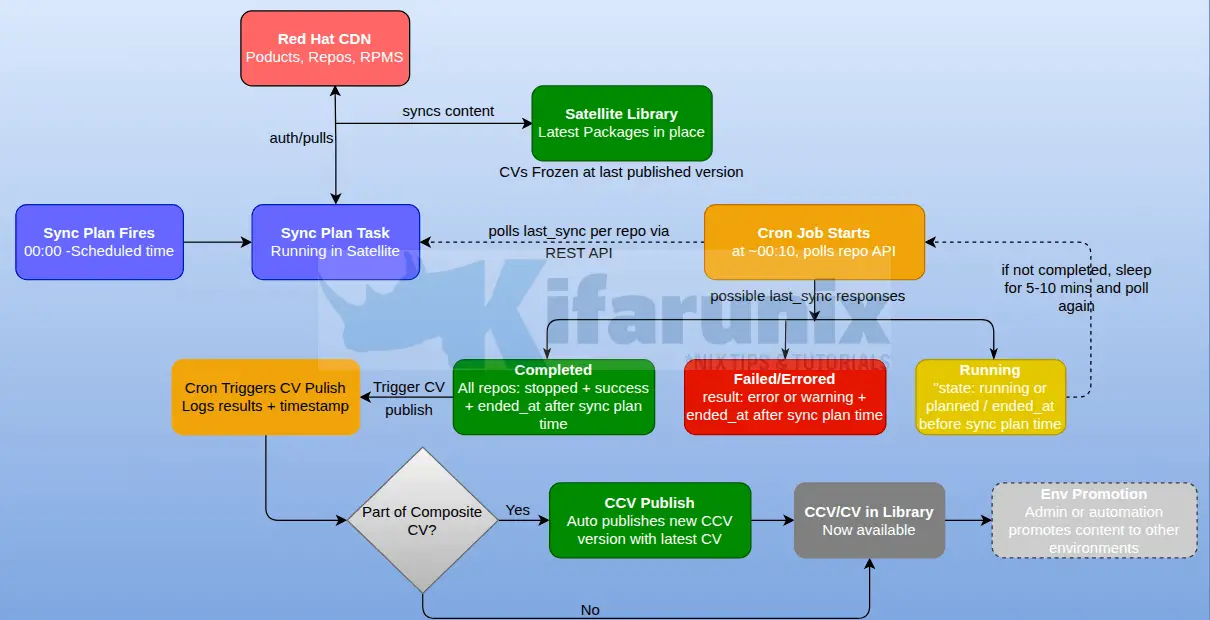
The cron job is scheduled 10 minutes after the sync plan start time. For example, if the sync plan fires at 00:00, the cron job starts at 00:10. This gives Satellite time to spin up all repo sync tasks before the first poll. If the script fired at exactly 00:00 it might poll before any sync tasks have started, see stale stopped+success results from the previous night, and publish immediately.
The script checks repo sync state every 5 minutes. Satellite sync tasks run for tens of minutes on real environments, checking every 5 minutes is sufficient to detect completion without putting unnecessary load on the Satellite API.
The Red Hat Satellite Content View Auto Publish Script
Here is our sample script for this process:
cat /opt/satellite-automation/cv_publish.sh#!/bin/bash
# =============================================================================
# cv_publish.sh — Auto-publish multiple Satellite Content Views sequentially
# after their sync plan completes.
# =============================================================================
# USAGE:
# ./cv_publish.sh <ORG_NAME> <SYNC_PLAN_ID> <SYNC_PLAN_TIME> <CV_NAME> [CV_NAME ...] [--ignore-sync-errors]
#
# ARGUMENTS:
# ORG_NAME Organization name e.g. kifarunix
# SYNC_PLAN_ID Numeric sync plan ID e.g. 1
# SYNC_PLAN_TIME Scheduled sync plan start time HH:MM e.g. 00:00
# Must match the time shown by: hammer sync-plan info --id <ID>
# Ensure Satellite timezone is set to your local timezone first.
# CV_NAME ... One or more content view names in publish order
#
# OPTIONAL FLAGS:
# --ignore-sync-errors Proceed with publish even if some repos failed or
# have never been synced. Failures are logged as warnings.
# Useful for environments with known broken repositories.
#
# EXAMPLE:
# ./cv_publish.sh kifarunix 1 00:00 rhel10 rhel9 rhel8 rhel7
# ./cv_publish.sh kifarunix 1 00:00 rhel10 rhel9 rhel8 rhel7 --ignore-sync-errors
#
# CVs are published in the ORDER given. Recommended: newest RHEL first.
# Each CV is fully published before the next starts.
#
# CRON (10 min after sync plan start at 00:00):
# 10 0 * * * /opt/satellite-automation/cv_publish.sh kifarunix 1 00:00 \
# rhel10 rhel9 rhel8 rhel7 \
# >> /var/log/satellite-cv-automation.log 2>&1
#
# CREDENTIALS FILE: /opt/satellite-automation/.sat.conf
# Must be readable by the user running this script.
# chmod 600 and owned by that user.
#
# If running as root (e.g. via /etc/cron.d/):
# chown root:root /opt/satellite-automation/.sat.conf
# chmod 600 /opt/satellite-automation/.sat.conf
#
# If running as a regular user (e.g. kifarunix via user crontab):
# chown kifarunix:kifarunix /opt/satellite-automation/.sat.conf
# chmod 600 /opt/satellite-automation/.sat.conf
#
# NOTE: Hammer authentication uses ~/.hammer/cli.modules.d/foreman.yml
# for whichever user runs this script. Ensure that file is configured
# for the same user.
#
# File contents:
# SAT_HOST=https://satellite.example.com
# SAT_USER=your-satellite-user
# SAT_PASS=yourpassword
#
# DEPENDENCIES: curl, jq, hammer
# Tested on: Red Hat Satellite 6.16.x
# =============================================================================
set -euo pipefail
# ─────────────────────────────────────────────
# 0. CONFIGURATION
# ─────────────────────────────────────────────
CREDENTIALS_FILE="${CREDENTIALS_FILE:-/opt/satellite-automation/.sat.conf}"
POLL_INTERVAL="${POLL_INTERVAL:-300}" # seconds between sync polls (5 min)
MAX_WAIT_MINUTES="${MAX_WAIT_MINUTES:-180}" # max wait for sync per CV (3 hours)
PUBLISH_POLL_INTERVAL="${PUBLISH_POLL_INTERVAL:-30}" # seconds between publish task polls
PUBLISH_TIMEOUT_MINUTES="${PUBLISH_TIMEOUT_MINUTES:-60}" # max wait for one CV publish
# ─────────────────────────────────────────────
# 1. LOGGING
# ─────────────────────────────────────────────
LOG_PREFIX="[MAIN] "
log() { echo "[$(date '+%Y-%m-%d %H:%M:%S')] ${LOG_PREFIX}$*"; }
log_info() { log "[INFO] $*"; }
log_warn() { log "[WARN] $*"; }
log_error() { log "[ERROR] $*"; }
log_success() { log "[OK] $*"; }
# ─────────────────────────────────────────────
# 2. ARGUMENT VALIDATION
# ─────────────────────────────────────────────
usage() {
echo "Usage: $0 <ORG_NAME> <SYNC_PLAN_ID> <SYNC_PLAN_TIME> <CV_NAME> [CV_NAME ...] [--ignore-sync-errors]"
echo ""
echo " ORG_NAME Organization name (e.g. 'kifarunix')"
echo " SYNC_PLAN_ID Numeric sync plan ID (e.g. '1')"
echo " SYNC_PLAN_TIME Sync plan scheduled time HH:MM (e.g. '00:00')"
echo " CV_NAME ... One or more CV names in publish order"
echo ""
echo "Optional flags:"
echo " --ignore-sync-errors Publish even if some repos failed or never synced"
echo ""
echo "Example:"
echo " $0 kifarunix 1 00:00 rhel10 rhel9 rhel8 rhel7"
echo " $0 kifarunix 1 00:00 rhel10 rhel9 rhel8 rhel7 --ignore-sync-errors"
echo ""
echo "Environment overrides:"
echo " CREDENTIALS_FILE default: /opt/satellite-automation/.sat.conf"
echo " POLL_INTERVAL sync poll interval in seconds, default: 300"
echo " MAX_WAIT_MINUTES max wait for sync, default: 180"
echo " PUBLISH_POLL_INTERVAL publish task poll interval, default: 30"
echo " PUBLISH_TIMEOUT_MINUTES max wait for publish task, default: 60"
echo " IGNORE_SYNC_ERRORS set to 'true' to ignore sync failures"
exit 1
}
[[ $# -lt 4 ]] && usage
ORG_NAME="$1"
SYNC_PLAN_ID="$2"
SYNC_PLAN_TIME="$3"
shift 3
# Parse remaining args — separate CV names from flags
CV_LIST=()
IGNORE_SYNC_ERRORS="${IGNORE_SYNC_ERRORS:-false}"
for arg in "$@"; do
if [[ "${arg}" == "--ignore-sync-errors" ]]; then
IGNORE_SYNC_ERRORS=true
else
CV_LIST+=("${arg}")
fi
done
[[ "${#CV_LIST[@]}" -eq 0 ]] && { log_error "No Content View names provided."; usage; }
# Build today's sync plan start epoch for ended_at comparison
SYNC_PLAN_START_EPOCH=$(date -d "$(date '+%Y-%m-%d') ${SYNC_PLAN_TIME}" '+%s')
log_info "========================================================"
log_info "Satellite Multi-CV Auto-Publish"
log_info " Organization : ${ORG_NAME}"
log_info " Sync Plan ID : ${SYNC_PLAN_ID}"
log_info " Sync Plan Time : ${SYNC_PLAN_TIME} (epoch: ${SYNC_PLAN_START_EPOCH})"
log_info " Ignore sync errors: ${IGNORE_SYNC_ERRORS}"
log_info " CVs to publish (in order):"
for i in "${!CV_LIST[@]}"; do
log_info " $((i+1)). ${CV_LIST[$i]}"
done
log_info "========================================================"
# ─────────────────────────────────────────────
# 3. LOAD CREDENTIALS
# ─────────────────────────────────────────────
if [[ ! -f "${CREDENTIALS_FILE}" ]]; then
log_error "Credentials file not found: ${CREDENTIALS_FILE}"
exit 2
fi
CRED_PERMS=$(stat -c "%a" "${CREDENTIALS_FILE}")
if [[ "${CRED_PERMS}" != "600" && "${CRED_PERMS}" != "400" ]]; then
log_error "Credentials file has unsafe permissions: ${CRED_PERMS}"
log_error "Run: chmod 600 ${CREDENTIALS_FILE}"
exit 2
fi
log_info "Loading credentials from: ${CREDENTIALS_FILE}"
while IFS= read -r line || [[ -n "${line}" ]]; do
[[ -z "${line}" || "${line}" =~ ^[[:space:]]*# ]] && continue
if [[ "${line}" =~ ^[A-Za-z_][A-Za-z0-9_]*= ]]; then
export "${line?}"
fi
done < "${CREDENTIALS_FILE}"
for var in SAT_HOST SAT_USER SAT_PASS; do
if [[ -z "${!var:-}" ]]; then
log_error "${var} not set in ${CREDENTIALS_FILE}"
exit 2
fi
done
SAT_HOST="${SAT_HOST%/}"
log_info "Credentials loaded. SAT_HOST=${SAT_HOST} SAT_USER=${SAT_USER}"
# ─────────────────────────────────────────────
# 4. DEPENDENCY CHECK
# ─────────────────────────────────────────────
for dep in curl jq hammer; do
if ! command -v "${dep}" &>/dev/null; then
log_error "Required dependency not found: ${dep}"
exit 3
fi
done
# ─────────────────────────────────────────────
# 5. API HELPERS
# ─────────────────────────────────────────────
sat_api_get() {
local path="$1"
local url="${SAT_HOST}${path}"
local tmp http_code response
tmp=$(mktemp)
http_code=$(curl \
--silent \
--write-out "%{http_code}" \
--output "${tmp}" \
--cacert /etc/pki/katello/certs/katello-default-ca.crt \
--user "${SAT_USER}:${SAT_PASS}" \
--header "Content-Type: application/json" \
--header "Accept: application/json" \
"${url}" 2>&1)
response=$(cat "${tmp}")
rm -f "${tmp}"
if [[ "${http_code}" -lt 200 || "${http_code}" -gt 299 ]]; then
log_error "API call failed [HTTP ${http_code}]: ${url}"
log_error "Response: ${response}"
return 1
fi
if ! echo "${response}" | jq empty 2>/dev/null; then
log_error "API returned non-JSON for: ${url}"
log_error "First 500 chars: ${response:0:500}"
return 1
fi
echo "${response}"
}
urlencode() {
python3 -c "import urllib.parse, sys; print(urllib.parse.quote(sys.argv[1]))" "$1" 2>/dev/null \
|| echo "$1" | sed 's/ /%20/g; s/"/%22/g; s/:/%3A/g'
}
iso_to_epoch() {
local iso="$1"
date -u -d "${iso}" '+%s' 2>/dev/null \
|| date -u -j -f '%Y-%m-%dT%H:%M:%S' "${iso%%.*}" '+%s' 2>/dev/null \
|| echo "0"
}
# Hammer auth args
if [[ -n "${SAT_HAMMER_CONFIG:-}" && -f "${SAT_HAMMER_CONFIG}" ]]; then
HAMMER_AUTH=(--config "${SAT_HAMMER_CONFIG}")
else
HAMMER_AUTH=(-u "${SAT_USER}" -p "${SAT_PASS}" --server "${SAT_HOST}")
fi
# ─────────────────────────────────────────────
# 6. RESOLVE ORG ID
# ─────────────────────────────────────────────
log_info "Looking up organization ID for: ${ORG_NAME}"
ORG_SEARCH=$(urlencode "name=\"${ORG_NAME}\"")
ORG_RESPONSE=$(sat_api_get "/katello/api/organizations?search=${ORG_SEARCH}&per_page=1")
ORG_ID=$(echo "${ORG_RESPONSE}" | jq -r '.results[0].id // empty')
[[ -z "${ORG_ID}" ]] && { log_error "Organization not found: ${ORG_NAME}"; exit 4; }
log_info "Organization ID: ${ORG_ID}"
# ─────────────────────────────────────────────
# 7. RESOLVE SYNC PLAN PRODUCTS
# ─────────────────────────────────────────────
log_info "Fetching products for Sync Plan ${SYNC_PLAN_ID}..."
SP_PRODUCTS=$(sat_api_get "/katello/api/v2/products?organization_id=${ORG_ID}&sync_plan_id=${SYNC_PLAN_ID}&per_page=100")
mapfile -t SYNC_PLAN_PRODUCT_IDS < <(echo "${SP_PRODUCTS}" | jq -r '.results[].id')
log_info "Products in sync plan: ${SYNC_PLAN_PRODUCT_IDS[*]:-none}"
declare -A SYNC_PLAN_PRODUCT_SET
for pid in "${SYNC_PLAN_PRODUCT_IDS[@]}"; do
SYNC_PLAN_PRODUCT_SET["${pid}"]=1
done
# ─────────────────────────────────────────────
# 8. WAIT FOR CV SYNC
# ─────────────────────────────────────────────
# Polls every POLL_INTERVAL seconds.
# For each repo in the CV, checks last_sync via the API.
#
# Three-phase check per repo:
# Phase 1: state != stopped --> sync still running, wait
# Phase 2: ended_at < SYNC_PLAN_START --> stale historical sync, wait
# Phase 3: result != success --> tonight's sync failed
# if --ignore-sync-errors: warn and continue
# otherwise: abort this CV
# Pass: all repos stopped + ended_at after sync plan time + result=success --> publish
wait_for_cv_sync() {
local cv_name="$1"
local cv_id="$2"
local -n _repo_ids_ref="$3"
local -n _repo_names_ref="$4"
local repo_count="${#_repo_ids_ref[@]}"
local start_ts
start_ts=$(date +%s)
local max_wait_seconds=$(( MAX_WAIT_MINUTES * 60 ))
log_info "Waiting for ${repo_count} repos in '${cv_name}' to complete tonight's sync..."
log_info "Sync plan scheduled at: ${SYNC_PLAN_TIME} (comparing ended_at against epoch ${SYNC_PLAN_START_EPOCH})"
while true; do
local now elapsed
now=$(date +%s)
elapsed=$(( now - start_ts ))
if [[ "${elapsed}" -gt "${max_wait_seconds}" ]]; then
log_error "Timeout: sync for '${cv_name}' did not complete in ${MAX_WAIT_MINUTES} min."
return 1
fi
log_info "--- [${cv_name}] Poll at $(date '+%H:%M:%S') (elapsed: $(( elapsed/60 ))m$(( elapsed%60 ))s) ---"
local all_done=true all_success=true any_never_synced=false
local i repo_id repo_name
for i in "${!_repo_ids_ref[@]}"; do
repo_id="${_repo_ids_ref[$i]}"
repo_name="${_repo_names_ref[$i]}"
local repo_json last_sync_json
repo_json=$(sat_api_get "/katello/api/repositories/${repo_id}" || echo '{}')
last_sync_json=$(echo "${repo_json}" | jq -c '.last_sync // {}')
local ls_state ls_result ls_started ls_ended
ls_state=$(echo "${last_sync_json}" | jq -r '.state // "unknown"')
ls_result=$(echo "${last_sync_json}" | jq -r '.result // "unknown"')
ls_started=$(echo "${last_sync_json}" | jq -r '.started_at // ""')
ls_ended=$(echo "${last_sync_json}" | jq -r '.ended_at // ""')
# Repo has never been synced
if [[ "${ls_state}" == "unknown" || -z "${ls_started}" ]]; then
if [[ "${IGNORE_SYNC_ERRORS}" == "true" ]]; then
log_warn " [!] '${repo_name}' — never synced, ignoring (--ignore-sync-errors)"
continue
fi
log_warn " [?] '${repo_name}' — has never been synced. Cannot publish."
any_never_synced=true
all_done=false
continue
fi
# Phase 1: sync still running
if [[ "${ls_state}" != "stopped" ]]; then
all_done=false
log_info " [⏳] '${repo_name}' | state=${ls_state} | result=${ls_result} | started=${ls_started}"
continue
fi
# Phase 2: stopped but ended_at is before tonight's sync plan start
if [[ -n "${ls_ended}" && "${ls_ended}" != "null" ]]; then
local ended_epoch
ended_epoch=$(iso_to_epoch "${ls_ended}")
if [[ "${ended_epoch}" -lt "${SYNC_PLAN_START_EPOCH}" ]]; then
all_done=false
log_info " [⏳] '${repo_name}' | last sync ended ${ls_ended} — predates tonight's sync plan (${SYNC_PLAN_TIME}), waiting..."
continue
fi
fi
# Phase 3: tonight's sync stopped — check result
if [[ "${ls_result}" == "success" ]]; then
log_success " [✓] '${repo_name}' | state=${ls_state} | result=${ls_result} | ended=${ls_ended}"
else
if [[ "${IGNORE_SYNC_ERRORS}" == "true" ]]; then
log_warn " [!] '${repo_name}' | result=${ls_result} — ignoring (--ignore-sync-errors)"
else
all_success=false
log_error " [✗] '${repo_name}' | state=${ls_state} | result=${ls_result} | ended=${ls_ended}"
fi
fi
done
if [[ "${any_never_synced}" == "true" && "${IGNORE_SYNC_ERRORS}" != "true" ]]; then
log_error " One or more repos have never been synced. Cannot publish '${cv_name}'."
log_error " Use --ignore-sync-errors to publish anyway."
return 1
fi
if [[ "${all_done}" == "false" ]]; then
log_info " Sync still in progress or awaiting tonight's run — sleeping ${POLL_INTERVAL}s..."
sleep "${POLL_INTERVAL}"
continue
fi
if [[ "${all_success}" == "true" || "${IGNORE_SYNC_ERRORS}" == "true" ]]; then
if [[ "${IGNORE_SYNC_ERRORS}" == "true" ]]; then
log_warn " Proceeding with publish despite sync errors (--ignore-sync-errors is set)."
fi
log_success " All ${repo_count} repos in '${cv_name}' checked. Proceeding to publish."
return 0
else
log_error " One or more repos in '${cv_name}' failed tonight's sync. Skipping publish."
log_error " Use --ignore-sync-errors to publish anyway."
return 1
fi
done
}
# ─────────────────────────────────────────────
# 9. PUBLISH CV AND WAIT
# ─────────────────────────────────────────────
publish_cv_and_wait() {
local cv_name="$1"
local org_name="$2"
local publish_desc="Auto-published after sync plan ${SYNC_PLAN_ID} on $(date '+%Y-%m-%d %H:%M:%S')"
log_info "Publishing CV '${cv_name}'..."
local hammer_out hammer_exit=0
hammer_out=$(hammer "${HAMMER_AUTH[@]}" \
content-view publish \
--organization "${org_name}" \
--name "${cv_name}" \
--description "${publish_desc}" \
--async \
2>&1) || hammer_exit=$?
if [[ "${hammer_exit}" -ne 0 ]]; then
log_error "hammer content-view publish failed for '${cv_name}':"
log_error "${hammer_out}"
return 1
fi
log_info "hammer output: ${hammer_out}"
local task_id
task_id=$(echo "${hammer_out}" | grep -oE '[0-9a-f]{8}-[0-9a-f]{4}-[0-9a-f]{4}-[0-9a-f]{4}-[0-9a-f]{12}' | head -1)
if [[ -z "${task_id}" ]]; then
log_warn "Could not extract task ID from hammer output — querying API for latest publish task..."
local cv_id_lookup
cv_id_lookup=$(sat_api_get \
"/katello/api/content_views?organization_id=${ORG_ID}&search=$(urlencode "name=\"${cv_name}\"")" \
| jq -r '.results[0].id // empty')
if [[ -n "${cv_id_lookup}" ]]; then
local latest_ver_json
latest_ver_json=$(sat_api_get \
"/katello/api/content_view_versions?content_view_id=${cv_id_lookup}&order=created_at+desc&per_page=1")
task_id=$(echo "${latest_ver_json}" | jq -r '.results[0].task_id // empty' 2>/dev/null || true)
fi
fi
if [[ -z "${task_id}" ]]; then
log_warn "Could not determine publish task ID for '${cv_name}'."
log_warn "Check Satellite UI → Monitor → Tasks to confirm publish completed."
return 1
fi
log_info "Polling publish task ${task_id} for '${cv_name}'..."
local pub_start pub_elapsed pub_timeout
pub_start=$(date +%s)
pub_timeout=$(( PUBLISH_TIMEOUT_MINUTES * 60 ))
while true; do
pub_elapsed=$(( $(date +%s) - pub_start ))
if [[ "${pub_elapsed}" -gt "${pub_timeout}" ]]; then
log_error "Timeout waiting for publish task ${task_id} (${PUBLISH_TIMEOUT_MINUTES} min)."
log_error "CV '${cv_name}' publish may still be running — check Monitor → Tasks."
return 1
fi
local task_json task_state task_result
task_json=$(sat_api_get "/foreman_tasks/api/tasks/${task_id}" || echo '{}')
task_state=$(echo "${task_json}" | jq -r '.state // "unknown"')
task_result=$(echo "${task_json}" | jq -r '.result // "unknown"')
if [[ "${task_state}" != "stopped" ]]; then
log_info " [⏳] Publish task ${task_id} | state=${task_state} | elapsed: $(( pub_elapsed/60 ))m$(( pub_elapsed%60 ))s"
sleep "${PUBLISH_POLL_INTERVAL}"
continue
fi
if [[ "${task_result}" == "success" ]]; then
log_success " [✓] Publish task complete | state=${task_state} | result=${task_result}"
return 0
else
log_error " [✗] Publish task FAILED | state=${task_state} | result=${task_result}"
log_error " Check Satellite UI → Monitor → Tasks → ${task_id}"
return 1
fi
done
}
# ─────────────────────────────────────────────
# 10. MAIN LOOP
# ─────────────────────────────────────────────
PUBLISHED_OK=()
PUBLISHED_FAIL=()
SYNC_FAIL=()
for CV_NAME in "${CV_LIST[@]}"; do
LOG_PREFIX="[${CV_NAME}] "
log_info "========================================================"
log_info "Processing CV: ${CV_NAME}"
log_info "========================================================"
# Resolve CV ID
CV_SEARCH=$(urlencode "name=\"${CV_NAME}\"")
CV_RESPONSE=$(sat_api_get "/katello/api/content_views?organization_id=${ORG_ID}&search=${CV_SEARCH}&per_page=1")
CV_ID=$(echo "${CV_RESPONSE}" | jq -r '.results[0].id // empty')
if [[ -z "${CV_ID}" ]]; then
log_error "Content View '${CV_NAME}' not found in org '${ORG_NAME}'. Skipping."
SYNC_FAIL+=("${CV_NAME}")
continue
fi
log_info "CV ID: ${CV_ID}"
# Resolve repositories in this CV
CV_DETAIL=$(sat_api_get "/katello/api/content_views/${CV_ID}?organization_id=${ORG_ID}")
mapfile -t REPO_IDS < <(echo "${CV_DETAIL}" | jq -r '.repositories[].id')
mapfile -t REPO_NAMES < <(echo "${CV_DETAIL}" | jq -r '.repositories[].name')
REPO_COUNT=${#REPO_IDS[@]}
if [[ "${REPO_COUNT}" -eq 0 ]]; then
log_error "No repositories found in CV '${CV_NAME}'. Skipping."
SYNC_FAIL+=("${CV_NAME}")
continue
fi
log_info "Repositories in '${CV_NAME}' (${REPO_COUNT}):"
for i in "${!REPO_IDS[@]}"; do
log_info " [${i}] ${REPO_NAMES[$i]}"
done
# Wait for tonight's sync to complete
if ! wait_for_cv_sync "${CV_NAME}" "${CV_ID}" REPO_IDS REPO_NAMES; then
log_error "Sync check failed for '${CV_NAME}'. Will NOT publish."
SYNC_FAIL+=("${CV_NAME}")
continue
fi
# Publish and wait for task completion
if publish_cv_and_wait "${CV_NAME}" "${ORG_NAME}"; then
log_success "CV '${CV_NAME}' published successfully."
PUBLISHED_OK+=("${CV_NAME}")
else
log_error "Publish FAILED for '${CV_NAME}'."
PUBLISHED_FAIL+=("${CV_NAME}")
fi
log_info ""
done
# ─────────────────────────────────────────────
# 11. SUMMARY
# ─────────────────────────────────────────────
LOG_PREFIX="[SUMMARY] "
log_info "========================================================"
log_info "Run complete."
log_info ""
[[ "${#PUBLISHED_OK[@]}" -gt 0 ]] && {
log_success " Published successfully (${#PUBLISHED_OK[@]}):"
for cv in "${PUBLISHED_OK[@]}"; do log_success " ✓ ${cv}"; done
}
[[ "${#SYNC_FAIL[@]}" -gt 0 ]] && {
log_error " Sync failed or CV not found (${#SYNC_FAIL[@]}):"
for cv in "${SYNC_FAIL[@]}"; do log_error " ✗ ${cv}"; done
}
[[ "${#PUBLISHED_FAIL[@]}" -gt 0 ]] && {
log_error " Publish task failed (${#PUBLISHED_FAIL[@]}):"
for cv in "${PUBLISHED_FAIL[@]}"; do log_error " ✗ ${cv}"; done
}
log_info "========================================================"
TOTAL_FAIL=$(( ${#SYNC_FAIL[@]} + ${#PUBLISHED_FAIL[@]} ))
exit "${TOTAL_FAIL}"We have also created the credentials file:
cat /opt/satellite-automation/.sat.confSAT_HOST=https://<your-satellite-fqdn>
SAT_USER=<service-account-username>
SAT_PASS=<service-account-password>Where:
<your-satellite-fqdn>is your Satellite server FQDN, e.gsatellite.kifarunix.com<service-account-username>is a dedicated service account e.gsvc-cv-publish<service-account-password>is the service account password.
Use a dedicated Satellite service account, not your admin account. The account needs minimum roles on the relevant organization. The script validates file permissions at startup and refuses to run if they are wrong. See below on how to create a service account.
Creating Red Hat Satellite Service Account
Method 1: Web UI
Always create the role before the user so it is ready to assign during user setup.
Step 1: Create the Custom Role
- Navigate to Administer > Roles
- Click Create Role
- Enter name:
CV-Publish-Promote - Click Submit
Step 2: Add Permission Filters to the Role
Click Filters next to the CV-Publish-Promote role.
Filter 1: Content View permissions:
- Click New Filter
- Set Resource type to
Content Views - From Available options, select:
view_content_viewspublish_content_viewspromote_or_remove_content_views
- Move them to Chosen options
- Leave Unlimited checked
- Click Submit
Filter 2: Lifecycle Environment permissions:
- Click New Filter
- Set Resource type to
Lifecycle Environments - From Available options, select:
promote_or_remove_content_views_to_environments
- Move it to Chosen options
- Leave Unlimited checked
- Click Submit
Filter 3: Task permissions:
- Click New Filter
- Set Resource type to
Satellite tasks/task - From Available options, select:
view_foreman_tasks
- Move it to Chosen options
- Leave Unlimited checked
- Click Submit
Step 3: Create the User
- Navigate to Administer > Users
- Click Create User
- Fill in the User tab: FieldValueLogin
svc-cv-publishFirst nameServiceLast nameAccountEmail(optional)Authorized byINTERNALPassword(strong password)Verify(re-enter password) - Click Submit
Step 4: Configure the User
Open the newly created user and go through each tab:
- Organizations tab to assign the required organization
- Locations tab to assign location (if applicable)
- Roles tab to assign
CV-Publish-Promote
Click Submit
Method 2: Hammer CLI
All commands run on the Satellite server. Credentials are read from ~/.hammer/cli.modules.d/foreman.yml, no inline credentials needed in scripts.
Step 1: Create the Custom Role
hammer role create --name "CV-Publish-Promote"Step 2: Confirm Permission IDs on Your System
Always verify IDs on your own Satellite before using them:
hammer filter available-permissions | grep -iE "content_view|foreman_task"Confirmed output from Satellite 6.15:
1   | view_foreman_tasks                              | ForemanTasks::Task
73  | view_content_views                              | Katello::ContentView
74  | create_content_views                            | Katello::ContentView
75  | edit_content_views                              | Katello::ContentView
76  | destroy_content_views                           | Katello::ContentView
77  | publish_content_views                           | Katello::ContentView
78  | promote_or_remove_content_views                 | Katello::ContentView
91  | promote_or_remove_content_views_to_environments | Katello::KTEnvironment
Step 3: Add Permissions to the Role
Content View: view + publish + promote
hammer filter create \
  --role "CV-Publish-Promote" \
  --permission-ids "73,77,78"
Lifecycle Environments: promote to environments:
hammer filter create \
  --role "CV-Publish-Promote" \
  --permission-ids "91"
Tasks: view only
hammer filter create \
  --role "CV-Publish-Promote" \
  --permission-ids "1"
Step 4: Create the User
hammer user create \
  --auth-source-id 1 \
  --login "svc-cv-publish" \
  --mail "[email protected]" \
  --organization-ids 1 \
  --password "StrongPassword123!"
--auth-source-id 1= INTERNAL authentication.--mailis required by the Satellite API, use a shared/team mailbox.--organization-idscan be updated later viahammer user updateif needed.
Step 5: Assign the Role
hammer user add-role \
  --login "svc-cv-publish" \
  --role "CV-Publish-Promote"
Step 6: Verify
hammer user info --login "svc-cv-publish"Configure Hammer for the Service Account
If the automation script runs under a dedicated OS user, configure hammer so no credentials are needed inline:
mkdir -p ~/.hammer/cli.modules.d/cat > ~/.hammer/cli.modules.d/foreman.yml << EOF
:foreman:
:host: 'https://your-satellite.example.com'
:username: 'svc-cv-publish'
:password: 'StrongPassword123!'
EOFchmod 600 ~/.hammer/cli.modules.d/foreman.ymlTest the configuration:
hammer pinghammer content-view list --organization-id 1How the Script Works
Sync state check per repository via API
For each CV, the script fetches the repository list then checks each repo individually:
GET /katello/api/repositories/<repo_id>The response includes a last_sync object:
{
  "last_sync": {
    "state": "stopped",
    "result": "success",
    "started_at": "2026-05-10T22:00:21.000Z",
    "ended_at": "2026-05-10T22:00:26.000Z"
  }
}
The script evaluates each repo through three phases:
- Phase 1
- Condition:
stateisrunningorplanned - Action: Sync in progress, wait and poll again
- Condition:
- Phase 2
- Condition:
stateisstoppedbutended_atis before tonight’s sync plan time - Action: Stale historical result, wait and poll again
- Condition:
- Phase 3
- Condition:
stateisstopped,ended_atis after sync plan time, andresultiserrororwarning - Action: If sync failed, skip the Content View publication. You can also publish it anyway by passing the
--ignore-sync-errorsoption.
- Condition:
- Pass
- Condition: All repos are
stopped,ended_atis after sync plan time, andresultissuccess - Action: Safe to publish
- Condition: All repos are
This three-phase check is what makes the script reliable. Without the ended_at comparison, the script would see a repo showing stopped+success from last night and immediately proceed to publish, against stale content.
The –ignore-sync-errors flag
By default the script aborts publishing a CV if any of its repos show a sync failure or have never been synced. This is the safe default, you do not want to publish a snapshot that includes a broken repository.
However in some environments a repository may be persistently broken or intentionally disabled or skipped in synchronization, and you still want the rest of the CV’s content published. In this case pass --ignore-sync-errors:
Normal run; abort on any sync failure
./cv_publish.sh kifarunix 1 00:00 rhel10 rhel9 rhel8 rhel7Ignore sync failures; publish anyway, log warnings
./cv_publish.sh kifarunix 1 00:00 rhel10 rhel9 rhel8 rhel7 --ignore-sync-errorsVia environment variable:
IGNORE_SYNC_ERRORS=true ./cv_publish.sh kifarunix 1 00:00 rhel10 rhel9 rhel8 rhel7When --ignore-sync-errors is set, failed or never-synced repos are logged as [WARN] and the script proceeds to publish. All other logic remains the same.
Publish task tracking
Once sync is confirmed, the script triggers publish with hammer --async:
hammer content-view publish \
    --organization "kifarunix" \
    --name "rhel9" \
    --description "Auto-published after sync plan 1 on 2026-05-10 00:15:00" \
    --async
Hammer returns immediately with the task UUID:
Content view is being published with task b717f2f4-e5d7-4a46-9c19-dc2daff5e545.The script polls the foreman task API every 30 seconds:
GET /foreman_tasks/api/tasks/b717f2f4-e5d7-4a46-9c19-dc2daff5e545Until state=stopped and result=success.
Live output from a real run
[2026-05-10 00:10:01] [MAIN]    [INFO]  Satellite Multi-CV Auto-Publish
[2026-05-10 00:10:01] [MAIN]    [INFO]    Organization   : kifarunix
[2026-05-10 00:10:01] [MAIN]    [INFO]    Sync Plan ID   : 1
[2026-05-10 00:10:01] [MAIN]    [INFO]    Sync Plan Time : 00:00
[2026-05-10 00:10:01] [MAIN]    [INFO]    CVs to publish: rhel10, rhel9, rhel8, rhel7
[2026-05-10 00:10:02] [rhel10]  [INFO]  Repositories in 'rhel10' (2):
[2026-05-10 00:10:02] [rhel10]  [INFO]    [0] Red Hat Enterprise Linux 10 for x86_64 - AppStream RPMs 10
[2026-05-10 00:10:02] [rhel10]  [INFO]    [1] Red Hat Enterprise Linux 10 for x86_64 - BaseOS RPMs 10
[2026-05-10 00:10:02] [rhel10]  [INFO]  Waiting for 2 repos in 'rhel10' to complete tonight's sync...
[2026-05-10 00:10:03] [rhel10]  [OK]    [✓] 'RHEL 10 AppStream' | state=stopped | result=success | ended=2026-05-10 00:00:30 UTC
[2026-05-10 00:10:03] [rhel10]  [OK]    [✓] 'RHEL 10 BaseOS'    | state=stopped | result=success | ended=2026-05-10 00:00:37 UTC
[2026-05-10 00:10:03] [rhel10]  [OK]    All 2 repos in 'rhel10' synced successfully tonight.
[2026-05-10 00:10:08] [rhel10]  [INFO]  hammer output: Content view is being published with task 9dd1dac6-...
[2026-05-10 00:10:38] [rhel10]  [INFO]    [⏳] Publish task | state=running | elapsed: 0m30s
[2026-05-10 00:11:08] [rhel10]  [OK]    [✓] Publish task complete | state=stopped | result=success
[2026-05-10 00:11:08] [rhel10]  [OK]    CV 'rhel10' published successfully.
[2026-05-10 00:11:10] [rhel9]   [INFO]  Waiting for 4 repos in 'rhel9' to complete tonight's sync...
[2026-05-10 00:11:10] [rhel9]   [OK]    All 4 repos in 'rhel9' synced successfully tonight.
[2026-05-10 00:14:52] [rhel9]   [OK]    CV 'rhel9' published successfully.
...
[2026-05-10 00:31:44] [SUMMARY] [OK]    Published successfully (4):
[2026-05-10 00:31:44] [SUMMARY] [OK]      ✓ rhel10
[2026-05-10 00:31:44] [SUMMARY] [OK]      ✓ rhel9
[2026-05-10 00:31:44] [SUMMARY] [OK]      ✓ rhel8
[2026-05-10 00:31:44] [SUMMARY] [OK]      ✓ rhel7
Composite Content Views
Composite Content Views, such as rhel7_leapp and rhel8_leapp used for LEAPP in-place upgrade streams, combine multiple standard Content Views into a single view. They do not contain repositories directly, so the script’s repo sync check does not apply to them.
The recommended approach is to let Satellite handle republishing automatically.
On each component Content View, enable “Always use latest version”:
hammer content-view component update \
  --composite-content-view "<CCV>" \
  --component-content-view "CV" \
  --latest \
  --organization "<Org>"
For example:
hammer content-view component update \
  --composite-content-view "rhel7_leapp" \
  --component-content-view "rhel7" \
  --latest \
  --organization "kifarunix"
On the Composite Content View, enable “Auto Publish”:
hammer content-view update \
    --name "<COMPOSITE_CV>" \
    --organization "<YOUR_ORG>" \
    --auto-publish yes
Example:
hammer content-view update \
    --name "rhel7_leapp" \
    --organization "kifarunix" \
    --auto-publish yes
With these two settings in place, every time the script publishes rhel7, Satellite automatically re-publishes rhel7_leapp. No changes to the script are needed.
Verify:
curl -sk  -u <username> \
  --header "Accept: application/json" \
  "https://satellite.comfythings.com/katello/api/content_views/9?organization_id=1" \
  | jq '{name, composite, auto_publish}'
{
"name": "rhel7_leapp",
"composite": true,
"auto_publish": true
}Scheduling with Cron
We will schedule the cron job 10 minutes after our sync plan start time and pass the sync plan scheduled time as the third argument so the script can compare ended_at correctly.
crontab -e# Sync plan runs at 00:00. Cron fires at 00:10.
# Script waits for all repos to confirm tonight's sync completed successfully,
# then publishes each CV in sequence.
10 0 * * * /opt/satellite-automation/cv_publish.sh <Org> <SYNC_PLAN_ID> <SYNC_PLAN_TIME> \
<CV1> <CV2>... \
>> /var/log/satellite-cv-automation.log 2>&1For example;
10 0 * * * /opt/satellite-automation/cv_publish.sh Kifarunix 1 00:00 rhel10 rhel9 rhel8 rhel7 >> /var/log/satellite-cv-automation.log 2>&1The script publishes content view sequentially so rhel10 publishes first, then rhel9, and so on. Each CV waits for its own repos to confirm tonight’s sync before publishing.
Override poll intervals if needed:
Check every 10 minutes, allow 4 hours max wait
POLL_INTERVAL=600 MAX_WAIT_MINUTES=240 \
    /opt/satellite-automation/cv_publish.sh kifarunix 1 00:00 rhel10 rhel9 rhel8 rhel7
Verifying the Automation
Check the log:
tail -100 /var/log/satellite-cv-automation.logLook for the [SUMMARY] block. A clean run shows all CVs under Published successfully.
Verify via hammer:
hammer content-view version list \
    --content-view "rhel9" \
    --organization "kifarunix"
----|---------|----------|----------
ID | VERSION | LIFECYCLE| PACKAGES
----|---------|----------|----------
5 | 3.0 | Library | 45412
4 | 2.0 | Library | 45397
----|---------|----------|----------The latest version should show Library. The “Updates available” tooltip in the Satellite web UI should be gone.
Extending to Lifecycle Environments
This guide uses a single Library lifecycle, appropriate for environments running official RHEL repositories with no content filters.
Lifecycle environments, Dev, Test, Production, add value when:
- You apply content filters on your Content Views, for example pinning errata or excluding packages newer than a certain date, and different environments need different filter states
- You need staged rollout, patch Dev hosts first, validate, then promote to Test, validate, then Production
- You have hosts that must only receive content approved after a soak period
If your setup has multiple lifecycle environments, add a promotion step after the publish task completes:
hammer content-view version promote \
    --content-view "<CV_NAME>" \
    --organization "<YOUR_ORG>" \
    --to-lifecycle-environment "<ENV_NAME>"
Example:
hammer content-view version promote \
    --content-view "rhel9" \
    --organization "kifarunix" \
    --to-lifecycle-environment "Production"
Promotion must follow the environment path in order; you cannot skip environments.
Troubleshooting
API returns HTTP 401
The service account credentials are wrong or the account lacks permissions. Verify:
curl --silent \
    --cacert /etc/pki/katello/certs/katello-default-ca.crt \
    --user "svc-cv-publish:yourpassword" \
    "https://satellite.kifarunix.com/katello/api/organizations" | jq .
Script keeps waiting and repos never confirm the sync
The ended_at comparison is not passing. Either:
- The sync plan time passed as the third argument does not match what Satellite actually ran, verify with
hammer sync-plan info --id 1 --organization "kifarunix" - The sync plan did not run tonight, check Content > Sync Plans in the UI
- The repos are genuinely still syncing, check Content > Products > Sync Status
Publish task times out
Default timeout is 60 minutes. Override:
PUBLISH_TIMEOUT_MINUTES=120 \
    /opt/satellite-automation/cv_publish.sh kifarunix 1 00:00 rhel9
CV not found
CV names are case-sensitive. Confirm exact names:
hammer content-view list --organization "kifarunix" --fields nameCredentials file permission error
The script refuses to run if the credentials file is not 600 or 400:
chmod 600 /opt/satellite-automation/.sat.conf
chown root:root /opt/satellite-automation/.sat.conf
Summary
Satellite sync plans solve only half the problem, they keep your raw repository content current. Without automating the publish step, your registered hosts never receive updates regardless of how reliably your sync plan runs.
The script in this guide closes that gap using the Satellite REST API. For each Content View it checks the real-time sync state of every repository individually, validates that tonight’s sync completed successfully by comparing last_sync.ended_at against the sync plan’s scheduled time, then publishes and tracks the publish task to completion.
For Composite Content Views used in LEAPP upgrade streams, enabling Auto Publish on the composite and Always use latest version on component CVs means Satellite handles republishing automatically, no script changes needed.