In this blog post, you will learn how to forward OpenShift logs to multiple destinations using ClusterLogForwarder, specifically to Elasticsearch for operational visibility and S3 for long-term archival.
In production OpenShift environments, sending all your logs to a single destination is rarely enough. You might need your application and infrastructure logs in Elasticsearch for real-time search and dashboarding, audit logs archived to S3-compatible storage for long-term compliance retention, and everything still flowing into LokiStack for the native OpenShift console experience.
The ClusterLogForwarder (CLF) resource in OpenShift Logging 6.x makes this possible by letting you define multiple outputs and route different log types through independent pipelines, all from a single configuration.
Table of Contents
Forward OpenShift Logs to Multiple Destinations Using ClusterLogForwarder
In this guide, we are using ClusterLogForwarder on OpenShift 4.20 with Cluster Logging Operator 6.4. We will specifically configure three simultaneous destinations:
- LokiStack, the existing log store for OpenShift console integration (already configured from the previous guide)
- External ELK Stack 9.x (Elasticsearch 9.x) for advanced log search, visualization, and alerting
- Self-hosted MinIO (S3-compatible) for cost-effective long-term log archival
All three log types, application, infrastructure, and audit, will be forwarded to each destination.
Architecture Overview
Before diving into configuration, here is the high-level log flow architecture we are building:
┌───────────────────────────────────────────────────────────┐
│            OpenShift Cluster (OCP 4.20)                   │
│                    Log Sources                            │
│  ┌───────────┐  ┌──────────────┐  ┌─────────────┐         │
│  │Application│  │Infrastructure│  │   Audit     │         │
│  │   Pods    │  │  Components  │  │   System    │         │
│  └─────┬─────┘  └──────┬───────┘  └──────┬──────┘         │
│        │               │                 │                │
│        └───────────────┼─────────────────┘                │
│                        ▼                                  │
│          ┌──────────────────────────┐                     │
│          │     Vector Collector     │ DaemonSet           │
│          │   (ClusterLogForwarder)  │                     │
│          └──────┬──────┬──────┬─────┘                     │
│                 │      │      │                           │
│     ┌───────────┘      │      └──────────┐                │
│     ▼                  ▼                 ▼                │
│ ┌──────────┐    ┌──────────────┐   ┌──────────┐           │
│ │LokiStack │    │External      │   │  MinIO   │           │
│ │(existing)│    │Elasticsearch │   │  (S3)    │           │
│ │          │    │   9.x        │   │          │           │
│ └──────────┘    └──────────────┘   └──────────┘           │
│  Console            Search &         Long-term            │
│  Integration        Dashboards        Archival            │
└───────────────────────────────────────────────────────────┘
Note that forwarding logs to three destinations effectively triples outbound log traffic from each node. This may lead to network saturation, increased resource consumption on collector pods, and cascading backpressure that can impact log delivery latency across all configured outputs.
Prerequisites
Before proceeding, ensure you have the following in place:
- Cluster Admin (cluster-admin) access.
- OCP cluster 4.19+ (We are on OpenShift Container Platform 4.20)
- Red Hat OpenShift Logging Operator 6.4 installed from OperatorHub (channel
stable-6.4) - Loki Operator installed and a working LokiStack deployment (see How to Configure Centralized Logging in OpenShift with LokiStack and ODF)
- External Elasticsearch 9.x instance accessible from the cluster, with credentials (username/password or API key)
- Self-hosted MinIO instance accessible from the cluster, with access key, secret key, and a bucket created for log storage
- OpenShift CLI (
oc) installed and authenticated as cluster-admin
Verify Installed Operators
Confirm all three required operators are installed and running before proceeding:
oc get csv -n openshift-loggingNAME DISPLAY VERSION REPLACES PHASE
cluster-logging.v6.4.3 Red Hat OpenShift Logging 6.4.3 cluster-logging.v6.4.2 Succeeded
cluster-observability-operator.v1.4.0 Cluster Observability Operator 1.4.0 cluster-observability-operator.v1.3.1 Succeeded
loki-operator.v6.4.3 Loki Operator 6.4.3 loki-operator.v6.4.2 SucceededAll three should show Succeeded.
Also verify your existing LokiStack is healthy:
oc get lokistack logging-loki -n openshift-logging \
  -o jsonpath='{.status.conditions}' | \
  jq 'sort_by(.lastTransitionTime) | last'
The LokiStack should show a ready status. If any of these checks fail, resolve the operator installation issues before continuing with the ClusterLogForwarder configuration below.
Sample output;
{
  "lastTransitionTime": "2026-03-18T19:51:22Z",
  "message": "All components ready",
  "reason": "ReadyComponents",
  "status": "True",
  "type": "Ready"
}
How the ClusterLogForwarder Routes Logs
If you followed the previous guide, you already have a working ClusterLogForwarder (CLF) sending logs to LokiStack. To add Elasticsearch and S3 as extra destinations, you need to understand the four building blocks inside the CLF spec and how they connect:
  Inputs ──> Pipelines ──> Outputs
                │
Filters (optional)- Inputs select which log streams to collect. Three built-in inputs are available:
application(container logs from user workloads),infrastructure(logs fromopenshift-*,kube-*, anddefaultnamespaces plus node journal logs), andaudit(API server audit logs, node auditd logs, OVN audit logs).
- Outputs define where logs are sent. Each output has a
typesuch aslokiStack,elasticsearch, ors3, with its own authentication, TLS, and tuning configuration. - Pipelines are the routing rules that connect inputs to outputs. A single pipeline can reference multiple inputs and multiple outputs, and the same input can appear in multiple pipelines, which is exactly how we send the same logs to three different destinations.
- Filters (optional) transform or drop log records before they reach an output, for example, dropping debug-level logs or pruning sensitive fields.
In this guide, we will define three outputs (LokiStack, Elasticsearch, S3), then create pipelines that route all three log types to each output.
Network Connectivity Requirements
The collector pods must be able to reach all external destinations (Elasticsearch and MinIO).
Verify connectivity from a collector pod:
oc rsh -n openshift-logging <collector-pod> curl -vk https://<ELASTICSEARCH_HOST>:9200oc rsh -n openshift-logging <collector-pod> curl -vk https://<MINIO_HOST>:9000If collector pods are not yet available, run the same tests from a temporary pod or an oc debug node session instead:
oc debug node/<node-name> -- chroot /host bash -c 'curl -vk https://<ELASTICSEARCH_HOST>:9200'If ES requires authentication and you get the 401 Unauthorized in the curl result, it means the endpoint is reachable and Elasticsearch is responding.
oc debug node/<node-name> -- chroot /host bash -c 'curl -vk https://<MINIO_HOST>:9000'Similarly, you can validate connectivity to the MinIO S3 endpoint. A successful TLS handshake followed by a 403 Forbidden or authentication-related response indicates that the endpoint is reachable and functioning correctly.
Ensure the following are correctly configured:
- DNS resolution from cluster nodes
- Firewall rules allowing outbound traffic
- NetworkPolicies permitting egress from openshift-logging namespace
If connectivity fails, logs will not be forwarded regardless of correct CLF configuration. As such, any DNS resolution failures, connection timeouts, or TLS errors should be resolved before applying the ClusterLogForwarder configuration.
Step 1: Configure the Service Account and RBAC
The Vector collector pods run as a DaemonSet on every node in the cluster. These pods need explicit RBAC permissions to read each log type; application, infrastructure, and audit. In OpenShift Logging 6.x, these permissions are not granted automatically. You must create a service account, reference it in the ClusterLogForwarder spec, and bind the appropriate cluster roles to it.
There are two sets of permissions required:
- Collection permissions allow Vector to read logs from the cluster. The Logging Operator provides three cluster roles, one per log type:
collect-application-logs: container logs from user workloadscollect-infrastructure-logs: logs fromopenshift-*,kube-*, anddefaultnamespaces, plus node journal logscollect-audit-logs: API server audit logs, node auditd logs, and OVN audit logs
- Write permissions which allow Vector to push logs to LokiStack tenants. The Logging Operator provides individual writer roles per log type:
cluster-logging-write-application-logscluster-logging-write-audit-logscluster-logging-write-infrastructure-logs- It also provides a single combined role that covers all three:
logging-collector-logs-writer: grants write access to all three LokiStack tenants (application, infrastructure, audit)
Since we are forwarding all three log types, we need four bindings total: the three collection roles plus the combined writer role.
If you already have a service account from your existing LokiStack setup, you can reuse it.
In my setup, we already created a service account called, logging-collector.
oc get sa -n openshift-logging | grep collectorlogging-collector 1 6d15hAnd we already bind it to the required cluster roles to collect logs and write to LokiStack:
oc get clusterrolebinding -o wide | grep logging-collectorcollect-application-logs ClusterRole/collect-application-logs 6d15h openshift-logging/logging-collector
collect-audit-logs ClusterRole/collect-audit-logs 31s openshift-logging/logging-collector
collect-infrastructure-logs ClusterRole/collect-infrastructure-logs 6d15h openshift-logging/logging-collector
logging-collector-logs-writer ClusterRole/logging-collector-logs-writer 6d15h openshift-logging/logging-collector
Otherwise if you haven’t created the service account yet, create one:
oc -n openshift-logging create serviceaccount logging-collectorYou can then bind the cluster roles for all three log types:
oc adm policy add-cluster-role-to-user collect-application-logs -z logging-collector -n openshift-loggingoc adm policy add-cluster-role-to-user collect-infrastructure-logs -z logging-collector -n openshift-loggingoc adm policy add-cluster-role-to-user collect-audit-logs -z logging-collector -n openshift-loggingIf you are forwarding logs to LokiStack, the service account also needs permission to write to the Loki tenants. Bind the LokiStack writer roles:
oc adm policy add-cluster-role-to-user logging-collector-logs-writer -z logging-collector -n openshift-loggingVerify the bindings:
oc get clusterrolebindings -o wide | grep logging-collectorStep 2: Create Secrets for External Destinations
Each external output requires a Kubernetes Secret in the openshift-logging namespace containing the authentication credentials.
Elasticsearch Secret
Before creating the secret on the OpenShift side, confirm that your Elasticsearch environment is ready to receive OCP logs. In our environment, we are running ELK stack 9.x (specifically, ELK 9.3.2). If you are running the same version, then:
- Elasticsearch 9.x enables TLS on the HTTP layer by default. The Vector collector needs the CA certificate to trust the connection.
You can download the CA cert from the ELK stack using openssl command:
Note that this extracts the second certificate in the chain, which is the CA certificate. The first certificate is the server’s leaf cert, you need the CA to establish trust, not the leaf certificate.openssl s_client -connect <elk-domain>:9200 -showcerts </dev/null 2>/dev/null | awk '/BEGIN CERTIFICATE/,/END CERTIFICATE/' | awk 'BEGIN{n=0} /BEGIN CERT/{n++} n==2' > elasticsearch-ca.crt
Verify that you have the right ELK CA cert. The command below should showCA:TRUEif it’s actually a CA cert:
If it saysopenssl x509 -in elasticsearch-ca.crt -text -noout | grep -A1 "Basic Constraints"CA:FALSE, you grabbed the wrong cert. - The index naming pattern must be decided in advance. In this guide, we use
ocp-prod-{.log_type}which creates indices namedocp-prod-application,ocp-prod-infrastructure, andocp-prod-audit. Adjust the prefix to match your environment (e.g.,ocp-prod-*,ocp-staging-*). - A dedicated user with write permissions to the target indices must exist. Do not use the built-in
elasticsuperuser, create a dedicated user scoped to your chosen index pattern (e.g.,ocp-prod-*) with minimum privileges (create_doc,create_index,view_index_metadata,auto_configure). In our ELK stack, we have created a dedicated userocp-prod-vector-writerand assigned it a role of the same name that grants write access to theocp-prod-*index pattern. You can verify the user and its assigned roles as follows:
Sample output:curl -s -XGET "https://elk.comfythings.com:9200/_security/role/ocp-prod-vector-writer" -H "Content-Type: application/json" -u elastic --cacert elasticsearch-ca.crt | jq .{ "ocp-prod-vector-writer": { "cluster": [], "indices": [ { "names": [ "ocp-prod-*" ], "privileges": [ "create_doc", "create_index", "auto_configure", "view_index_metadata" ], "allow_restricted_indices": false } ], "applications": [], "run_as": [], "metadata": {}, "transient_metadata": { "enabled": true } } } - ILM (Index Lifecycle Management) policies should already be configured and attached to your index pattern via an index template. Retention periods vary by organization and compliance requirements. For example, PCI-DSS and SOX typically require 1-7 years for audit logs, while general enterprise policies often mandate 90 days for application logs and 1 year for audit logs.
Why username/password and not API key? The CLF Elasticsearch output spec supports three authentication methods, username/password, token, and custom headers. API key authentication in Elasticsearch is implemented via the Authorization: ApiKey <encoded> HTTP header, which maps to the CLF headers field. However, headers is a plain string map in the CLF manifest, meaning the API key must be hardcoded directly in the CLF YAML rather than referenced from a Kubernetes secret. This exposes the key in oc get clusterlogforwarder -o yaml output and in any version-controlled copy of the manifest.
Username/password authentication, by contrast, is natively supported via secret references in the CLF spec, credentials never appear in the manifest itself. For this reason, username/password via a dedicated least-privilege user is the more practical and secure choice for most production deployments.
If you require API key authentication for example, your security policy prohibits password-based service accounts, the recommended approach is to use the External Secrets Operator (ESO) with a secrets manager such as HashiCorp Vault, AWS Secrets Manager, or Azure Key Vault. ESO can dynamically inject the API key from your vault into a Kubernetes secret, which is then referenced in the CLF headers field at apply time, keeping the key out of the manifest entirely. This adds operational overhead but is the right pattern for high-compliance environments where all secrets must flow through a centralised vault.
Once your Elasticsearch environment is ready, create a secret on OCP containing the username, password, and CA certificate:
Replace the path to ES CA cert accordingly.
oc create secret generic es-secret \
  --from-literal=es_username='<ES_USERNAME>' \
  --from-literal=es_password='<ES_PASSWORD>' \
  --from-file=es-ca-bundle.crt=/path/to/elasticsearch-ca.crt \
  -n openshift-logging
MinIO (S3) Secret
To forward logs to MinIO, you need the following in place before proceeding:
- A running MinIO instance accessible from your OpenShift cluster
- A bucket created for log storage (e.g.,
openshift-logs). Vector will not create it for you - The MinIO API endpoint URL
- An access key and secret key with write permissions to the bucket.
In our setup, we have created a bucket named ocp-prod-logs with the following access policy applied to the dedicated access key:
{
  "Version": "2012-10-17",
  "Statement": [
    {
      "Effect": "Allow",
      "Action": [
        "s3:PutObject",
        "s3:GetBucketLocation",
        "s3:ListBucket"
      ],
      "Resource": [
        "arn:aws:s3:::ocp-prod-logs",
        "arn:aws:s3:::ocp-prod-logs/*"
      ]
    }
  ]
}
Once you have those ready, create the Kubernetes secret with the MinIO credentials:
oc create secret generic minio-s3-secret \
  --from-literal=aws_access_key_id='<ACCESS_KEY>' \
  --from-literal=aws_secret_access_key='<SECRET_KEY>' \
  -n openshift-logging
Replace <ACCESS_KEY> and <SECRET_KEY> with your actual MinIO credentials.
If your MinIO is using custom TLS Certificates, get the CA cert and add it to the secret (Replace the path to MinIO TLS CA cert accordingly):
oc create secret generic minio-s3-secret \
  --from-literal=aws_access_key_id='<ACCESS_KEY>' \
  --from-literal=aws_secret_access_key='<SECRET_KEY>' \
  --from-file=minio-ca-bundle.crt=/path/to/minio-ca.crt \
  -n openshift-logging
Step 3: Configure the ClusterLogForwarder with Multiple Outputs
In our setup, we already have a ClusterLogForwarder that forwards application and infrastructure logs to LokiStack.
oc get clf -n openshift-loggingNAME AGE
instance 10doc get clusterlogforwarder instance -n openshift-logging -o yamlapiVersion: observability.openshift.io/v1
kind: ClusterLogForwarder
metadata:
annotations:
kubectl.kubernetes.io/last-applied-configuration: |
{"apiVersion":"observability.openshift.io/v1","kind":"ClusterLogForwarder","metadata":{"annotations":{},"name":"instance","namespace":"openshift-logging"},"spec":{"collector":{"tolerations":[{"effect":"NoSchedule","key":"node.ocs.openshift.io/storage","operator":"Equal","value":"true"}]},"outputs":[{"lokiStack":{"authentication":{"token":{"from":"serviceAccount"}},"target":{"name":"logging-loki","namespace":"openshift-logging"}},"name":"lokistack-out","tls":{"ca":{"configMapName":"openshift-service-ca.crt","key":"service-ca.crt"}},"type":"lokiStack"}],"pipelines":[{"inputRefs":["application","infrastructure"],"name":"infra-app-logs","outputRefs":["lokistack-out"]}],"serviceAccount":{"name":"logging-collector"}}}
creationTimestamp: "2026-03-12T18:39:21Z"
generation: 1
name: instance
namespace: openshift-logging
resourceVersion: "117774580"
uid: 6bc0986d-fb75-418d-b568-cfa16f5a6e11
spec:
collector:
tolerations:
- effect: NoSchedule
key: node.ocs.openshift.io/storage
operator: Equal
value: "true"
managementState: Managed
outputs:
- lokiStack:
authentication:
token:
from: serviceAccount
target:
name: logging-loki
namespace: openshift-logging
name: lokistack-out
tls:
ca:
configMapName: openshift-service-ca.crt
key: service-ca.crt
type: lokiStack
pipelines:
- inputRefs:
- application
- infrastructure
name: infra-app-logs
outputRefs:
- lokistack-out
serviceAccount:
name: logging-collector
status:
conditions:
- lastTransitionTime: "2026-03-12T18:39:21Z"
message: 'permitted to collect log types: [application infrastructure]'
reason: ClusterRolesExist
status: "True"
type: observability.openshift.io/Authorized
- lastTransitionTime: "2026-03-12T18:39:21Z"
message: ""
reason: ValidationSuccess
status: "True"
type: observability.openshift.io/Valid
- lastTransitionTime: "2026-03-21T12:23:20Z"
message: ""
reason: ReconciliationComplete
status: "True"
type: Ready
inputConditions:
- lastTransitionTime: "2026-03-23T15:35:27Z"
message: input "application" is valid
reason: ValidationSuccess
status: "True"
type: observability.openshift.io/ValidInput-application
- lastTransitionTime: "2026-03-23T15:35:27Z"
message: input "infrastructure" is valid
reason: ValidationSuccess
status: "True"
type: observability.openshift.io/ValidInput-infrastructure
outputConditions:
- lastTransitionTime: "2026-03-12T18:39:21Z"
message: output "lokistack-out" is valid
reason: ValidationSuccess
status: "True"
type: observability.openshift.io/ValidOutput-lokistack-out
pipelineConditions:
- lastTransitionTime: "2026-03-12T18:39:21Z"
message: pipeline "infra-app-logs" is valid
reason: ValidationSuccess
status: "True"
type: observability.openshift.io/ValidPipeline-infra-app-logsIn this step, we will update it to add Elasticsearch and S3 as additional forwarding destinations and include audit log collection across all three outputs.
If your existing CLF configuration differs, adapt the YAML below to match your environment.
Back up your current CLF configuration before making changes:
oc get clusterlogforwarder instance -n openshift-logging -o yaml > clf-backup.yamlThen, let’s apply the updated CLF configuration below. This preserves the existing LokiStack output and service account, keeps the collector toleration for ODF storage nodes, and adds the new Elasticsearch and S3 outputs with pipelines for all three log types.
Save the following as clusterlogforwarder.yaml:
apiVersion: observability.openshift.io/v1
kind: ClusterLogForwarder
metadata:
  name: instance
  namespace: openshift-logging
spec:
  managementState: Managed
  serviceAccount:
    name: logging-collector
  collector:
    tolerations:
      - effect: NoSchedule
        key: node.ocs.openshift.io/storage
        operator: Equal
        value: "true"

  outputs:
    - name: lokistack-out
      type: lokiStack
      lokiStack:
        target:
          name: logging-loki
          namespace: openshift-logging
        authentication:
          token:
            from: serviceAccount
      tls:
        ca:
          key: service-ca.crt
          configMapName: openshift-service-ca.crt

    - name: external-es
      type: elasticsearch
      elasticsearch:
        url: 'https://<ELASTICSEARCH_HOST>:9200'
        version: 8
        index: 'ocp-prod-{.log_type||"undefined"}'
        authentication:
          username:
            key: es_username
            secretName: es-secret
          password:
            key: es_password
            secretName: es-secret
      tls:
        ca:
          key: es-ca-bundle.crt
          secretName: es-secret

    - name: minio-s3
      type: s3
      s3:
        bucket: ocp-prod-logs
        url: 'https://<MINIO_HOST>:9000'
        region: minio
        keyPrefix: '{.log_type||"unknown"}/{.kubernetes.namespace_name||"cluster"}/{.hostname||"node"}/'
        authentication:
          type: awsAccessKey
          awsAccessKey:
            keyId:
              key: aws_access_key_id
              secretName: minio-s3-secret
            keySecret:
              key: aws_secret_access_key
              secretName: minio-s3-secret
      tls:
        ca:
          key: minio-ca-bundle.crt
          secretName: minio-s3-secret

  pipelines:
    - name: all-to-lokistack
      inputRefs:
        - application
        - infrastructure
        - audit
      outputRefs:
        - lokistack-out

    - name: all-to-elasticsearch
      inputRefs:
        - application
        - infrastructure
        - audit
      outputRefs:
        - external-es

    - name: all-to-minio
      inputRefs:
        - application
        - infrastructure
        - audit
      outputRefs:
        - minio-s3
A few notes from the configuration above.
- Elasticsearch output:
- The
version: 8field is critical. The CLF outputversionfield currently accepts values 6, 7, or 8. Useversion: 8even when targeting Elasticsearch 9.x, as the 9.x REST API is fully backward compatible with the 8.x API surface. - The
indexfield uses a dynamic template (ocp-prod-{.log_type||"undefined"}) that creates separate indices prefixed withocp-prod-based on log type (e.g.,ocp-prod-application,ocp-prod-infrastructure,ocp-prod-audit).
- The
- S3 output:
- The
urlfield specifies your MinIO endpoint. This is what makes thes3output type work with S3-compatible services rather than just AWS S3. - The
region: minio: MinIO does not use AWS regions but theregionfield is required by the S3 output spec. Any non-empty string works,miniois a common convention. - The
keyPrefixuses dynamic templating to organize logs into a directory-like structure:<log_type>/<namespace>/<hostname>/. - Note that the
keyPrefixmust end with/if you want it to act as a directory path. A trailing slash is not added automatically. - If using publicly trusted certificate, you can omit the
tlsblock.
- The
- Pipelines: We define three separate pipelines, one per destination. Each pipeline references all three input types. You could alternatively use a single pipeline with multiple
outputRefs, but separate pipelines give you the flexibility to route different log types to different destinations later. For example, to send only audit logs to S3:pipelines: - name: audit-to-minio inputRefs: - audit outputRefs: - minio-s3
Backpressure, Buffering, and Log Delivery Guarantees
Before applying this configuration, it is worth understanding what happens when one of your destinations goes down. If Elasticsearch becomes unreachable, or MinIO runs out of disk space, will you lose logs? Do you need to put Kafka in front of your sinks?
How Vector Handles Backpressure
OpenShift Logging 6.4 uses Vector as its collector. Vector treats buffering as a per-sink concern. Each sink has its own independent in-memory buffer, isolating a failure in one destination from directly affecting another at the buffer level.
When a destination becomes unavailable, Vector responds in two sequential phases:
Phase 1: Adaptive Request Concurrency (ARC)
Vector’s ARC controller is the first line of defense. Before any buffer fills up, ARC monitors response times from the destination and automatically reduces the number of concurrent outbound requests when it detects degradation, whether that is slow responses, 5xx errors, or HTTP 429 rate-limit signals. This controlled backoff gives the struggling destination room to recover without being overwhelmed by a flood of retries.
Phase 2: Buffer accumulation and backpressure propagation
If the destination remains fully unreachable and ARC cannot keep the pace, events begin accumulating in the sink’s in-memory buffer. Once full, Vector’s default when_full: block behavior activates. This means Vector will pause and wait until there is space available in the buffer before it continues processing new events. Backpressure then propagates upstream through any transforms back to the kubernetes_logs source. The source pauses reading from pod log files on disk and holds its file checkpoint position until the sink recovers.
The complete failure sequence:
- The sink (e.g., Elasticsearch) starts returning errors or timing out
- ARC detects the degraded response times and automatically reduces concurrent outbound requests to that sink
- If the destination remains unreachable, events accumulate in the sink’s in-memory buffer
- Once the buffer is full,
when_full: blockactivates and the sink stops accepting further events - Backpressure propagates upstream through any transforms back to the
kubernetes_logssource, which pauses reading from log files on disk and holds its checkpoint position - Log files remain safely on disk and Vector’s checkpoint tracks exactly where it stopped reading
- When the destination recovers, the buffer drains, backpressure releases, and the source resumes reading from the exact checkpoint position.
The Real Risk: Kubelet Log Rotation
The backpressure mechanism above protects you during short outages. Log files stay on disk and Vector catches up cleanly after recovery. The actual risk of permanent log loss is kubelet log rotation, not Vector.
Kubelet manages container log files under /var/log/pods/ and enforces rotation limits via two settings:
| Setting | Upstream Kubernetes default | OpenShift default |
|---|---|---|
containerLogMaxSize | 10 MB | 50 MB |
containerLogMaxFiles | 5 | 5 |
| Total per-container retention | ~50 MB | ~250 MB |
OpenShift’s larger per-file default gives significantly more runway than upstream Kubernetes. However, if a sink stays down long enough that a container writes more logs than kubelet retains, the oldest rotated files are deleted before Vector reads them and those logs are gone permanently.
How much time does the OpenShift 250 MB window actually buy you?
- A busy API pod writing 1 MB/s exhausts it in roughly 4 minutes
- A quiet service writing 10 KB/s gives you around 7 hours
The window varies enormously by workload. Inspect and tune these values on your cluster:
oc get --raw "/api/v1/nodes/<node-name>/proxy/configz" | jq . | grep -E "containerLogMaxSize|containerLogMaxFile" "containerLogMaxSize": "50Mi",
"containerLogMaxFiles": 5,The Multi-Sink Backpressure Problem
With multiple pipelines each sending to an independent sink, there is an important subtlety. Each sink has its own buffer, but there is only one kubernetes_logs source per node. A source only sends events as fast as the slowest sink configured to provide backpressure. This means a dead Elasticsearch instance can slow down log delivery to LokiStack and MinIO as well. The logs are not lost as they remain on disk, but latency across all outputs increases until the blocked sink recovers or is removed from the configuration.
If you need to protect your healthy sinks from a consistently unreliable one, configure that sink’s buffer to use when_full: drop_newest instead of block. This causes Vector to discard new events for that specific sink when its buffer is full rather than stalling the shared source. This protects throughput to your other destinations at the cost of accepting potential log loss for the unreliable sink.
Tuning Delivery Behavior
The ClusterLogForwarder exposes tuning parameters on each output to control delivery behavior. Add a tuning block under each output’s type-specific spec:
- name: external-es
  type: elasticsearch
  elasticsearch:
    url: 'https://<ELASTICSEARCH_HOST>:9200'
    version: 8
    index: 'ocp-prod-{.log_type||"undefined"}'
    tuning:
      deliveryMode: AtLeastOnce
      compression: gzip
      minRetryDuration: 5
      maxRetryDuration: 30
The key parameters:
deliveryMode:AtLeastOnce(default): If Vector crashes or restarts, any logs that were read but not yet delivered to the destination are retried. It also holds back new logs rather than dropping them when a destination is slow or unavailable. Some duplicates are possible after a crash, but log loss is prevented.AtMostOnce: Vector makes no attempt to retry failed deliveries. This gives better throughput but means logs can be permanently lost during a crash or outage.
compression: gzip: Reduces network bandwidth. Particularly useful for the MinIO/S3 output writing over the network.minRetryDuration/maxRetryDuration(in seconds): Control the exponential backoff between retry attempts. WithAtLeastOnce, Vector retries indefinitely. These parameters control how aggressively it backs off between attempts, not whether it eventually gives up.
Do You Need a Message Broker?
For most environments, including home labs and small-to-medium production clusters, the answer is no. The combination of Vector’s file-based checkpointing, AtLeastOnce delivery mode, and kubelet’s log file retention provides a reasonable durability window for typical outage scenarios.
You should consider introducing a durable message broker (such as Kafka, Red Hat AMQ Streams, or Apache Pulsar) as a buffer tier when:
- Compliance requirements demand zero log loss for audit logs, even during extended multi-hour outages of downstream systems.
- High log volume across many nodes means the kubelet rotation window is too short to survive even brief outages.
- Multiple independent consumer teams need to process the same log stream at different rates without affecting each other.
- Your sinks are frequently unreliable or have maintenance windows measured in hours rather than minutes.
In such cases, the architecture would change to: Vector > message broker > separate consumers for each destination. The CLF natively supports a kafka output type, making Kafka the most straightforward choice on OpenShift. You would forward all logs to Kafka first and then run separate consumers (which could be additional Vector instances, Logstash, or Kafka Connect) to fan out to Elasticsearch, S3, and LokiStack.
For this guide, we will proceed with the direct multi-output architecture, which is appropriate for the majority of deployments.
Step 4: Apply and Verify the CLF Configuration
Apply the ClusterLogForwarder configuration:
oc apply -f clusterlogforwarder.yamlCheck the CLF status. The CLF must satisfy three status conditions before the operator deploys the collector: Authorized, Valid, and Ready. All must show status: "True".
oc get clusterlogforwarder instance -n openshift-logging -o jsonpath='{range .status.conditions[*]}{.type}{": "}{.status}{"\n"}{end}'Expected output:
observability.openshift.io/Authorized: True
observability.openshift.io/Valid: True
Ready: True
Check the output conditions individually:
oc get clusterlogforwarder instance -n openshift-logging -o jsonpath='{range .status.outputConditions[*]}{.type}{": "}{.status}{" - "}{.message}{"\n"}{end}'observability.openshift.io/ValidOutput-lokistack-out: True - output "lokistack-out" is valid
observability.openshift.io/ValidOutput-external-es: True - output "external-es" is valid
observability.openshift.io/ValidOutput-minio-s3: True - output "minio-s3" is validVerify the collector DaemonSet pods are running:
oc get daemonset -n openshift-loggingSample output from my cluster with 9 nodes.
NAME       DESIRED   CURRENT   READY   UP-TO-DATE   AVAILABLE   NODE SELECTOR            AGE
instance   9         9         9       9            9           kubernetes.io/os=linux   11d
oc get pods -l app.kubernetes.io/component=collector -n openshift-loggingYou should see one collector pod running on each node (or each schedulable node, depending on tolerations).
Check collector logs for any output errors:
oc logs -l app.kubernetes.io/component=collector -n openshift-logging --tail=50 | grep -i -E "error|warn"Debugging with Increased Log Level
If you need to troubleshoot, increase the collector log verbosity by annotating the CLF:
oc -n openshift-logging annotate clusterlogforwarder instance \
  observability.openshift.io/log-level=debug --overwrite
This sets the Vector collector to debug-level logging. Remember to revert to info after troubleshooting:
oc -n openshift-logging annotate clusterlogforwarder instance \
  observability.openshift.io/log-level=info --overwrite
Step 5: Validate Log Delivery at Each Destination
Verify Logs in LokiStack (OpenShift Console)
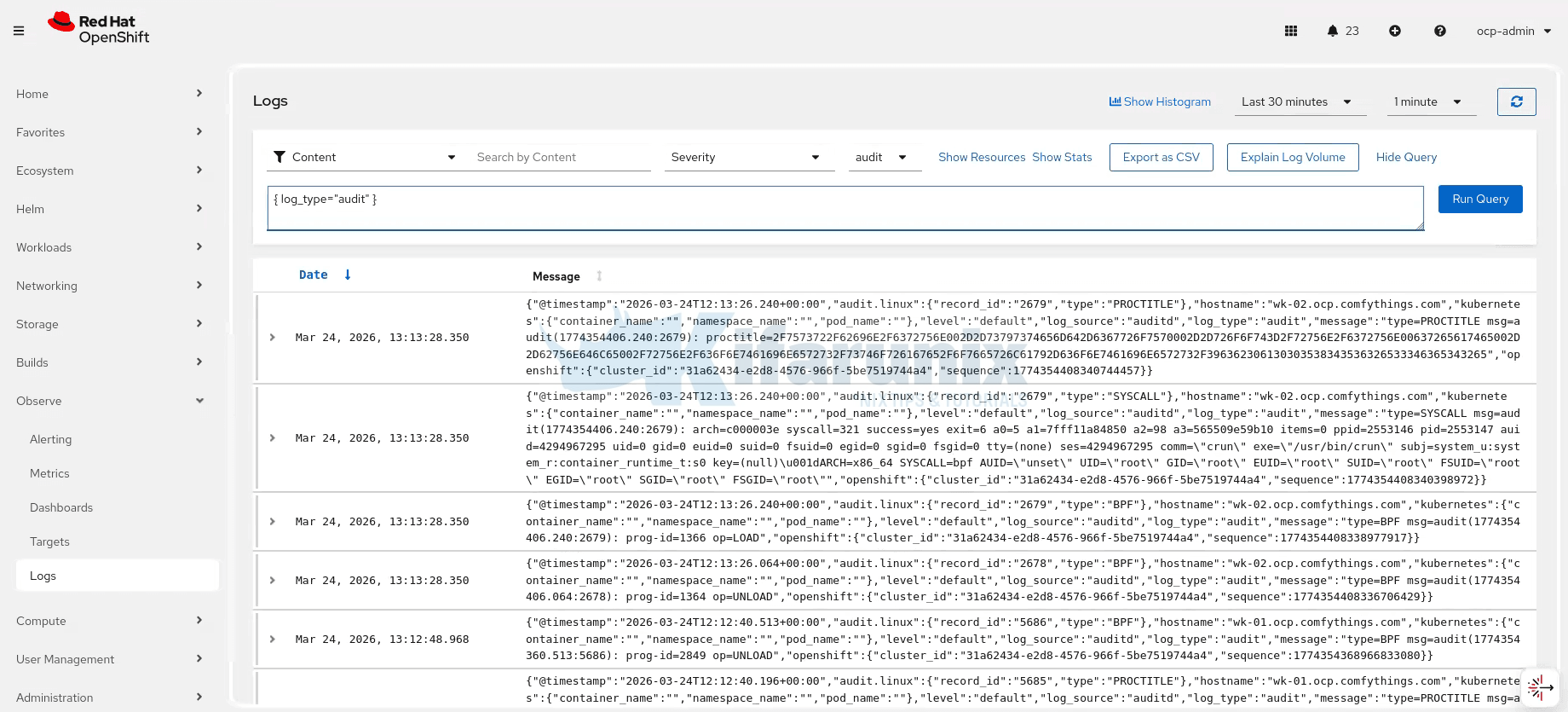
Navigate to Observe > Logs in the OpenShift web console. You should see logs appearing for all three tenants (application, infrastructure, audit). Use a simple LogQL query to verify:
{log_type="application"} | jsonSample audit logs:
Verify Logs in Elasticsearch
From a machine that can access your Elasticsearch instance, check the indices. Username used here must have rights to read the indices.
curl -u 'USERNAME:PASSWORD' \
  -k 'https://<ELASTICSEARCH_HOST>:9200/_cat/indices?v&s=index'
You should see indices matching the ocp-prod-{.log_type} template pattern, typically application, infrastructure, and audit indices.
Sample output;
health status index                                                              uuid                   pri rep docs.count docs.deleted store.size pri.store.size dataset.size
...
yellow open   ocp-prod-application                                               V2oXSLv9Riq3EzWwE2ICaw   1   1       3675            0      2.3mb          2.3mb        2.3mb
yellow open   ocp-prod-audit                                                     _D-PAgD2R7-PuDH62kvVDA   1   1     356255            0    444.9mb        444.9mb      444.9mb
yellow open   ocp-prod-infrastructure                                            GXvaQ2rHSAuxPfyP9FIybw   1   1    1478784            0      793mb          793mb        793mb
yellow open   ocp-prod-undefined                                                 cFDKdmkhTXKtVeXI2PIVhQ   1   1        105            0     56.1kb         56.1kb       56.1kb
And it seems, we have a fourth index, the ocp-prod-undefined index, which means some logs are arriving without a .log_type field, so the fallback "undefined".
Query a sample document:
curl -u 'USERNAME:PASSWORD' --cacert elasticsearch-ca.crt 'https://<ELASTICSEARCH_HOST>:9200/ocp-prod-application/_search?pretty&size=1'Sample output;
{
  "took" : 14,
  "timed_out" : false,
  "_shards" : {
    "total" : 1,
    "successful" : 1,
    "skipped" : 0,
    "failed" : 0
  },
  "hits" : {
    "total" : {
      "value" : 7046,
      "relation" : "eq"
    },
    "max_score" : 1.0,
    "hits" : [
      {
        "_index" : "ocp-prod-application",
        "_id" : "_gorIJ0Bbz8FC-yS-sDK",
        "_score" : 1.0,
        "_ignored" : [
          "kubernetes.annotations.k8s.ovn.org/pod-networks.keyword"
        ],
        "_source" : {
          "@timestamp" : "2026-03-24T14:07:24.621521247Z",
          "hostname" : "wk-01.ocp.comfythings.com",
          "kubernetes" : {
            "annotations" : {
              "k8s.ovn.org/pod-networks" : "{\"default\":{\"ip_addresses\":[\"10.128.0.20/23\"],\"mac_address\":\"0a:58:0a:80:00:14\",\"gateway_ips\":[\"10.128.0.1\"],\"routes\":[{\"dest\":\"10.128.0.0/14\",\"nextHop\":\"10.128.0.1\"},{\"dest\":\"172.30.0.0/16\",\"nextHop\":\"10.128.0.1\"},{\"dest\":\"169.254.0.5/32\",\"nextHop\":\"10.128.0.1\"},{\"dest\":\"100.64.0.0/16\",\"nextHop\":\"10.128.0.1\"}],\"ip_address\":\"10.128.0.20/23\",\"gateway_ip\":\"10.128.0.1\",\"role\":\"primary\"}}",
              "k8s.v1.cni.cncf.io/network-status" : "[{\n    \"name\": \"ovn-kubernetes\",\n    \"interface\": \"eth0\",\n    \"ips\": [\n        \"10.128.0.20\"\n    ],\n    \"mac\": \"0a:58:0a:80:00:14\",\n    \"default\": true,\n    \"dns\": {}\n}]",
              "openshift.io/scc" : "restricted-v2",
              "seccomp.security.alpha.kubernetes.io/pod" : "runtime/default",
              "security.openshift.io/validated-scc-subject-type" : "user"
            },
            "container_id" : "cri-o://9100eea2ca76c8aea9eca7580ae8d2d7e782d0705386bc8a259118b5c9681bcf",
            "container_image" : "image-registry.openshift-image-registry.svc:5000/monitoring-demo/mobilepay-api:2.0",
            "container_iostream" : "stdout",
            "container_name" : "api",
            "labels" : {
              "app" : "mobilepay-api",
              "pod-template-hash" : "6b898c6dd5"
            },
            "namespace_id" : "16d93953-1d86-4056-87fa-e686f5b3ee60",
            "namespace_labels" : {
              "kubernetes_io_metadata_name" : "monitoring-demo",
              "pod-security_kubernetes_io_audit" : "restricted",
              "pod-security_kubernetes_io_audit-version" : "latest",
              "pod-security_kubernetes_io_warn" : "restricted",
              "pod-security_kubernetes_io_warn-version" : "latest"
            },
            "namespace_name" : "monitoring-demo",
            "pod_id" : "897c2a10-30aa-4d97-be21-43df748f9210",
            "pod_ip" : "10.128.0.20",
            "pod_name" : "mobilepay-api-6b898c6dd5-44zq4",
            "pod_owner" : "ReplicaSet/mobilepay-api-6b898c6dd5"
          },
          "level" : "info",
          "log_source" : "container",
          "log_type" : "application",
          "message" : "INFO:     10.131.0.14:46684 - \"GET /metrics HTTP/1.1\" 200 OK",
          "openshift" : {
            "cluster_id" : "31a62434-e2d8-4576-966f-5be7519744a4",
            "sequence" : 1774361245450052272
          },
          "timestamp" : "2026-03-24T14:07:24.621521247Z"
        }
      }
    ]
  }
}
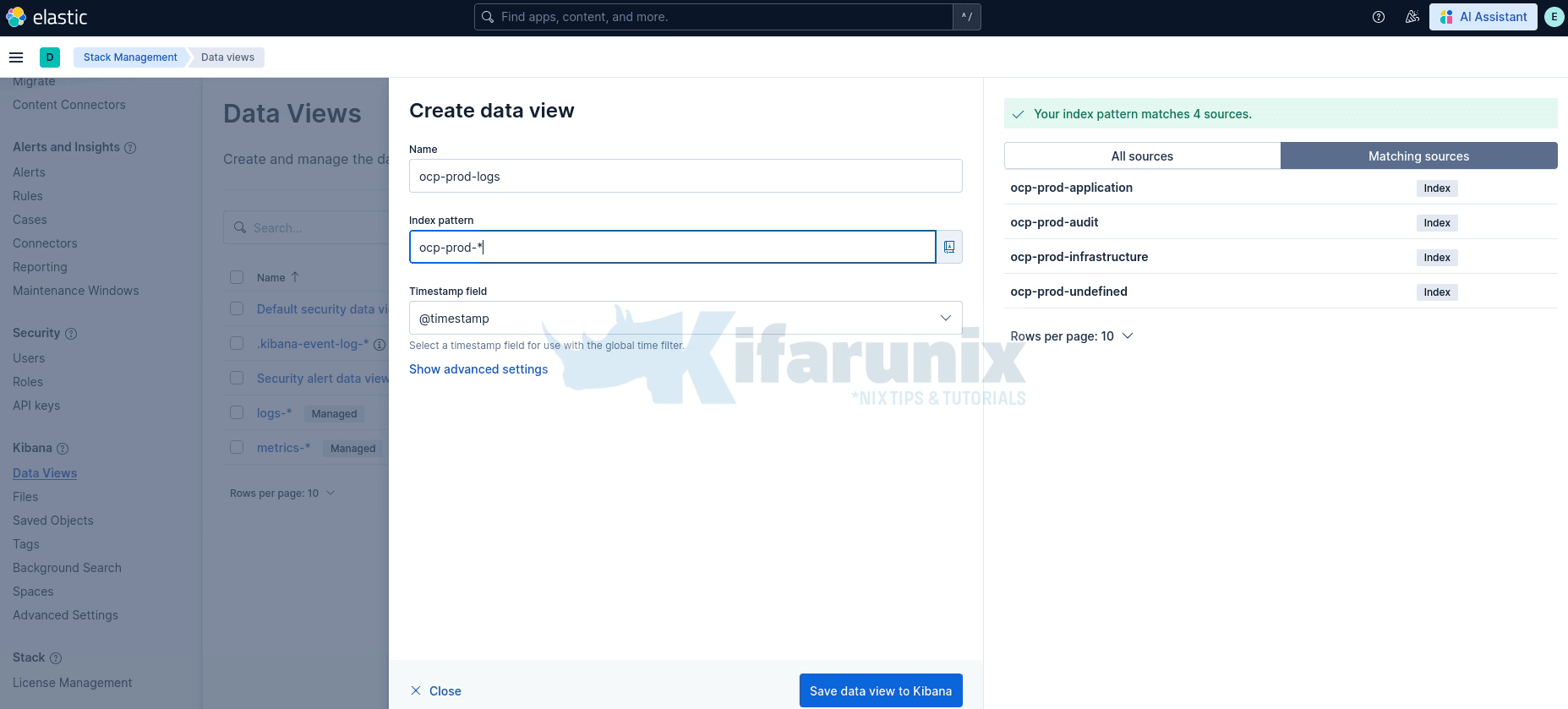
To view the logs in Kibana, create a Data View. In Kibana, go to Stack Management > Data Views> Create data view. Set the index pattern to ocp-prod-* and select @timestamp as the timestamp field then Save data view to Kibana.
Once created, navigate to Discover, select your new data view, and you should see OCP logs flowing in.
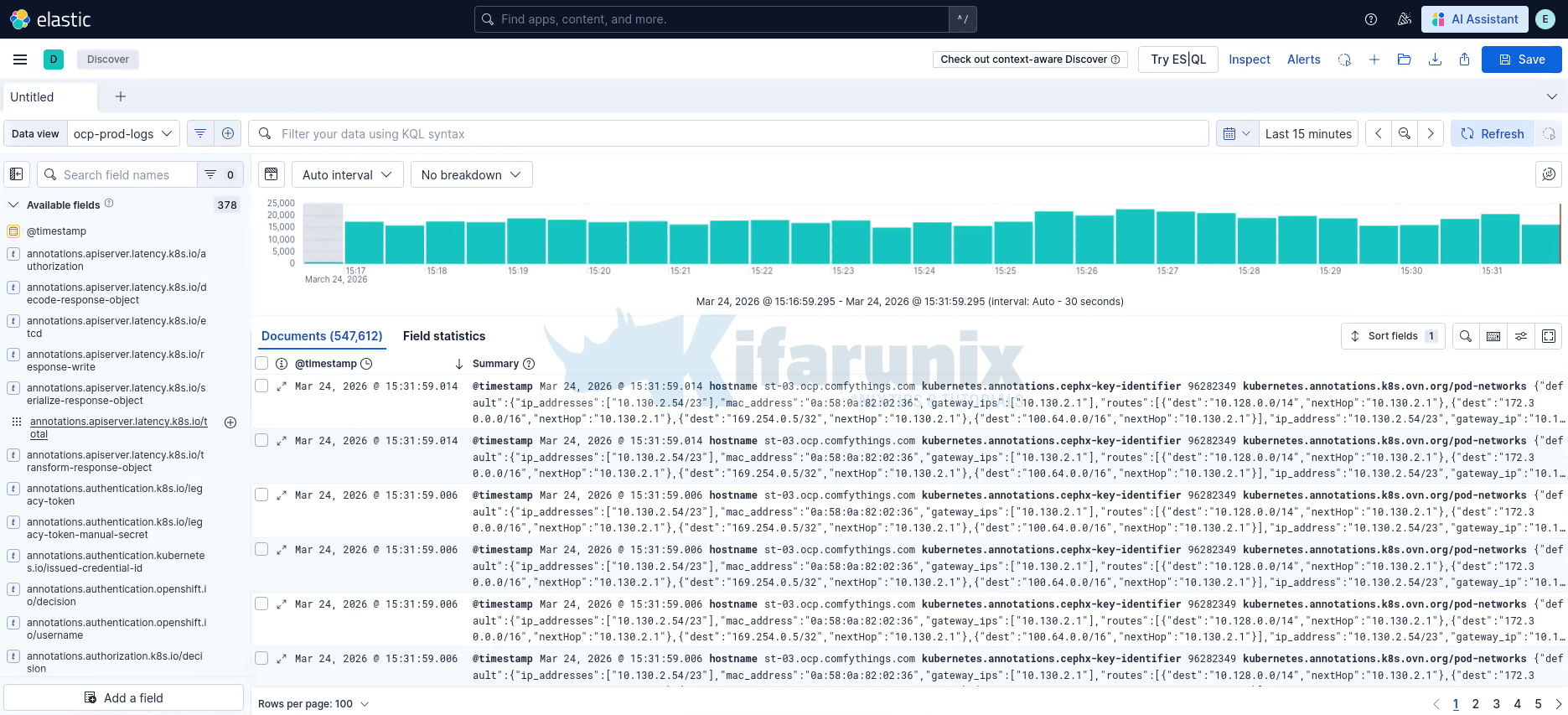
You can filter by log_type field to view application, infrastructure, or audit logs separately.
Verify Logs in MinIO
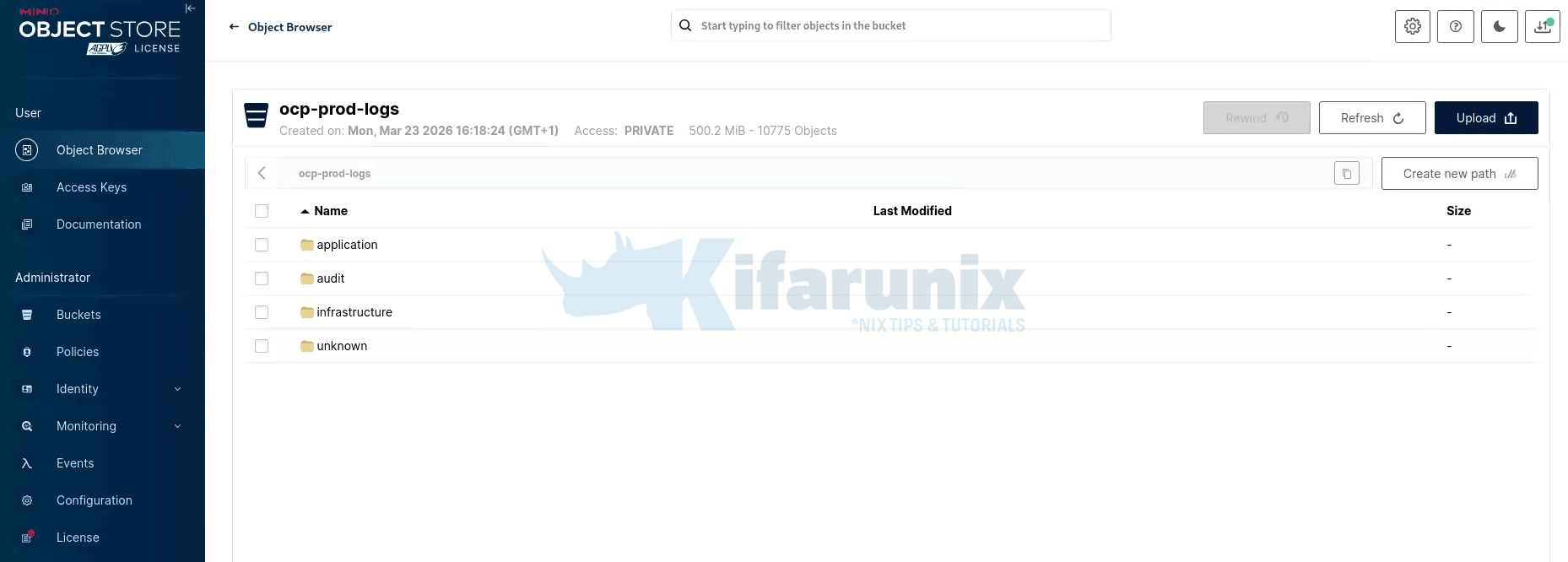
Log into the MinIO web console and navigate to your log bucket. You should see directory prefixes matching the keyPrefix template: application/, infrastructure/, audit/, each containing log objects organized by namespace and hostname.
If you have the MinIO Client (mc) configured, you can also verify from the CLI:
mc ls <ALIAS>/<BUCKET_NAME>/Troubleshooting Common Issues
CLF Status Shows “Not Ready” or “Not Valid”
Check the detailed status conditions:
oc get clf <CLF_NAME> -n openshift-logging -o yamlLook at .status.conditions, .status.outputConditions, and .status.pipelineConditions for specific error messages. Common causes include:
- Missing secrets: The secret referenced in an output does not exist or is missing required keys.
- Missing RBAC: The service account does not have the required cluster role bindings for the log types referenced in pipelines.
- Invalid URL: The output URL is malformed or missing the protocol prefix.
Collector Pods in CrashLoopBackOff
Check collector logs:
oc logs -l app.kubernetes.io/component=collector -n openshift-logging --previousCommon causes:
- Buffer corruption after OOM: OpenShift Logging 6.4.1 fixed a recovery logic issue for corrupted buffer files after OOM events. Ensure you are running at least 6.4.1.
- Large log messages: If extremely large application log messages cause buffer overflow, consider using the
maxMessageSizetuning parameter (available in OpenShift Logging 6.4.2+).
Collector Pods Showing Repeated 500 or 429 Errors
If collector logs show repeated delivery failures:
oc logs -l app.kubernetes.io/component=collector -n openshift-loggingWARN Retrying after error. error=Server responded with an error: 500 Internal Server Error
...
WARN Retrying after error. error=Server responded with an error: 429 Too Many RequestsLokiStack is rejecting log batches from Vector due to ingestion rate limits or temporary overload. This is common after LokiStack restarts or sudden log bursts.
Check LokiStack status first:
oc describe lokistack logging-loki -n openshift-logging | grep -A 15 "Conditions:"If the Status condition is True and Type: Ready, LokiStack is operational and the errors are likely transient rate limiting rather than a hard failure.
If errors persist, increase the global ingestion limits in the LokiStack CR:
spec.limits.global.ingestion.ingestionRate: 20
spec.limits.global.ingestion.ingestionBurstSize: 50
In the CLF yaml:
spec:
  limits:
    global:
      retention:
        days: 3
      ingestion:
        ingestionRate: 20
        ingestionBurstSize: 50
If the issue continues after raising limits, check distributor and ingester logs for the underlying rejection reason:
oc logs -n openshift-logging -l app.kubernetes.io/component=distributor --tail=100 | grep -E "(error|warn)"oc logs -n openshift-logging -l app.kubernetes.io/component=ingester --tail=100 | grep -E "(error|warn)"- Scale ingester replicas (
spec.template.ingester.replicas: 3). - Check for high-cardinality label streams, too many unique label combinations significantly increase ingester memory pressure and can trigger 500s under load.
Logs Not Appearing in Elasticsearch
- Version mismatch: Ensure
version: 8is set in the Elasticsearch output. Without this, the collector sends the_typefield which Elasticsearch 8.x and later, rejects. - Index template conflicts: If you have existing index templates in Elasticsearch that conflict with the dynamic index name, logs may be rejected. Check the Elasticsearch logs for indexing errors.
- TLS certificate issues: If Elasticsearch uses a custom CA, ensure the
ca-bundle.crtkey in the secret contains the correct certificate chain.
An “undefined” Index Appears in Elasticsearch
You may notice an index named ocp-prod-undefined (or whatever your fallback value is) in Elasticsearch. This happens when a small number of logs arrive with log_type set to null instead of application, infrastructure, or audit. The dynamic index template ocp-prod-{.log_type||"undefined"} falls back to "undefined" when the field is null.
One common observed cause is pods in transient states, for example, init containers or containers that have restarted (you can tell by the log file suffix, e.g., registry-server/2.log where 2 indicates the third container instance), where Vector may read the log file before metadata enrichment has assigned a log_type. The exact trigger may vary depending on workload and cluster conditions.
This is typically a tiny fraction of your total log volume (in our environment, 116 documents out of 1.8 million). It is not a configuration error and does not indicate log loss. The fallback "undefined" is working as designed, it catches the edge cases instead of dropping those logs silently.
Logs Not Appearing in MinIO/S3
- Credentials: Verify the access key and secret key in the secret are correct.
- Bucket existence: The S3 bucket must exist before the collector tries to write to it. The collector does not create buckets.
- Network policies: If Loki network policies are enabled, they may block egress to MinIO. Check the network policies in the
openshift-loggingnamespace. - Endpoint URL: For MinIO, the URL must include the protocol and port (e.g.,
https://minio.example.com:9000) or no port if you are port forwarding. Do not include the bucket name in the URL.
Using Filters to Reduce Log Volume
Collecting all cluster logs produces a large amount of data, which can be expensive to move and store. To reduce volume, you can configure a drop filter to exclude unwanted log records before they are forwarded to an output. The log collector evaluates each log record against the filter and drops records that match the specified conditions.
How the drop filter evaluates records
The drop filter uses test blocks to define one or more conditions for evaluating log records. The filter applies the following rules:
- A test passes if all its specified field conditions evaluate to true (AND logic).
- If a test passes, the filter drops the log record.
- If you define multiple
testblocks, the filter drops the record if any test passes (OR logic). - If a condition references a missing field, that condition evaluates to
falseand does not cause a drop on its own. - Filters are applied in the order listed in
filterRefs. A record dropped by an earlier filter is never evaluated by subsequent filters or forwarded to any output.
Example: Dropping debug-level application logs
The following ClusterLogForwarder configuration drops all debug-level application logs before forwarding to Elasticsearch:
spec:
  filters:
    - name: drop-debug        # (1)
      type: drop              # (2)
      drop:
        - test:               # (3)
            - field: .level   # (4)
              matches: "debug" # (5)
  pipelines:
    - name: filtered-to-elasticsearch
      inputRefs:
        - application
      filterRefs:
        - drop-debug          # (6)
      outputRefs:
- external-es- (1) A unique name for this filter, referenced by pipelines.
- (2) Specifies the filter type. The
dropfilter excludes records that match its configuration. - (3) Defines a test block. All field conditions within the block must match for the test to pass.
- (4) The dot-delimited path to the field being evaluated. Segments with special characters must be quoted, for example
.kubernetes.labels."app.version-1.2/beta". - (5) A regular expression to match against the field value. Records that match are dropped. Use
notMatchesto drop records that do not match. - (6) References the filter by name. Filters are applied in the order listed here.
Note: You can set either matches or notMatches for a single field path, but not both.
Additional examples:
Keep only high-priority records, drop any record that doesn’t contain critical or error in message, and where the log level is info or warning:
filters:
  - name: important
    type: drop
    drop:
      - test:
          - field: .message
            notMatches: "(?i)critical|error"
          - field: .level
            matches: "info|warning"
Drop records matching any of several conditions using multiple test blocks (OR logic):
filters:
  - name: namespace-and-pod-filter
    type: drop
    drop:
      - test:                                      # (1)
          - field: .kubernetes.namespace_name
            matches: "openshift.*"
      - test:                                      # (2)
          - field: .log_type
            matches: "application"
          - field: .kubernetes.pod_name
            notMatches: "my-pod"
Where:
- (1) Drops logs from any namespace whose name starts with
openshift. - (2) Drops logs where both conditions are true: the log type is
application, and the pod name does not includemy-pod.
For a full reference of filter configuration options, including prune filters and advanced field path syntax, see the OpenShift logging documentation.
Conclusion
In this guide, we configured a ClusterLogForwarder on OpenShift 4.20 with Red Hat OpenShift Logging Operator 6.4 to forward all three log types (application, infrastructure, and audit) to three simultaneous destinations:
- LokiStack for native OpenShift console log integration
- External Elasticsearch 9.x for real-time search and visualization
- Self-hosted MinIO (S3) for cost-effective long-term log archival
This multi-destination logging architecture gives you the best of all worlds: real-time observability through the OpenShift console and Elasticsearch, combined with durable, cost-efficient archival in S3-compatible storage for compliance and audit requirements.