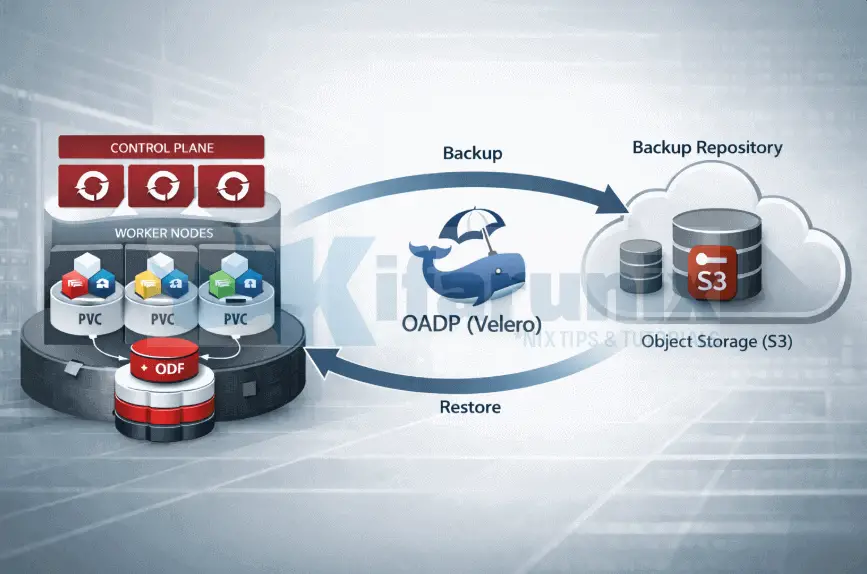
In this blog post, you will learn how to backup and restore applications in OpenShift 4 with OADP (Velero). In our previous guide, we covered how to backup and restore OpenShift etcd. While etcd backups safeguard cluster state, they don’t cover application resources or persistent volumes (PVs). As such, backing up OpenShift workloads, including applications and their persistent data, alongside etcd backup is essential for full disaster recovery, compliance, and resilience. This is where OpenShift API for Data Protection (OADP) comes in. Built on the open-source Velero project, OADP integrates seamlessly with OpenShift to protect namespaces, Kubernetes objects, and storage volumes at enterprise scale.
This guide is split into three parts:
- Part 1: How to Install and Configure OADP on OpenShift 4 covers:
- installing the OADP Operator
- preparing object storage
- configuring s3 storage credentials
- setting up ODF for CSI snapshots
- creating the DataProtectionApplication CR, and
- verifying the deployment.
- Part 2: How to Backup Applications and Persistent Volumes in OpenShift with OADP covers:
- deploying a test application
- creating on-demand backups
- scheduling automated backups, and
- verifying backup data in MinIO.
- Part 3: How to Restore and Validate Application Backups in OpenShift with OADP covers:
- restoring from backup and
- validating that application data survived the restore.
Table of Contents
Backup and Restore Applications in OpenShift 4 with OADP (Velero)
What is OADP and Why Do You Need It?
OpenShift API for Data Protection (OADP) is Red Hat’s officially supported Operator for backing up and restoring applications running on OpenShift Container Platform. It deploys and manages Velero, the popular open source Kubernetes backup tool, while adding OpenShift specific enhancements such as:
- Tight integration with OpenShift features such as Routes, the internal image registry, and image streams
- Built in RBAC controls and security defaults
- Declarative Custom Resources such as DataProtectionApplication, Backup, and Restore that feel native to Kubernetes and OpenShift workflows
- Support for OpenShift Virtualization VMs via the KubeVirt plugin
Your cluster is not the same as your applications. etcd, the distributed key value store at the heart of OpenShift, holds the declarative state of the cluster. It stores Kubernetes API objects such as Deployments, ConfigMaps, Secrets, Services, CRDs, and more. However, etcd does not store the actual runtime data inside Persistent Volumes.
Example: If a PostgreSQL pod writes 50 GB of customer data to a PVC, that data lives on the storage backend such as Ceph, AWS EBS, or vSphere. If the PVC is deleted using oc delete pvc, the storage volume fails, or a ransomware event occurs, an etcd backup alone cannot recover the data. It can only recreate the empty PVC definition.
OADP solves this by protecting both the Kubernetes objects and the actual data inside your volumes. It is the tool you use when you need to safeguard business critical application data, not just the cluster skeleton.
With OADP, you can:
- Back up all Kubernetes resources in selected namespaces or filtered by labels and selectors, including Deployments, StatefulSets, Services, ConfigMaps, Secrets, Routes, ServiceAccounts, RoleBindings, PVCs, and more, and optionally include any dependent cluster-scoped resources needed for a successful restore.
- Back up the actual contents of Persistent Volumes, not just the PVC definition, using:
- CSI snapshots for fast point in time backups when supported by your storage
- Filesystem level backups via Kopia, the default in recent versions, or legacy Restic for volumes without snapshot support
- Back up internal container images pulled from the OpenShift image registry via image streams, ensuring restored applications can pull the exact same images without external dependencies
- Restore flexibly: an entire namespace, a single resource, a specific PVC, or only the PV data
- Restore to the same namespace, a different namespace via namespace mapping, or even a different OpenShift cluster for migrations, blue green disaster recovery, or cross region failover
- Schedule automated backups with cron style schedules and TTL based retention policies
- Target any S3 compatible object storage such as AWS S3, Google Cloud Storage, Azure Blob, OpenShift Data Foundation with NooBaa, MinIO, Dell ECS, NetApp StorageGRID, and more
OADP vs etcd Backup: Understanding the Difference
This distinction is critical. Many teams initially conflate the two, but they serve complementary purposes.
- Primary focus:
- etcd backup: cluster control plane and all API objects, the cluster declarative state
- OADP: applications and their data
- What it protects:
- etcd backup: all Kubernetes objects stored in etcd such as Deployments, CRDs, ConfigMaps, name them.
- OADP: namespace scoped resources, relevant dependent cluster scoped resources such as CRDs and StorageClasses, actual PV data, and internal images
- Persistent Volume data
- etcd backup: not included, only PVC definitions
- OADP: included via CSI snapshots or filesystem copy
- Scope
- etcd backup: full cluster, disruptive restore required
- OADP: granular per namespace or per resource, non disruptive
- Restore impact
- etcd backup: replaces the entire control plane state, cluster downtime required
- OADP: restores applications on a running cluster with minimal or no downtime
- Typical use case
- etcd backup: catastrophic cluster failure such as etcd corruption or master node loss
- OADP: application recovery, accidental deletion, ransomware, migration, disaster recovery for workloads
- Limitations
- etcd backup: no PV data, requires full cluster access
- OADP: does not support full cluster restore, etcd recovery, or core OpenShift Operators
- Recommendation
- etcd backup: essential for cluster foundations
- OADP: essential for protecting customer applications
Bottom line is, in a production OpenShift environment, both are required for true resilience.
- Use etcd backups with automated snapshots to protect and recover the cluster itself
- Use OADP to protect and recover your applications and their data on top of a healthy cluster
In a real disaster recovery drill:
- Restore etcd first to bring the cluster back online
- Then trigger OADP restores to repopulate your applications and data
How OADP Backs Up Persistent Volumes
Backing up a Kubernetes Deployment for example, is straightforward. It is just a YAML manifest. However, backing up the data inside a running PostgreSQL instance, a Loki log store, or an image registry is a different problem entirely.
The data lives inside a Persistent Volume, managed by the storage layer, largely invisible to Kubernetes itself. OADP solves this through two fundamentally different strategies. Understanding where each one operates in the stack is what determines when to use which.
The Storage Layer Problem
When Velero backs up a namespace, it serializes all Kubernetes API objects (it converts them into structured JSON files) and save them in object storage. Deployments, Services, ConfigMaps, PVCs, e.t.c, all are captured as YAML and stored. That part is easy.
But a PersistentVolumeClaim (PVC) object is just a pointer. It tells you:
- A volume exists
- Which storage class provisioned it
- How large it is
It doesn’t say anything about what is actually inside it. For that, OADP needs to reach into the storage layer directly, and it has two ways to do that:
- CSI Snapshot backup
- Filesystem Backup
Method 1: CSI Snapshot-Based Backup
This method uses the Kubernetes CSI VolumeSnapshot API to create a point-in-time snapshot of a Persistent Volume at the storage layer. It only works when the storage backend supports CSI snapshots. Examples of such storage backends include AWS EBS, Google Persistent Disk, Azure Disk, ODF, Ceph RBD, and NetApp Trident. In other words, the CSI driver for your storage class must implement the VolumeSnapshot API. If the backend does not support snapshots, OADP cannot use this method.
So, when a CSI-compliant driver is in use and a VolumeSnapshotClass is configured, OADP instructs the driver to take a point-in-time snapshot at the block layer. The driver handles everything:
- Consistency and crash-safe capture
- Changed block tracking
- Snapshot lifecycle management
The pod does not need to be paused or quiesced when snapshot of the persistent volume is being taken. On Ceph for example, a snapshot is fundamentally a metadata operation, meaning it completes in seconds regardless of how large the volume is.
On OpenShift with ODF, the CSI snapshot infrastructure ships ready to use. ODF provides:
- A Ceph RBD CSI driver with snapshot support for block volumes (RWO)
- A CephFS CSI driver with snapshot support for shared file volumes (RWX)
VolumeSnapshotClassresources for both, pre-installed in the cluster
The Problem with Local Snapshots
A CSI snapshot created by ODF lives inside Ceph. It is stored as a Ceph RBD snapshot, tracked internally by the same Ceph cluster that hosts your volumes. If that ODF cluster is lost, corrupted, or being decommissioned, the snapshots go with it.
You have not backed up your data. You have created a local recovery point.
For a backup to be meaningful, the data needs to leave the storage system entirely.
Data Mover: Getting Snapshot Data into Object Storage
Data Mover is what bridges the CSI snapshots and object storage by moving the actual snapshot volume data out of the storage backend entirely and into your configured backup target.
After Velero creates the CSI snapshot, Data Mover takes over in a well-defined sequence:
- A temporary PVC is provisioned from the snapshot, creating a short-lived consistent view of the volume at the exact moment the snapshot was taken
- The Node Agent, running on the same node as that temporary PVC, uses Kopia to read the volume contents
- Kopia deduplicates, compresses, and streams the data directly into your
BackupStorageLocation, for example MinIO in our case - Once the upload completes, both the temporary PVC and the original CSI snapshot are deleted
What remains in target backup storage is a Kopia repository containing the full volume contents, consistent to the moment the snapshot was taken, with zero dependency on ODFor your storage backend. You can restore it to a completely different cluster with a completely different storage backend.
OADP manages this workflow automatically through DataUpload and DataDownload CRs, created in the openshift-adp namespace during backup and restore respectively. You will not create these manually, but when a Data Mover operation stalls or fails, these CRs and their events are the first place to look.
Method 2: File System Backup (FSB)
File System Backup takes the opposite approach. Rather than going below the filesystem to the block layer, it goes above it, reading files directly from the mounted volume path on the node.
OADP deploys a Node Agent as a DaemonSet across all worker nodes. When FSB is selected for a volume, the Node Agent on the relevant node:
- Locates the volume mount on the host under
/var/lib/kubelet/pods/ - Runs a Kopia backup against that path
- Streams deduplicated, compressed data directly to object storage
Because FSB operates at the file level and talks directly to object storage, it carries no CSI dependency whatsoever. No VolumeSnapshotClass, no snapshot-capable driver, no storage vendor involvement. It works identically across:
- Ceph RBD
- CephFS
- NFS
- Local volumes
- Any Kubernetes-supported storage
This makes FSB the universal fallback when snapshot support is unavailable.
The one constraint: the pod must be running and the volume actively mounted. The Node Agent accesses data through the pod’s mount path on the host. A scaled-down workload with an unmounted PVC cannot be backed up with FSB.
Choosing the Right Backup Method
OADP supports both methods and the right choice depends on your storage backend and what you need from a backup. The table below compares the two across the considerations that matter most:
| Consideration | CSI + Data Mover | FSB |
|---|---|---|
| Snapshot consistency | Block-level, pod-independent | File-level, pod must be running |
| Object storage target | Yes, via Data Mover | Yes, directly |
| Storage dependency after backup | None, data is in object storage | None, data is in object storage |
| Speed | Fast snapshot + async upload | Slower, full file traversal |
| Cross-cluster restore | Yes | Yes |
CSI Snapshots with Data Mover is the stronger choice when your storage backend supports it.
For this guide, our workloads run on ODF with MinIO as the backup target. CSI snapshot support is available out of the box and VolumeSnapshotClass resources are already present in the cluster. CSI Snapshots with Data Mover targeting MinIO is therefore the method we will use throughout. If the entire ODF cluster had to be rebuilt tomorrow, the data is in MinIO and restoring to a fresh cluster is straightforward.
How OADP Works Under the Hood
Before diving into configuration, it helps to understand what actually happens when OADP runs a backup or restore. This makes the configuration choices that follow easier to reason about.
Backup Flow
- You create a
Backupcustom resource (CR) in theopenshift-adpnamespace, specifying which namespaces or labels to include. - Velero (deployed by OADP) reads this CR and begins the backup process.
- Velero serializes all Kubernetes objects (Deployments, Services, PVCs, Secrets, etc.) into a tarball archive.
- For Persistent Volumes, Velero uses one of the following methods (depending on your configuration):
- CSI snapshots: Uses the CSI to take a volume snapshot directly at the storage layer. This is fast, storage-efficient, and the preferred method.
- Kopia (Node Agent): An open-source file system backup tool. Kopia reads the data on the volume byte-by-byte and uploads it to object storage. This is slower but works on any storage type.
- Restic (Node Agent): An older alternative to Kopia. Still supported but Kopia is now the recommended uploader in OADP 1.3+.
- The tarball (Kubernetes objects) and volume data are uploaded to your configured S3-compatible object storage bucket.
Restore Flow
- You create a
RestoreCR referencing a specific backup. - Velero downloads the tarball from object storage.
- It re-creates all Kubernetes objects in the target namespace.
- For Persistent Volumes, it either restores from a CSI snapshot or re-uploads the file system data to a new PVC.
OADP Architecture Overview
The key components deployed in the openshift-adp namespace after installing OADP are:
- oadp-controller-manager: The OADP Operator controller. Watches for DataProtectionApplication (DPA) CRs and reconciles the desired state.
- velero: The Velero server pod. Processes Backup, Restore, and Schedule CRs. Manages Kubernetes object backups (Deployments, Services, Secrets, PVC metadata) and coordinates volume backups.
- node-agent (formerly restic): A DaemonSet running on every node. Performs filesystem-level volume backups using Kopia (recommended) or Restic. Only runs when nodeAgent is enabled in the DPA.
- BackupStorageLocation (BSL): A Velero CR that specifies the S3-compatible object storage bucket. Velero uses this to read and write backup archives.
- VolumeSnapshotLocation (VSL): A Velero CR (optional) that configures where volume snapshots are stored when using native cloud provider snapshots or CSI snapshots.
- DataProtectionApplication (DPA): The master configuration CR for OADP. Defines plugins, backup locations, node agent settings, and overall OADP behavior.
Prerequisites for Deploying OADP
- OpenShift cluster with cluster-admin
- oc CLI
- S3-compatible object storage
- CSI-compatible storage
- Access credentials to S3 object storage
Conclusion
Protecting application data in OpenShift requires more than etcd snapshots. etcd gives you the cluster skeleton back. OADP gives you the applications and the data inside them. Together, they cover the full spectrum of what a production disaster recovery strategy needs.
In this guide, we walked through what OADP is, how it differs from etcd backup, the two methods it uses to protect persistent volumes, and how the full backup and restore flow works under the hood. With that foundation in place, you are ready to move from theory to implementation.
In our next guide, we will cover:
how to install and configure OADP on OpenShift 4
The guide covers deploying the Operator, preparing MinIO as the backup target, configuring ODF for CSI snapshots, and standing up the DataProtectionApplication CR. By the end of it, you will have a fully functional OADP deployment ready to protect your workloads.