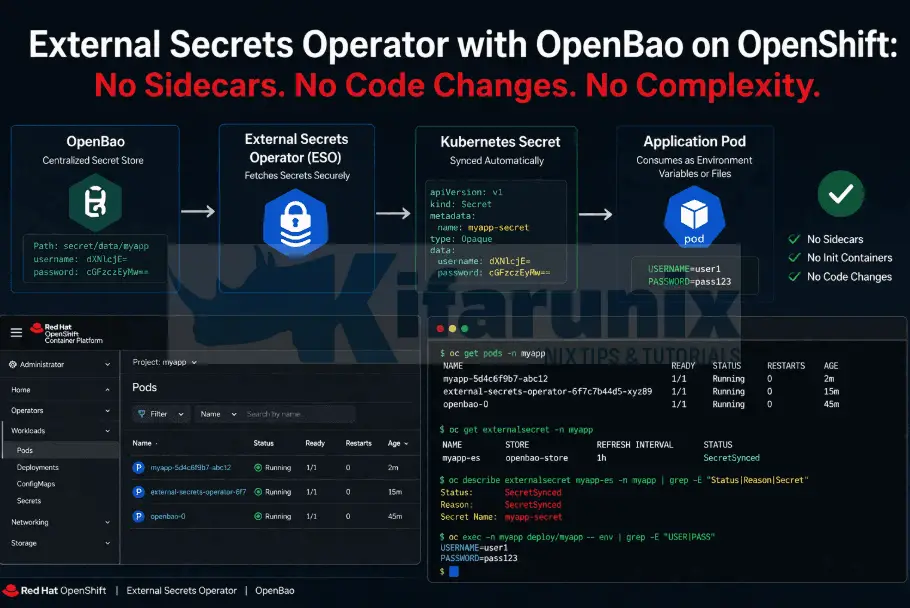
A container with no shell is doing the right thing. A secrets pipeline that cannot deliver credentials to that container is doing nothing at all. Every sidecar injection pattern, from the Vault Agent Injector to init container wrappers, assumes a shell exists inside the container to bridge rendered files into environment variables. Strip the shell out and the entire delivery chain breaks.
The External Secrets Operator removes the container from the equation entirely. It authenticates to OpenBao, reads the secrets, and writes them into a native Kubernetes Secret on a schedule. No sidecar. No init container. No code change. No image rebuild. This guide walks through installing the External Secrets Operator for Red Hat OpenShift on OCP 4.x, wiring it to OpenBao with Kubernetes auth, and replacing a manually created Secret with one that stays in sync with OpenBao automatically.
Table of Contents
External Secrets Operator with OpenBao on OpenShift
In the previous post, I covered how the OpenBao Agent Injector uses init and sidecar containers to deliver secrets into a workload at pod startup. That approach works well when the container has a shell to source the rendered secrets files into environment variables. But some containers simply cannot consume secrets delivered that way.
Google’s distroless images ship with nothing beyond the compiled binary and its runtime dependencies. No shell, no package manager, no env, no cat, no source. Scratch-based Go containers are the same. So is any image that was deliberately stripped down to reduce its attack surface. The Agent Injector can drop a secrets file into a shared volume, but without a shell there is nothing inside the container to pick that file up and turn it into the DB_PASSWORD environment variable the application expects at startup.
That leaves you with two bad options: change the image or the application code to accommodate file-based credentials, or fall back to a static Kubernetes Secret created by hand. Neither is acceptable.
The External Secrets Operator (ESO) takes a fundamentally different approach. Instead of injecting secrets into the pod, ESO runs as its own controller outside the pod lifecycle. It authenticates to your secrets backend, reads the secrets you specify, and writes them into a native Kubernetes Secret on a configurable refresh interval. The workload reads from that Secret exactly as it always has, through envFrom, volume mounts, or individual env var references, with no awareness that an external secrets backend exists.
If you are running distroless containers, third-party images you do not control, or any workload where adding sidecars or modifying startup commands is not an option, ESO is how you get secrets into it.
But the Secret Ends Up in Kubernetes Again?
Some people flag ESO as a step backwards because the secret ends up in a Kubernetes Secret, and Kubernetes Secrets are just base64-encoded in etcd. That concern is valid but incomplete.
The difference is ownership and lifecycle.
A manually created Kubernetes Secret is static. You create it, it sits there, nobody rotates it, and if credentials change you are doing it by hand.
An ESO-managed Kubernetes Secret is a projection. The source of truth lives in OpenBao. ESO reconciles the projection continuously. If you rotate a credential in OpenBao, ESO updates the Kubernetes Secret within the next refresh window automatically. If you delete the ExternalSecret, ESO deletes the Secret it owns.
The credential lifecycle is controlled in one place.
Prerequisites
This post builds on the earlier posts in this series:
- Deploy OpenBao on OpenShift with HA Raft, TLS, and Static Key Auto-Unseal
- OpenBao Kubernetes Auth on OpenShift: Eliminate Static Secrets from Your Workloads
To proceed, you need:
- A running OpenBao cluster with Kubernetes auth enabled and TLS configured and accessible from within the cluster.
ocCLI with cluster-admin accessbaoCLI configured with a valid token (or equivalent API/UI access to OpenBao)
The Demo Environment
In our demo setup, we have a Go-based application (infrawatch-collector) running alongside a PostgreSQL StatefulSet in the infrawatch-dev namespace. The collector is built on gcr.io/distroless/static:nonroot, a distroless image with no shell, no package manager, and no tooling beyond the compiled binary.
Initially, both workloads shared the same manually created Kubernetes Secret (infrawatch-db-secret) for database credentials. In the previous post, I moved PostgreSQL’s initialization credentials into the OpenBao KV v2 store and configured the Agent Injector to deliver them as files at pod startup. The Postgres image reads them natively through its _FILE environment variable convention (POSTGRES_PASSWORD_FILE, POSTGRES_USER_FILE, POSTGRES_DB_FILE) with no additional configuration.
The collector, however, still reads its database credentials from environment variables via envFrom: secretRef: name: infrawatch-db-secret. It cannot use the Agent Injector because there is no shell inside the container to source rendered secrets files into environment variables. That means it was still depending on a static, manually created Kubernetes Secret.
By the end of this post, infrawatch-db-secret will be owned and continuously synced by ESO from OpenBao.
How ESO Works
When installed, ESO introduces two resources that are worth understanding before proceeding. The resources are:
- A
SecretStore(orClusterSecretStorefor cluster-wide scope) which describes how ESO connects to the external secrets provider. It holds the server address, authentication method, and the KV engine path. Think of it as a named connection to OpenBao. - An
ExternalSecretwhich references aSecretStoreand declares which keys to fetch and what Kubernetes Secret to create or update. It also definesrefreshInterval: how often ESO re-reads from OpenBao and updates the Kubernetes Secret. If you rotate a credential in OpenBao, ESO picks it up within the next refresh cycle without any manual intervention.
The full flow:
OpenBao KV (source of truth)
  └── SecretStore (how to connect + authenticate)
        └── ExternalSecret (what to fetch, where to write)
              └── Kubernetes Secret (e.g infrawatch-db-secret)
                    └── workload pod (envFrom: secretRef)
ESO uses the Vault provider for OpenBao. This works because OpenBao is API-compatible with HashiCorp Vault.
The upstream ESO project documents this integration explicitly on the OpenBao provider page. In the SecretStore, you point provider.vault.server at your OpenBao address. Everything else is the same.
Authentication: Kubernetes Auth vs Token Auth
ESO needs to authenticate to OpenBao to read secrets. There are two practical options in this environment:
- Token auth uses a long-lived OpenBao token stored in a Kubernetes Secret. ESO reads the token from that Secret and presents it on every request. It is simple to set up but introduces the same problem we are trying to solve: a static credential sitting in a Kubernetes Secret.
- Kubernetes auth lets ESO authenticate using its own ServiceAccount JWT, the same mechanism I already configured for the workloads in the previous post. ESO’s controller pod presents its ServiceAccount token to OpenBao, OpenBao validates it against the Kubernetes API, and issues a short-lived token. No static credential.
I will use Kubernetes auth. It requires a dedicated OpenBao role bound to the ESO controller’s ServiceAccount.
Step 1: Verify the Secret Exists in OpenBao
Before configuring ESO, confirm the secrets are present at the path we will reference.
We have already created the two secrets:
- one for PostgreSQL bootstrap (initialization) and
- another for the collector application credentials.
bao kv get secret/infrawatch/dev/collector============ Secret Path ============
secret/data/infrawatch/dev/collector
======= Metadata =======
Key Value
--- -----
created_time 2026-04-10T09:14:44.40707408Z
custom_metadata <nil>
deletion_time n/a
destroyed false
version 1
======= Data =======
Key Value
--- -----
db_host infrawatch-postgres
db_name collector
db_password p@ssw0rd123
db_port 5432
db_sslmode disable
db_user collectorbao kv get secret/infrawatch/dev/postgres=========== Secret Path ===========
secret/data/infrawatch/dev/postgres
======= Metadata =======
Key Value
--- -----
created_time 2026-04-10T13:45:15.916148344Z
custom_metadata <nil>
deletion_time n/a
destroyed false
version 5
========== Data ==========
Key Value
--- -----
db_name collector
db_password p@ssw0rd123
db_user collector
postgres_db collector
postgres_password p@ssw0rd
postgres_user infrawatchThe ExternalSecret will sync these into a Kubernetes Secret that the workloads on cluster consume.
If you haven’t stored the secrets yet on KV, you can check how to store the secrets guide.
Step 2: Verify the Existing OpenBao Policy
In our previous guide, we created a policy named infrawatch-dev that grants read access to development secrets. This policy already provides the permissions required by External Secrets Operator (ESO).
First, confirm that the policy exists by listing all available policies:
bao policy listadmin
default
infrawatch-dev
rootIf policy appears in the list, inspect it to verify its configuration:
bao policy read infrawatch-devYou should see rules similar to:
# Policy: infrawatch-dev
# Purpose: Allow InfraWatch dev workloads to read their database credentials
# Scope: Read-only access to secret/data/infrawatch/dev/*

# Read secrets
path "secret/data/infrawatch/dev/*" {
  capabilities = ["read"]
}

# List secret keys (needed for discovery, optional)
path "secret/metadata/infrawatch/dev/*" {
  capabilities = ["list", "read"]
}

# Allow the token to look up its own properties (useful for debugging)
path "auth/token/lookup-self" {
  capabilities = ["read"]
}

# Allow the token to renew itself (keeps the pod from having to re-authenticate)
path "auth/token/renew-self" {
  capabilities = ["update"]
}
This ensures ESO can access secrets under secret/data/infrawatch/dev/*.
If the policy doesn’t exist yet, follow the guide below to create it:
How to create OpenBao Policies and Roles
Step 3: Install the External Secrets Operator for Red Hat OpenShift
The External Secrets Operator (ESO) for Red Hat OpenShift is a supported, production-ready operator available through the Red Hat Operator Catalog. It enables OpenShift workloads to securely retrieve secrets from external backends such as OpenBao, eliminating the need to store sensitive data directly in Kubernetes.
As of OpenShift 4.20+, ESO is generally available as a Day-2 operator and forms part of Red Hat’s broader secrets management ecosystem, alongside tools like cert-manager and the Secrets Store CSI Driver.
If you previously installed the community version of the External Secrets Operator, you must remove it before installing the Red Hat-supported version. Running both simultaneously is not supported and may lead to conflicts.
Installing ESO on OpenShift
Hence, to install ESO on OCP platform, login to the web UI and:
- Navigate to Ecosystem > Software Catalog
- Search for “External Secrets Operator for Red Hat OpenShift”
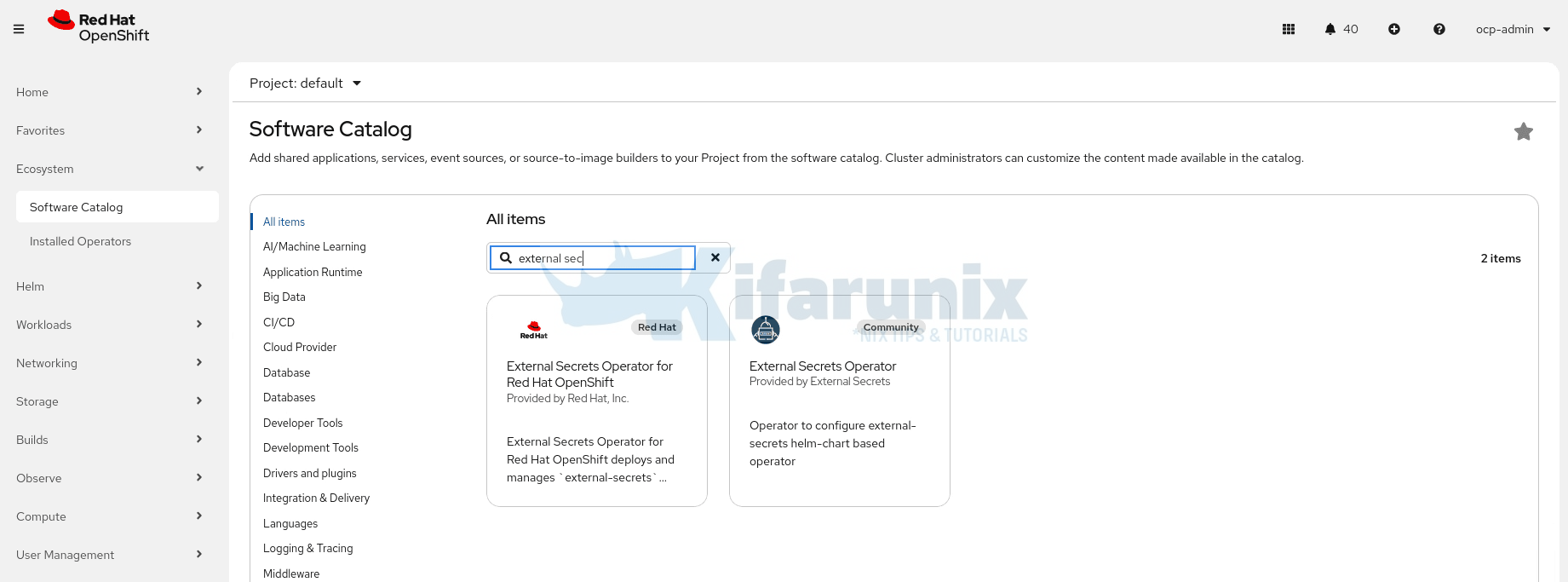
- Install the operator with default settings. It will install into the
external-secrets-operatornamespace (OLM creates it if it does not exist).
Alternatively, you can install the External Secrets Operator for Red Hat OpenShift using the OpenShift CLI (oc).
1. Create the Operator Namespace
oc create namespace external-secrets-operator2. Create the OperatorGroup
The OperatorGroup defines the scope of the operator (cluster-wide in this case).
cat <<'EOF' | oc apply -f -
apiVersion: operators.coreos.com/v1
kind: OperatorGroup
metadata:
  name: external-secrets-operator
  namespace: external-secrets-operator
spec:
  targetNamespaces: []
EOF
3. Create the Subscription
cat <<'EOF' | oc apply -f -
apiVersion: operators.coreos.com/v1alpha1
kind: Subscription
metadata:
  name: openshift-external-secrets-operator
  namespace: external-secrets-operator
spec:
  channel: stable
  name: openshift-external-secrets-operator
  source: redhat-operators
  sourceNamespace: openshift-marketplace
  installPlanApproval: Automatic
EOF
4. Verify the Operator Installation
Wait a few moments for the installation to complete, then check the ClusterServiceVersion (CSV):
oc get csv -n external-secrets-operatorYou should see output similar to:
NAME                                    DISPLAY                                           VERSION   PHASE
openshift-external-secrets-operator.v1.1.0   External Secrets Operator for Red Hat OpenShift   1.1.0     external-secrets-operator.v1.0.0        Succeeded
Create the ExternalSecretsConfig Operand
Installing ESO, whether from the web console or the CLI, only installs the meta-operator: a single manager pod in the external-secrets-operator namespace whose only job is to watch for configuration. It does not sync secrets. It cannot talk to OpenBAO. It is just waiting for instructions.
The operand pods, the components that do the actual work, only exist after you create the ExternalSecretsConfig object. ExternalSecretsConfig is custom resource that tells the operator to deploy and manage the real ESO operand pods:
external-secretswhich connects to OpenBAO, reads secret values, and writes them as native KubernetesSecretobjects. This is the pod doing the actual sync work.external-secrets-webhookwhich validates yourExternalSecretandSecretStoreresources at admission time. If this pod is not running, every ESO resource you apply will be rejected by the API server regardless of whether it is correct.external-secrets-cert-controllerwhich manages the TLS certificate the webhook uses. If it stops running, the webhook certificate eventually expires and secret syncing breaks silently.
Without creating this resource, the operator shows as installed and healthy, but no pods will run in the external-secrets namespace and secret synchronization will not work.
Run the command below to create the ExternalSecretsConfig resource:
cat <<'EOF' | oc apply -f -
apiVersion: operator.openshift.io/v1alpha1
kind: ExternalSecretsConfig
metadata:
  name: cluster
spec:
  controllerConfig:
    networkPolicies:
      - componentName: ExternalSecretsCoreController
        egress:
          - {}
        name: allow-external-secrets-egress
EOF
This command:
- Creates the
external-secretsnamespace if it does not already exist. - Deploys the three required ESO operand pods listed above.
- Applies a NetworkPolicy that allows the controller to reach external secret providers. Red Hat ships ESO with outbound traffic blocked by default. Without this egress rule, the controller pods have no network path to OpenBAO and will never pull a secret. The
{}rule permits all outbound destinations, which is the safe default when your provider address is not yet fixed. In production, tighten this to your specific OpenBAO endpoint and port.
Verify the ESO Pods are Running
oc get pods -n external-secretsExpected output (all pods should be Running and 1/1 Ready):
NAME                                                READY   STATUS    RESTARTS   AGE
external-secrets-984b6dd55-x76qz                    1/1     Running   0          2m31s
external-secrets-cert-controller-855cbbff54-mp5k9   1/1     Running   0          2m30s
external-secrets-webhook-859768446b-rmd5s           1/1     Running   0          2m31s
Then confirm the ExternalSecretsConfig object itself reports a successful reconciliation:
oc get externalsecretsconfig.operator.openshift.io cluster \
  -n external-secrets-operator \
  -o jsonpath='{.status.conditions}' | jq .
Look for "type": "Ready" with "status": "True" and "message": "reconciliation successful".
Sample output;
[
  {
    "lastTransitionTime": "2026-04-09T16:37:29Z",
    "message": "",
    "observedGeneration": 2,
    "reason": "Ready",
    "status": "False",
    "type": "Degraded"
  },
  {
    "lastTransitionTime": "2026-04-09T16:37:29Z",
    "message": "reconciliation successful",
    "observedGeneration": 2,
    "reason": "Ready",
    "status": "True",
    "type": "Ready"
  }
]
If you skip this step and go ahead creating ExternalSecret resources, they will be rejected with dial tcp: connect: connection refused because the webhook pod does not exist yet. OLM will still report the operator as Succeeded. The error message does not make the cause obvious, and this is the most common ESO setup failure on OpenShift.
Step 4: Create a Dedicated ServiceAccount for OpenBao Authentication
OpenBao’s Kubernetes auth works by validating a Kubernetes ServiceAccount token. When ESO needs to fetch a secret from OpenBao, it presents a token belonging to a specific SA. OpenBao then checks the following against a specific role:
- Is this SA name allowed?
- Is this SA in the allowed namespace?
- What policy should I give it?
So the SA is basically your Kubernetes identity that OpenBao recognizes.
Which SA should you use? Your workloads might already be running under their own dedicated SAs. For example, in my infrawatch-dev namespace, my workloads are running on their respective SAs:
oc get pod -n infrawatch-dev \
     -o custom-columns='POD:.metadata.name,SA:.spec.serviceAccountName'
Sample output;
POD                                     SA
infrawatch-collector-6f9468f49f-f6s8z   infrawatch-collector
infrawatch-postgres-0                   infrawatch-postgres
However, these SAs exist purely for Kubernetes-level permissions like accessing ConfigMaps, PVCs, calling the K8s API, and so on. Mixing OpenBao authentication into them creates unnecessary coupling between your application identity and your secrets backend identity.
As such, create a dedicated SA specifically for ESO to use when authenticating to OpenBao on behalf of the workloads in your namespace:
For example, let’s create an SA in my infrawatch-dev namespace:
oc create sa eso-infrawatch-dev -n infrawatch-devThis SA has one job only: presenting its token to OpenBao. Your application pods never use it. They simply consume the Kubernetes Secret objects that ESO writes into their respective namespace as a result.
Step 5: Create a Dedicated OpenBao Role for ESO
An OpenBao Kubernetes Auth role is a mapping between a Kubernetes identity (NS + SA) and an OpenBao policy. OpenBao simply validates the token presented to it and checks if the SA and namespace match a role. If they do, it returns a token scoped to that role’s policy.
Since we are working in the infrawatch-dev namespace, we bind the ServiceAccount we just created (eso-infrawatch-dev) in the same namespace.
We have already created the policies in previous steps (Step 2):
bao write auth/kubernetes/role/ocp4-eso \
  bound_service_account_names=eso-infrawatch-dev \
  bound_service_account_namespaces=infrawatch-dev \
  policies=infrawatch-dev \
  ttl=1h \
  max_ttl=24h
Success! Data written to: auth/kubernetes/role/ocp4-esoVerify:
bao read auth/kubernetes/role/ocp4-esoKey Value
--- -----
alias_name_source serviceaccount_uid
bound_service_account_names [eso-infrawatch-dev]
bound_service_account_namespace_selector n/a
bound_service_account_namespaces [infrawatch-dev]
max_ttl 24h
policies [infrawatch-dev]
token_bound_cidrs []
token_explicit_max_ttl 0s
token_max_ttl 24h
token_no_default_policy false
token_num_uses 0
token_period 0s
token_policies [infrawatch-dev]
token_strictly_bind_ip false
token_ttl 1h
token_type default
ttl 1hThe role binds the our infrawatch-dev ServiceAccount to the infrawatch-dev policy, giving it read access to the InfraWatch secrets in OpenBao.
Step 6: Create a Secret Holding OpenBao CA Certificate
ESO’s controller will make HTTPS requests to OpenBao at https://openbao.openbao.svc.cluster.local:8200. My OpenBao deployment uses TLS certificates issued by cert-manager with a self-signed CA. The ESO controller needs to trust this CA.
Retrieve the CA certificate from the OpenBao namespace:
oc extract secret/openbao-ca-secret -n openbao --keys=ca.crt --to=- > /tmp/openbao-ca.crtNext, create the CA Secret. I will create it in the openbao namespace alongside the OpenBao deployment itself, since that is where the TLS certificates already live. You can place it wherever makes sense for your environment.
oc create secret generic openbao-ca \
  --from-file=ca.crt=/tmp/openbao-ca.crt \
  -n openbao
Step 7: Create the SecretStore
Now that the External Secrets Operator (ESO) is installed and running, the next step is to tell ESO how to connect to your OpenBao instance. This is done by creating a SecretStore (or cluster-wide ClusterSecretStore).
So, what exactly is a SecretStore? As already mentioned above, a SecretStore is a custom resource (CR) provided by the External Secrets Operator that acts as a connection configuration between your OpenShift cluster and an external secrets backend (in this case, OpenBao). In essence, it defines:
- The address/URL of your OpenBao server
- Which secrets engine to use (usually kv, Key/Value)
- How to authenticate to OpenBao (e.g., using a token, Kubernetes auth, etc.)
Since we are only dealing with namespaced-scope secrets, let’s create our SecretStore in our infrawatch-dev namespace:
cat <<'EOF' | oc apply -f -
apiVersion: external-secrets.io/v1
kind: SecretStore
metadata:
  name: openbao-infrawatch
  namespace: infrawatch-dev
spec:
  provider:
    vault:
      server: "https://openbao.openbao.svc.cluster.local:8200"
      path: "secret"
      version: "v2"
      caProvider:
        type: Secret
        name: openbao-ca
        key: ca.crt
        namespace: openbao
      auth:
        kubernetes:
          mountPath: "kubernetes"
          role: "ocp4-eso"
          serviceAccountRef:
            name: "eso-infrawatch-dev"
            namespace: "infrawatch-dev"
EOF
A few things to note here:
path: "secret"is the KV engine mount path, not the full secret path. Do not include the secret name here.version: "v2"matches the KV v2 engine I enabled in the first post. ESO will prependdata/to key paths when calling the OpenBao API. This is standard KV v2 behavior and matches how OpenBao (and Vault) handle thedata/prefix internally.caProviderreferences the Secret I just created. This tells ESO to trust my self-signed CA when connecting to OpenBao over TLS.auth.kubernetes.serviceAccountRefpoints to our respective namespace ServiceAccount. ESO will use that SA’s JWT to authenticate against theocp4-esoOpenBao role.
Verify the SecretStore is valid:
oc get secretstore -n infrawatch-devNAME AGE STATUS CAPABILITIES READY
openbao-infrawatch 81s Valid ReadWrite TrueSTATUS: Valid means ESO successfully authenticated to OpenBao. If you see InvalidProviderConfig or Unauthorized here, check the CA cert path and the role bindings.
When would you use a ClusterSecretStore instead?
If you have multiple namespaces that all need to pull secrets from the same OpenBao instance, repeating a SecretStore per namespace becomes tedious. A ClusterSecretStore is cluster-scoped, so any namespace can reference it. Because it is not bound to a single namespace, it can reference an SA in any namespace, including the ESO controller’s own SA in external-secrets:
cat <<'EOF' | oc apply -f -
apiVersion: external-secrets.io/v1
kind: ClusterSecretStore
metadata:
  name: openbao-cluster
spec:
  provider:
    vault:
      server: "https://openbao.openbao.svc.cluster.local:8200"
      path: "secret"
      version: "v2"
      caProvider:
        type: Secret
        name: openbao-ca
        key: ca.crt
        namespace: openbao
      auth:
        kubernetes:
          mountPath: "kubernetes"
          role: "ocp4-eso"
          serviceAccountRef:
            name: "external-secrets"
            namespace: "external-secrets"
EOF
For this guide, since all our workloads are in infrawatch-dev, the namespace-scoped SecretStore is sufficient and the cleaner choice.
Step 8: Create the ExternalSecret
The ExternalSecret declares what to fetch from OpenBao and what Kubernetes Secret to create. We will create two ExternalSecret resources:
- one fetching application database credentials from
infrawatch/dev/collectorand writing them intoinfrawatch-collector-db-creds, and - another for fetching database initialization credentials from
infrawatch/dev/postgresqland writing them intoinfrawatch-postgres-admin-credsin theinfrawatch-devnamespace.
This keeps each workload’s credentials isolated; the collector only sees its own database connection credentials, while PostgreSQL sees both its own admin credentials and those of the application, since it needs them to precreate the application database.
If you had manually created a Secret with the same target name as your ExternalSecret, you must delete it first. ESO cannot take ownership of a Secret it did not create and will error with creationPolicy: Owner.
However, DO NOT delete the existing secret before your ExternalSecret resources are created and synced by ESO. If you delete it prematurely, any pod that restarts in that window will fail to start because the secret no longer exists and ESO has not yet created the replacement.
The safe order is:
- Apply the
ExternalSecretresources first - Verify ESO has successfully created and synced the new secrets
- Update your workload manifests to reference the new secret names
- Roll out the updated deployments
- Only then delete the old
infrawatch-db-secret
In our case we are using new distinct target names (infrawatch-postgres-secret and infrawatch-collector-secret) so there is no naming conflict. The old infrawatch-db-secret can remain untouched until we are ready to decommission it.
Now let’s create the ExternalSecrets for fetching the secret.
Create PostreSQL initialization secrets:
cat <<'EOF' | oc apply -f -
apiVersion: external-secrets.io/v1
kind: ExternalSecret
metadata:
  name: infrawatch-postgres-admin-secret
  namespace: infrawatch-dev
spec:
  refreshInterval: 1h
  secretStoreRef:
    name: openbao-infrawatch
    kind: SecretStore
  target:
    name: infrawatch-postgres-admin-creds
    creationPolicy: Owner
    deletionPolicy: Retain
  data:
    - secretKey: POSTGRES_USER
      remoteRef:
        key: infrawatch/dev/postgres
        property: postgres_user
    - secretKey: POSTGRES_PASSWORD
      remoteRef:
        key: infrawatch/dev/postgres
        property: postgres_password
    - secretKey: POSTGRES_DB
      remoteRef:
        key: infrawatch/dev/postgres
        property: postgres_db
    - secretKey: DB_USER
      remoteRef:
        key: infrawatch/dev/postgres
        property: db_user
    - secretKey: DB_PASSWORD
      remoteRef:
        key: infrawatch/dev/postgres
        property: db_password
    - secretKey: DB_NAME
      remoteRef:
        key: infrawatch/dev/postgres
        property: db_name
EOF
Create ExternalSecret for fetching the application DB credentials:
cat <<'EOF' | oc apply -f -
apiVersion: external-secrets.io/v1
kind: ExternalSecret
metadata:
  name: infrawatch-collector-db-secret
  namespace: infrawatch-dev
spec:
  refreshInterval: 1h
  secretStoreRef:
    name: openbao-infrawatch
    kind: SecretStore
  target:
    name: infrawatch-collector-db-creds
    creationPolicy: Owner
    deletionPolicy: Retain
  data:
    - secretKey: DB_HOST
      remoteRef:
        key: infrawatch/dev/collector
        property: db_host
    - secretKey: DB_PORT
      remoteRef:
        key: infrawatch/dev/collector
        property: db_port
    - secretKey: DB_USER
      remoteRef:
        key: infrawatch/dev/collector
        property: db_user
    - secretKey: DB_PASSWORD
      remoteRef:
        key: infrawatch/dev/collector
        property: db_password
    - secretKey: DB_NAME
      remoteRef:
        key: infrawatch/dev/collector
        property: db_name
    - secretKey: DB_SSLMODE
      remoteRef:
        key: infrawatch/dev/collector
        property: db_sslmode
EOF
Breaking this down:
refreshInterval: 1hmeans ESO re-reads from OpenBao every hour and updates the Kubernetes Secret if the values changed. Reduce this for testing or for secrets that rotate frequently. Set to0to fetch once and never refresh.target.name: infrawatch-collector-db-secretmeans ESO will create a Kubernetes Secret with this exact name.target.creationPolicy: Ownermeans ESO owns the Secret. If you delete theExternalSecret, ESO deletes the Kubernetes Secret too. UseOrphanif you want the Secret to survive deletion of theExternalSecret.target.deletionPolicy: Retainmeans if the secret is deleted from OpenBao or OpenBao becomes unreachable, ESO retains the last known values in the Kubernetes Secret rather than deleting it. This prevents a sudden runtime failure if OpenBao is temporarily down. Change toDeleteif you want strict lifecycle coupling.datafetches specific keys from the OpenBao path and lets you rename them as they land in the Kubernetes Secret. Each entry has asecretKey(the key name in the Kubernetes Secret) and aremoteRef.property(the key name in OpenBao).
Each key in the OpenBao secret (DB_HOST, DB_NAME, DB_PASSWORD, DB_PORT, DB_USER) becomes a key in the Kubernetes Secret.
Do not include secret/data/ in the key here. If you include the full path, ESO will prepend secret/data/ a second time and you will get a 404.
Verify the ExternalSecret synced:
oc get externalsecret infrawatch-collector-db-secret -n infrawatch-devNAMESPACE NAME STORETYPE STORE REFRESH INTERVAL STATUS READY
infrawatch-dev infrawatch-collector-db-secret SecretStore openbao-infrawatch 1h0m0s SecretSynced TrueSTATUS: SecretSynced means ESO successfully read from OpenBao and wrote the Kubernetes Secret. Check the created Secret:
oc get secret infrawatch-collector-db-secret -n infrawatch-dev -o json | \
  jq '.data | map_values(@base64d)'
{
"DB_HOST": "infrawatch-postgres",
"DB_NAME": "collector",
"DB_PASSWORD": "p@ssw0rd123",
"DB_PORT": "5432",
"DB_SSLMODE": "disable",
"DB_USER": "collector"
}All the keys are present with the correct values from OpenBao. The workloads will read exactly these keys via envFrom: secretRef.
Linux environment variables are case-sensitive. DB_HOST and db_host are two completely different variables. Our secrets are stored in OpenBao with lowercase keys:
db_host        infrawatch-postgres
db_password    p@ssw0rd123
But our workloads expect uppercase environment variables (DB_HOST, DB_PASSWORD). If we used dataFrom with extract:
dataFrom:
  - extract:
      key: infrawatch/dev/collector
ESO would create the Kubernetes Secret with the exact same lowercase keys from OpenBao and our apps would never find DB_HOST or DB_PASSWORD.
Instead we use data with explicit mapping. secretKey is what lands in the Kubernetes Secret (uppercase, what the app expects), and remoteRef.property is what is stored in OpenBao (lowercase):
data:
  - secretKey: DB_HOST        # uppercase, what the app expects
    remoteRef:
      key: infrawatch/dev/collector
      property: host          # lowercase, what is stored in OpenBao
If your OpenBao keys already match what your app expects, dataFrom with extract is simpler and requires no explicit mapping:
# OpenBao keys already uppercase:
# DB_HOST            infrawatch-postgres
# DB_PASSWORD p@ssw0rd123
dataFrom:
  - extract:
      key: infrawatch/dev/collector
# ESO creates the Kubernetes Secret with DB_HOST, DB_PASSWORD exactly as stored
Confirm the Kubernetes secrets are created:
oc get secrets -n infrawatch-dev | grep credsinfrawatch-collector-db-creds Opaque 6 5m
infrawatch-postgres-admin-creds Opaque 5 5mStep 9: Verify the Workloads Reads the ESO-Managed Secret
For context, below are our original workload manifests before any ESO changes:
cat collector.yaml---
apiVersion: apps/v1
kind: Deployment
metadata:
name: infrawatch-collector
namespace: infrawatch-dev
labels:
app: infrawatch-collector
spec:
replicas: 1
selector:
matchLabels:
app: infrawatch-collector
template:
metadata:
labels:
app: infrawatch-collector
annotations:
prometheus.io/scrape: "true"
prometheus.io/port: "8080"
prometheus.io/path: "/metrics"
spec:
securityContext:
runAsNonRoot: true
seccompProfile:
type: RuntimeDefault
containers:
- name: collector
image: image-registry.openshift-image-registry.svc:5000/infrawatch-dev/collector:latest
ports:
- containerPort: 8080
name: http
envFrom:
- secretRef:
name: infrawatch-db-secret
env:
- name: PORT
value: "8080"
securityContext:
allowPrivilegeEscalation: false
capabilities:
drop: ["ALL"]
resources:
requests:
cpu: 100m
memory: 64Mi
limits:
cpu: 500m
memory: 256Mi
readinessProbe:
httpGet:
path: /readyz
port: 8080
initialDelaySeconds: 5
periodSeconds: 10
livenessProbe:
httpGet:
path: /healthz
port: 8080
initialDelaySeconds: 15
periodSeconds: 30
---
apiVersion: v1
kind: Service
metadata:
name: infrawatch-collector
namespace: infrawatch-dev
spec:
selector:
app: infrawatch-collector
ports:
- name: http
port: 8080
targetPort: 8080
---
apiVersion: route.openshift.io/v1
kind: Route
metadata:
name: infrawatch-collector
namespace: infrawatch-dev
spec:
host: infrawatch-dev.apps.ocp.comfythings.com
to:
kind: Service
name: infrawatch-collector
port:
targetPort: http
tls:
termination: edge
insecureEdgeTerminationPolicy: RedirectThe collector manifest has not changed. It still reads from infrawatch-db-secret via envFrom.
cat postgres.yaml---
apiVersion: v1
kind: Service
metadata:
name: infrawatch-postgres
namespace: infrawatch-dev
spec:
selector:
app: infrawatch-postgres
clusterIP: None
ports:
- port: 5432
targetPort: 5432
---
apiVersion: apps/v1
kind: StatefulSet
metadata:
name: infrawatch-postgres
namespace: infrawatch-dev
spec:
serviceName: infrawatch-postgres
replicas: 1
selector:
matchLabels:
app: infrawatch-postgres
template:
metadata:
labels:
app: infrawatch-postgres
annotations:
vault.hashicorp.com/agent-inject: "true"
vault.hashicorp.com/role: "infrawatch-postgres-dev"
vault.hashicorp.com/tls-secret: "openbao-ca-cert"
vault.hashicorp.com/ca-cert: "/vault/tls/ca.crt"
vault.hashicorp.com/agent-inject-secret-pg-password: "secret/data/infrawatch/dev/postgres"
vault.hashicorp.com/agent-inject-template-pg-password: |
{{- with secret "secret/data/infrawatch/dev/postgres" -}}
{{ .Data.data.postgres_password }}
{{- end }}
vault.hashicorp.com/agent-inject-secret-pg-user: "secret/data/infrawatch/dev/postgres"
vault.hashicorp.com/agent-inject-template-pg-user: |
{{- with secret "secret/data/infrawatch/dev/postgres" -}}
{{ .Data.data.postgres_user }}
{{- end }}
vault.hashicorp.com/agent-inject-secret-pg-db: "secret/data/infrawatch/dev/postgres"
vault.hashicorp.com/agent-inject-template-pg-db: |
{{- with secret "secret/data/infrawatch/dev/postgres" -}}
{{ .Data.data.postgres_db }}
{{- end }}
spec:
serviceAccountName: infrawatch-postgres
securityContext:
runAsNonRoot: true
seccompProfile:
type: RuntimeDefault
containers:
- name: postgres
image: postgres:15-alpine
ports:
- containerPort: 5432
env:
- name: PGDATA
value: /var/lib/postgresql/data/pgdata
- name: POSTGRES_PASSWORD_FILE
value: /vault/secrets/pg-password
- name: POSTGRES_USER_FILE
value: /vault/secrets/pg-user
- name: POSTGRES_DB_FILE
value: /vault/secrets/pg-db
securityContext:
allowPrivilegeEscalation: false
capabilities:
drop: ["ALL"]
volumeMounts:
- name: data
mountPath: /var/lib/postgresql/data
- name: initdb
mountPath: /docker-entrypoint-initdb.d
resources:
requests:
cpu: 100m
memory: 256Mi
limits:
cpu: 500m
memory: 512Mi
readinessProbe:
exec:
command:
- /bin/sh
- -c
- pg_isready -U $(cat /vault/secrets/pg-user) -d $(cat /vault/secrets/pg-db)
initialDelaySeconds: 5
periodSeconds: 10
volumes:
- name: initdb
configMap:
name: postgres-initdb
defaultMode: 0755
volumeClaimTemplates:
- metadata:
name: data
spec:
accessModes: [ReadWriteOnce]
storageClassName: ocs-storagecluster-ceph-rbd
resources:
requests:
storage: 10GiNow that ESO is managing our secrets under new names (infrawatch-postgres-secret and infrawatch-collector-secret), we need to update our workload manifests to reference the new secret names. We also need to remove the hard-coded Secret from postgres.yaml since it is now managed by ESO.
The only change to collector.yaml is the envFrom secret reference, everything else remains identical:
# Before
envFrom:
  - secretRef:
      name: infrawatch-db-secret

# After
envFrom:
  - secretRef:
      name: infrawatch-collector-db-creds
For postgres.yaml, with the Vault Agent approach, secrets were injected as files into /vault/secrets/ by a sidecar container running alongside the postgres container. The postgres container then read those files via POSTGRES_PASSWORD_FILE, POSTGRES_USER_FILE, and POSTGRES_DB_FILE, a pattern the postgres image supports natively. This required:
- A dedicated
infrawatch-postgresServiceAccount bound to a Vault role - Vault Agent sidecar annotations on every pod that needed secrets
- A running Vault Agent injector in the cluster
- TLS configuration for the sidecar to talk to OpenBao
Now that ESO manages the secrets, none of that is needed. The updated postgres.yaml removes all Vault Agent annotations and sidecar dependencies, and reads secrets directly from the ESO-managed Kubernetes Secret via envFrom:
cat postgres-v2.yaml---
apiVersion: v1
kind: Service
metadata:
name: infrawatch-postgres
namespace: infrawatch-dev
spec:
selector:
app: infrawatch-postgres
clusterIP: None
ports:
- port: 5432
targetPort: 5432
---
apiVersion: apps/v1
kind: StatefulSet
metadata:
name: infrawatch-postgres
namespace: infrawatch-dev
spec:
serviceName: infrawatch-postgres
replicas: 1
selector:
matchLabels:
app: infrawatch-postgres
template:
metadata:
labels:
app: infrawatch-postgres
spec:
serviceAccountName: infrawatch-postgres
securityContext:
runAsNonRoot: true
seccompProfile:
type: RuntimeDefault
containers:
- name: postgres
image: postgres:15-alpine
ports:
- containerPort: 5432
env:
- name: PGDATA
value: /var/lib/postgresql/data/pgdata
envFrom:
- secretRef:
name: infrawatch-postgres-admin-creds
securityContext:
allowPrivilegeEscalation: false
capabilities:
drop: ["ALL"]
volumeMounts:
- name: data
mountPath: /var/lib/postgresql/data
- name: initdb
mountPath: /docker-entrypoint-initdb.d
resources:
requests:
cpu: 100m
memory: 256Mi
limits:
cpu: 500m
memory: 512Mi
readinessProbe:
exec:
command:
- sh
- -c
- pg_isready -U $POSTGRES_USER
initialDelaySeconds: 5
periodSeconds: 10
volumes:
- name: initdb
configMap:
name: postgres-initdb
defaultMode: 0755
volumeClaimTemplates:
- metadata:
name: data
spec:
accessModes: [ReadWriteOnce]
storageClassName: ocs-storagecluster-ceph-rbd
resources:
requests:
storage: 10GiThe key changes are:
- All
vault.hashicorp.com/annotations removed. No sidecar, no file injection, no Vault Agent POSTGRES_PASSWORD_FILE,POSTGRES_USER_FILE,POSTGRES_DB_FILEreplaced withenvFromreading directly frominfrawatch-postgres-secret- Readiness probe updated from reading a file (
cat /vault/secrets/pg-user) to reading an environment variable ($POSTGRES_USER)
To validate these changes, we will delete the StatefulSet and its PVC to force a clean reinitialization, ensuring the initdb script runs fresh and PostgreSQL picks up the ESO-managed secrets correctly. The collector deployment is also deleted and redeployed to pick up the new secret reference. Since these are demo workloads, a full delete and redeploy is acceptable here. This would not be appropriate in a production environment, where a rolling restart (kubectl/oc rollout restart) would be the safer approach to avoid downtime.
Once redeployed, we expect:
- PostgreSQL to initialize successfully, creating the
collectorrole and database via the initdb script - The collector pod to come up healthy, successfully connecting to PostgreSQL using the ESO-managed credentials
- Both pods to reach
RunningandReadystate with noCrashLoopBackOfferrors
Let’s go:
oc delete statefulset infrawatch-postgres -n infrawatch-devoc delete pvc data-infrawatch-postgres-0 -n infrawatch-devoc delete deploy infrawatch-collector -n infrawatch-devThen, we apply the latest manifest:
oc apply -f postgres-v2.yamlAfter a few, these are the logs:
oc logs infrawatch-postgres-0 -n infrawatch-dev -f...
fixing permissions on existing directory /var/lib/postgresql/data/pgdata ... ok
creating subdirectories ... ok
selecting dynamic shared memory implementation ... posix
selecting default max_connections ... 100
selecting default shared_buffers ... 128MB
selecting default time zone ... UTC
creating configuration files ... ok
running bootstrap script ... ok
performing post-bootstrap initialization ... sh: locale: not found
2026-04-10 16:15:26.830 UTC [17] WARNING: no usable system locales were found
ok
syncing data to disk ... ok
Success. You can now start the database server using:
pg_ctl -D /var/lib/postgresql/data/pgdata -l logfile start
initdb: warning: enabling "trust" authentication for local connections
initdb: hint: You can change this by editing pg_hba.conf or using the option -A, or --auth-local and --auth-host, the next time you run initdb.
waiting for server to start....2026-04-10 16:15:38.182 UTC [24] LOG: starting PostgreSQL 15.17 on x86_64-pc-linux-musl, compiled by gcc (Alpine 15.2.0) 15.2.0, 64-bit
2026-04-10 16:15:38.182 UTC [24] LOG: listening on Unix socket "/var/run/postgresql/.s.PGSQL.5432"
.2026-04-10 16:15:39.015 UTC [27] LOG: database system was shut down at 2026-04-10 16:15:32 UTC
2026-04-10 16:15:39.428 UTC [24] LOG: database system is ready to accept connections
done
server started
CREATE DATABASE
/usr/local/bin/docker-entrypoint.sh: running /docker-entrypoint-initdb.d/init.sh
CREATE ROLE
CREATE DATABASE
GRANT
waiting for server to shut down....2026-04-10 16:15:43.510 UTC [24] LOG: received fast shutdown request
2026-04-10 16:15:43.657 UTC [24] LOG: aborting any active transactions
2026-04-10 16:15:43.738 UTC [24] LOG: background worker "logical replication launcher" (PID 30) exited with exit code 1
2026-04-10 16:15:43.740 UTC [25] LOG: shutting down
2026-04-10 16:15:44.009 UTC [25] LOG: checkpoint starting: shutdown immediate
.2026-04-10 16:15:45.095 UTC [41] FATAL: the database system is shutting down
......2026-04-10 16:15:51.727 UTC [25] LOG: checkpoint complete: wrote 1845 buffers (11.3%); 0 WAL file(s) added, 0 removed, 0 recycled; write=6.196 s, sync=0.765 s, total=7.988 s; sync files=604, longest=0.293 s, average=0.002 s; distance=8480 kB, estimate=8480 kB
.2026-04-10 16:15:51.861 UTC [24] LOG: database system is shut down
done
server stopped
PostgreSQL init process complete; ready for start up.
2026-04-10 16:15:52.632 UTC [1] LOG: starting PostgreSQL 15.17 on x86_64-pc-linux-musl, compiled by gcc (Alpine 15.2.0) 15.2.0, 64-bit
2026-04-10 16:15:52.633 UTC [1] LOG: listening on IPv4 address "0.0.0.0", port 5432
2026-04-10 16:15:52.633 UTC [1] LOG: listening on IPv6 address "::", port 5432
2026-04-10 16:15:52.824 UTC [1] LOG: listening on Unix socket "/var/run/postgresql/.s.PGSQL.5432"
2026-04-10 16:15:54.407 UTC [45] LOG: database system was shut down at 2026-04-10 16:15:51 UTC
2026-04-10 16:15:55.074 UTC [47] FATAL: the database system is starting up
2026-04-10 16:15:57.993 UTC [1] LOG: database system is ready to accept connections
2026-04-10 16:20:54.509 UTC [43] LOG: checkpoint starting: time
2026-04-10 16:20:58.883 UTC [43] LOG: checkpoint complete: wrote 34 buffers (0.2%); 0 WAL file(s) added, 0 removed, 0 recycled; write=3.439 s, sync=0.343 s, total=4.374 s; sync files=11, longest=0.176 s, average=0.032 s; distance=151 kB, estimate=151 kBAnd there we go:
oc get pods -n infrawatch-devoc get pods -n infrawatch-dev
NAME READY STATUS RESTARTS AGE
infrawatch-postgres-0 1/1 Running 0 4mApply the other workload;
oc apply -f collector.yamlCheck;
oc get pods -n infrawatch-devNAME READY STATUS RESTARTS AGE
infrawatch-collector-546fbbf78c-dh5h7 1/1 Running 0 21s
infrawatch-postgres-0 1/1 Running 0 6mChecking further:
curl -k https://infrawatch-dev.apps.ocp.comfythings.com/readyz{"status":"ready"}The /readyz endpoint returning {"status":"ready"} confirms the collector is fully initialized and successfully connected to PostgreSQL using the ESO-managed credentials. The workloads are healthy and the end-to-end flow is validated, secrets are sourced from OpenBao via ESO, materialized as Kubernetes Secrets, and consumed by the workloads without any Vault Agent sidecar involvement.
Step 10: Verify ESO Syncs Updates from OpenBao
This step verifies that ESO detects changes in OpenBao and updates the Kubernetes Secret automatically. It does not rotate the credential inside PostgreSQL. OpenBao’s KV store is just holding a value. It has no connection to the database. Changing a password in OpenBao without also changing it in PostgreSQL will break the collector’s database connection on its next restart.
Full end-to-end credential rotation, where OpenBao generates ephemeral database credentials and revokes them when the TTL expires, is covered in the dynamic database credentials post later in this series.
For now, we are testing the sync mechanism only. Update a non-breaking value in OpenBao to confirm ESO picks it up. For example, add a test key:
bao kv patch secret/infrawatch/dev/collector sync_test=eso-worksWithout waiting for the refresh interval, force an immediate sync by annotating the ExternalSecret:
oc annotate externalsecret infrawatch-collector-db-secret \
  -n infrawatch-dev \
  force-sync=$(date +%s) \
  --overwrite
ESO picks up the annotation and triggers an immediate reconciliation. Check the Secret:
oc get secret infrawatch-collector-db-creds -n infrawatch-dev \
  -o jsonpath='{.data.SYNC_TEST}' | base64 -d
Well, the result will be empty! The key does not exist in the Secret. This is expected. Our ExternalSecret uses data with explicit key mappings, not dataFrom: extract. Only the six keys we mapped (db_host, db_port, db_user, db_password, db_name, db_sslmode) are synced. Any new key added to OpenBao is ignored unless you add a corresponding mapping in the ExternalSecret.
So how do you confirm ESO is actually syncing? Check the ExternalSecret status:
oc get externalsecret infrawatch-collector-db-secret \
  -n infrawatch-dev
NAME STORE AGE STATUS READY
infrawatch-collector-db-secret openbao-infrawatch 90m SecretSynced TrueSecretSynced with Ready: True confirms ESO is actively reconciling. Verify the actual values match what is in OpenBao:
oc extract secret/infrawatch-collector-db-creds -n infrawatch-dev --to=-# DB_HOST
infrawatch-postgres
# DB_NAME
collector
# DB_PASSWORD
p@ssw0rd123
# DB_PORT
5432
# DB_SSLMODE
disable
# DB_USER
collectorAll six mapped keys are present with the correct values from OpenBao. If you update any of these values in OpenBao, ESO will pick up the change on the next refresh cycle (or immediately if you use the force-sync annotation) and update the Kubernetes Secret accordingly.
And at this point, ESO is doing exactly what it was deployed to do: keeping the Kubernetes Secret in sync with OpenBao without touching the workload, without a sidecar, and without any code changes to the collector.
Troubleshooting Common Issues
Here are the most common problems I ran into while setting up ESO with OpenBao on OpenShift, along with how to fix them.
- SecretStore shows
InvalidProviderConfig. Most commonly caused by a wrong CA cert or a mismatched path. Check that the OpenBao CA Secret exists in the correct namespace, that theca.crtkey exists inside it, and that theserveraddress is reachable from theexternal-secretsnamespace. Test connectivity:
Check logs and delete the test pod:oc run curl-test --image=curlimages/curl:latest --restart=Never -n external-secrets -- curl -k https://openbao.openbao.svc.cluster.local:8200/v1/sys/health
Note: the Red Hat downstream ESO deploys a default deny-all egress NetworkPolicy in theoc logs curl-test -n external-secrets
oc delete pod curl-test -n external-secretsexternal-secretsnamespace. If the curl test or ESO itself cannot reach OpenBao, you may need to add a NetworkPolicy allowing egress to theopenbaonamespace. SecretSyncedErrorwith “permission denied”. The ESO role does not have the right policy or is bound to the wrong ServiceAccount. Verify with:
Confirmbao read auth/kubernetes/role/ocp4-esobound_service_account_namesmatches the actual ESO controller SA name andbound_service_account_namespacesmatches the actual namespace.- ExternalSecret creates a new Secret instead of updating the existing one. If the target Secret was already present when you applied the
ExternalSecret, ESO cannot take ownership of it. Delete the existing Secret first, then apply theExternalSecret. ESO will recreate it withcreationPolicy: Owner. - KV secret not found. Verify the exact path. With KV v2, the key in the
ExternalSecretshould be the path relative to the KV engine mount (for example,myapp/dev/database), not the full API path (secret/data/myapp/dev/database). ESO automatically prependssecret/data/based on thepathandversionfields in theSecretStore. If you include the full path, ESO will double-prefix it and return a 404. - ESO pods running but no
SecretStoreorExternalSecretCRDs available. If you installed the Red Hat downstream operator but did not create theExternalSecretsConfigCR, the operands (controller, webhook, cert-controller) will not deploy. The operator itself runs inexternal-secrets-operator, but the operands only start after you create theExternalSecretsConfignamedcluster. This is a required post-install step that is easy to miss. - Namespace-scoped
SecretStorerejects cross-namespaceserviceAccountRef. If you seenamespace should either be empty or match the namespace of the SecretStore, it means you are using a namespace-scopedSecretStorewith aserviceAccountRefpointing to a different namespace. ESO enforces this boundary. Use aClusterSecretStoreinstead, which is allowed to reference ServiceAccounts in any namespace.
Conclusion
In this guide, we walked through integrating the External Secrets Operator with OpenBao on OpenShift, eliminating the Vault Agent sidecar, removing hardcoded secrets from manifests, and letting ESO automatically sync credentials from OpenBao into Kubernetes Secrets that workloads consume natively. No sidecars, no code changes, no static tokens in your cluster.
There is still room to go further. In the next posts in this series, we will cover:
- OpenBao + GitLab CI via AppRole: Replace masked CI/CD variables in your GitLab pipelines with dynamic, short-lived credentials fetched from OpenBao at pipeline runtime. No static tokens sitting in GitLab’s variable store.
- Dynamic Database Credentials: Configure the OpenBao database secrets engine to generate ephemeral PostgreSQL credentials per workload, with automatic revocation when the TTL expires.