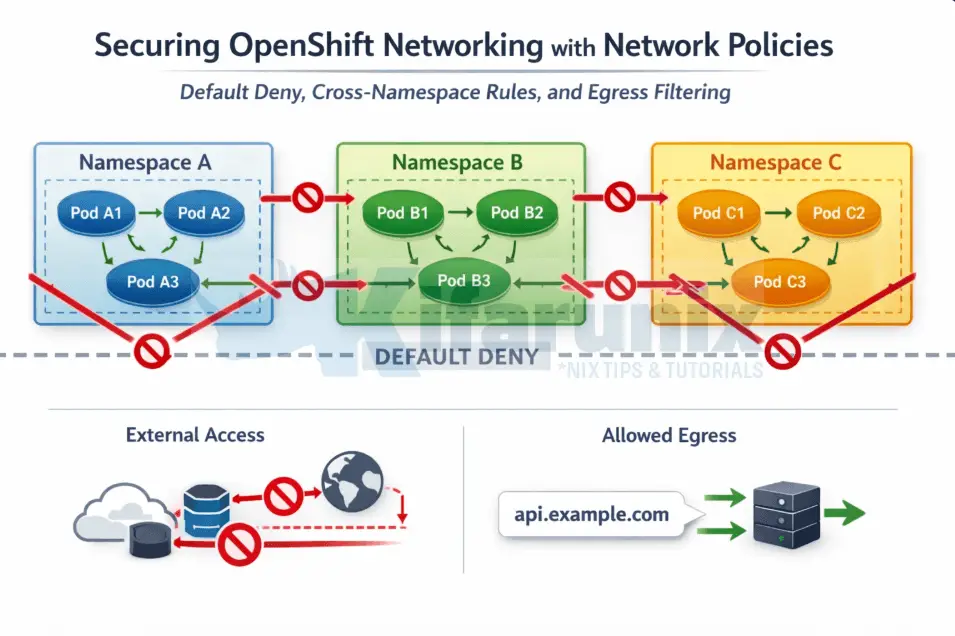
Securing OpenShift networking with network policies is one of the most critical steps in moving from a flat, permissive cluster to a production-ready, zero-trust architecture. Every OpenShift cluster ships with a flat network model by default. Any pod, in any namespace, can initiate a TCP connection to any other pod in the cluster without restriction. In a development lab this is convenient. In a production environment running regulated workloads (financial services, healthcare, government) it is a security posture you cannot defend.
NetworkPolicy is the Kubernetes-native answer to this problem. It is a namespaced API resource, enforced directly by the CNI plugin, that lets you define exactly which traffic is permitted to and from your pods. Everything not explicitly allowed is dropped. This is the foundation of zero-trust networking within a cluster, and it is where every serious OpenShift security hardening exercise starts.
This guide uses OVN-Kubernetes, the default and recommended CNI plugin for all OpenShift 4 installations. OVN-Kubernetes enforces NetworkPolicy through Open Virtual Network Access Control Lists applied at the hypervisor level, not via iptables. This distinction matters operationally: enforcement happens before traffic ever reaches a pod’s network namespace, and it scales without the per-flow rule explosion that plagued older SDN implementations.
By the end of this guide you will have a complete, production-grade network policy baseline applied to a namespace including:
- Default deny (ingress and egress)
- Namespace isolation and intra-namespace communication
- Cross-namespace access using label selectors
- OpenShift router and platform access
- DNS egress (critical and commonly broken)
- Real-time troubleshooting using OVN-Kubernetes ACL audit logging
Table of Contents
Securing OpenShift Networking with Network Policies
How NetworkPolicy Works on OVN-Kubernetes
When you define a NetworkPolicy for pods in Kubernetes, OVN-Kubernetes enforces it at the network level by controlling traffic flow based on the rules you specify. Before applying any policies, here is what you need to understand about how they behave.
Key behavioral rules:
- Pod without any NetworkPolicy: by default, a pod with no associated NetworkPolicy accepts all incoming traffic. There are no restrictions whatsoever.
- Pod with a NetworkPolicy applied: once a NetworkPolicy selects a pod, only traffic explicitly allowed by that policy is accepted. Everything else is dropped. Policies are additive, meaning if multiple policies select the same pod, traffic permitted by any one of them is allowed through. No single policy can override another to block traffic that a second policy permits.
- Namespace scope and cross-namespace traffic: NetworkPolicy is namespace-scoped. A policy created in
app-nscannot select or control traffic to pods indb-ns. To allow cross-namespace communication, you use thenamespaceSelectorfield in thefromortosections of your policy. - Traffic control layer: NetworkPolicy controls Ingress (incoming) and Egress (outgoing) traffic at Layer 3/4, meaning TCP, UDP, ICMP, and SCTP (Stream Control Transmission Protocol). It does not understand HTTP paths or request headers. For that level of control you need a service mesh like Red Hat OpenShift Service Mesh.
- Explicit policyTypes: the
policyTypesfield specifies whether the policy applies to Ingress, Egress, or both. Kubernetes can infer this from the stanzas you write, but explicitly declaring it is always safer in production.
How OVN-Kubernetes enforces policies:
- Ingress ACL (Access Control List):
- When a NetworkPolicy is created that selects a pod, OVN-Kubernetes programs an Ingress ACL on the logical switch port for that pod.
- The Ingress ACL checks whether incoming traffic matches any allowed rule in the policy. If the traffic matches a rule, it’s allowed; if it doesn’t, the traffic is dropped.
- Additive Nature of Policies:
- If multiple NetworkPolicies select the same pod, OVN-Kubernetes applies the rules of all policies together. This means that if any policy allows the traffic, it will be allowed. There’s no overriding; all allowed traffic from any matching policy will be accepted.
- Deny-All Behavior:
- If a pod has no NetworkPolicy, it will accept traffic from all sources.
- However, once a NetworkPolicy is applied to a pod, it denies all traffic by default unless explicitly permitted by the policy. This default-deny behavior is key to understanding how OVN-Kubernetes works, as it ensures that only traffic defined in the policies is allowed.
For cases where you need to deny traffic that namespace-level policies would otherwise allow, OVN-Kubernetes provides cluster-scoped extensions called AdminNetworkPolicy (ANP) and BaselineAdminNetworkPolicy (BANP)). Those are out of scope for this post.
The three network planes
An OpenShift cluster operates across three distinct network planes. Understanding what each one is and which IP ranges belong to it is foundational context for everything that follows in this guide.
- The node network is the physical network your cluster nodes sit on. This is where hypervisor interfaces and node IPs live.
- The cluster network (also called the pod network) is an overlay managed by OVN-Kubernetes. Every pod receives an IP from this range. When you see a pod IP like
10.130.0.172, that address comes from the cluster network. - The service network is a virtual IP space used exclusively for ClusterIP services. When you create a Service, Kubernetes assigns it an IP from this range. These addresses do not exist on any physical or virtual interface. OVN-Kubernetes intercepts traffic destined for a service IP and performs DNAT, rewriting the destination to one of the backing pod IPs. NetworkPolicy egress rules are evaluated against the original destination IP before DNAT happens.
Check your cluster’s network CIDRs:
oc get network cluster -o yamlapiVersion: config.openshift.io/v1
kind: Network
metadata:
creationTimestamp: "2026-01-12T16:02:48Z"
generation: 34
name: cluster
resourceVersion: "110008132"
uid: ae187df2-674e-4dd1-9101-9fdd08c43bd4
spec:
clusterNetwork:
- cidr: 10.128.0.0/14
hostPrefix: 23
externalIP:
policy: {}
networkDiagnostics:
mode: ""
sourcePlacement: {}
targetPlacement: {}
networkType: OVNKubernetes
serviceNetwork:
- 172.30.0.0/16
status:
clusterNetwork:
- cidr: 10.128.0.0/14
hostPrefix: 23
clusterNetworkMTU: 1400
conditions:
- lastTransitionTime: "2026-03-17T06:42:49Z"
message: ""
observedGeneration: 0
reason: AsExpected
status: "True"
type: NetworkDiagnosticsAvailable
networkType: OVNKubernetes
serviceNetwork:
- 172.30.0.0/16From the output you can see our:
clusterNetworkis10.128.0.0/14andserviceNetworkis172.30.0.0/16.
These values are specific to this cluster and will differ on yours depending on what was configured at install time.
The distinction of such network planes matters when writing network policies, especially Egress policies. A namespaceSelector rule builds an AddressSet of pod IPs for the selected namespace. On OVN-Kubernetes, egress NetworkPolicy ACLs are evaluated after DNAT has resolved the service ClusterIP to a backing pod IP. This means namespaceSelector targeting openshift-dns with port 5353 works correctly for DNS egress, by the time the ACL fires, the destination is already a CoreDNS pod IP, which is exactly what the namespace AddressSet contains.
Use ipBlock targeting the service CIDR only when you need to allow egress to a ClusterIP directly, without relying on DNAT resolution to a known namespace.
One OVN-Kubernetes-specific behavior to know before you start
When you apply a default-deny ingress policy to a namespace, the OpenShift Ingress Controller pods in openshift-ingress immediately lose access to your pods. Your Route objects still appear healthy, but every HTTP and HTTPS request returns 503. This catches most engineers the first time they harden a namespace. The fix involves a specific namespace label that OVN-Kubernetes recognises, and it is covered in full in Step 4.
Prerequisites
Before you begin, ensure you have the following:
- OpenShift cluster with OVN-Kubernetes as the CNI
ocCLI authenticated as a user withcluster-adminor namespaceadminrole
Verify OVN-Kubernetes is active in your OCP cluster:
oc get network cluster -o jsonpath='{.spec.networkType}{"\n"}'Expected output:
OVNKubernetesLab Setup
This guide builds directly on the OpenShift Multi-Tenancy guide published previously on this blog. In that guide, we configured a custom project request template that automatically injects ResourceQuotas, LimitRanges, and a default NetworkPolicy baseline into every new namespace at creation time.
If you followed that guide, your cluster already has that template active. Every namespace you create with oc new-project starts with these five NetworkPolicies already in place:
deny-all-ingress: blocks all incoming traffic to every pod in the namespaceallow-from-same-namespace: allows pods within the same namespace to talk to each otherallow-from-openshift-ingress: allows the OpenShift HAProxy router to reach your podsallow-from-openshift-monitoring: allows Prometheus to scrape metrics from your podsallow-from-kube-apiserver-operator: allows API server webhook health checks to reach your pods
This is important context. This guide does not start from a flat network. It starts from that ingress baseline and builds on top of it, extending it with cross-namespace rules and egress filtering, which the project template does not cover at all.
If you have not followed the previous guide and your cluster does not have the project template configured, the namespaces you create will start with no NetworkPolicies and open cross-namespace communication. The steps in this guide still apply either way, but your starting state will differ.
Create the lab namespaces and workloads
Create namespaces:
oc new-project policy-demooc new-project client-nsDeploy a web server in policy-demo
oc run webserver \
  --image=nginxinc/nginx-unprivileged:latest \
  --labels="app=webserver,tier=frontend" \
  --port=8080 -n policy-demo
Expose it as a ClusterIP service:
oc expose pod webserver --port=8080 --name=webserver-svc -n policy-demoDeploy a test client in the same namespace:
oc run client  --image=registry.access.redhat.com/ubi9/ubi-minimal:latest \
  -n policy-demo \
  -- sleep infinity
Deploy a test client in the second namespace:
oc run cross-ns-client --image=registry.access.redhat.com/ubi9/ubi:latest \
   -n client-ns \
  -- sleep infinity
Wait for pods to reach Running state:
oc get pods -n policy-demooc get pods -n client-nsVerify the baseline policies are in place
Because oc new-project triggered the project template, the five baseline policies should already exist in policy-demo:
oc get networkpolicy -n policy-demoNAME POD-SELECTOR AGE
allow-from-kube-apiserver-operator <none> 9m
allow-from-openshift-ingress <none> 9m
allow-from-openshift-monitoring <none> 9m
allow-from-same-namespace <none> 9m
deny-all-ingress <none> 9mCapture the webserver pod IP on the policy-demo namespace:
WEBSERVER_IP=$(oc get pod webserver -n policy-demo -o jsonpath='{.status.podIP}')Now confirm the baseline is behaving correctly. Intra-namespace traffic should be allowed by allow-from-same-namespace:
oc -n policy-demo exec client -- curl -s -o /dev/null -w "%{http_code}" http://webserver-svc:8080;echo- A status code of 200 shows connection successful; traffic allowed
- Otherwise connection failed, timed out means traffic blocked (NetworkPolicy, service, or firewall issue)
Cross-namespace traffic from client-ns should already be blocked by deny-all-ingress:
oc -n client-ns exec cross-ns-client -- curl -s --connect-timeout 3 http://${WEBSERVER_IP}:8080command terminated with exit code 28The baseline is confirmed. Ingress is locked down, same-namespace communication works, and the platform namespaces (router, monitoring, API server) have their access preserved. What the template does not cover is what this guide addresses next: cross-namespace application traffic and egress control.
Step 1: Understanding What the Baseline Covers and What It Does Not
The five policies we created and attached to the new project template give us a solid ingress baseline.
deny-all-ingressselects all pods with an emptypodSelector: {}and declarespolicyTypes: [Ingress]with an emptyingress: []. This means all inbound traffic is blocked for every pod in the namespace unless another policy explicitly permits it.allow-from-same-namespacecounters the blanket deny for intra-namespace traffic by allowing ingress from any pod within the same namespace. This keeps your frontend-to-backend and API-to-database communication working within a project.allow-from-openshift-ingressuses thepolicy-group.network.openshift.io/ingress: ""label to allow the HAProxy router pods through. Without this, every Route pointing at this namespace returns 503 even though the Route and Service objects appear healthy.allow-from-openshift-monitoringallows Prometheus scraping. Without it, your ServiceMonitor and PodMonitor objects silently produce no data.allow-from-kube-apiserver-operatorallows the kube-apiserver-operator’s webhook health checks. Without it, admission webhook validations fail in ways that look like application deployment errors.
What the template does not cover:
- Cross-namespace traffic between application namespaces (a shared database, a common API gateway, a logging collector)
- Any egress control whatsoever. Every pod in every namespace can still initiate outbound connections to anywhere, including the internet
Those two gaps are what the remaining steps address.
Step 2: Allowing Cross-Namespace Traffic
In our previous guide on multi-tenancy, the project template policies we built cover ingress isolation within and around a single namespace. They handle same-namespace pod communication, router access, monitoring scraping, and API server webhooks. What they deliberately do not cover is traffic between application namespaces, because that is workload-specific. The template has no way of knowing that your policy-demo namespace needs to accept requests from client-ns, or that a shared database namespace needs to accept connections from three different app namespaces. That is context only you have.
This is where you extend the baseline with policies specific to your application topology.
Allow Traffic from a Specific Namespace
The policy manifest below does three specific things.
- The outer
podSelectorwithapp: webservertargets only the webserver pods, not every pod in the namespace. This is intentional: you wantclient-nsto reach the webserver specifically, not every pod running inpolicy-demo. - The
policyTypes: [Ingress]declaration makes it explicit that this policy controls inbound traffic only. - The
namespaceSelectorinside thefromstanza uses thekubernetes.io/metadata.namelabel to identifyclient-nsby name. This label is automatically set on every namespace by Kubernetes and is the reliable way to select a namespace without relying on custom labels that someone might change or forget to set.
cat 03-allow-from-client-ns.yamlapiVersion: networking.k8s.io/v1
kind: NetworkPolicy
metadata:
name: allow-from-client-ns
namespace: policy-demo
spec:
podSelector:
matchLabels:
app: webserver
policyTypes:
- Ingress
ingress:
- from:
- namespaceSelector:
matchLabels:
kubernetes.io/metadata.name: client-nsUpdate the namespace and pod label selectors to match your environment, then save and apply:
oc apply -f 03-allow-from-client-ns.yamlNow, verify that a pod in client-ns can reach the webserver pod in policy-demo over HTTP on port 8080:
oc exec -n client-ns cross-ns-client -- curl -s -o /dev/null -w "%{http_code}" http://${WEBSERVER_IP}:8080; echoA status code of 200 confirms access to the webserver. Otherwise, access is not allowed
The AND vs OR Selector Trap
For tighter control you can require that the source pod matches both a namespace label and a pod label. However, the placement of namespaceSelector and podSelector within the same from list item has precise semantic meaning.
When namespaceSelector and podSelector appear as fields of the same list item (same - entry), they combine with AND logic: the source must satisfy both conditions simultaneously.
ingress:
  - from:
      - namespaceSelector:
          matchLabels:
            kubernetes.io/metadata.name: client-ns
        podSelector:
          matchLabels:
            role: api
When they appear as separate list items (separate - entries), they combine with OR logic: the source must satisfy either condition.
ingress:
  - from:
      - namespaceSelector:
          matchLabels:
            kubernetes.io/metadata.name: client-ns
      - podSelector:
          matchLabels:
            role: api
This is one of the most common NetworkPolicy production incidents. The YAML indentation silently changes the security semantics. Always test the actual behaviour after applying a policy, not just the intent.
Step 3: Allowing Ingress from the OpenShift Router
Our project template already includes allow-from-openshift-ingress:
...
- apiVersion: networking.k8s.io/v1
  kind: NetworkPolicy
  metadata:
    name: allow-from-openshift-ingress
    namespace: ${PROJECT_NAME}
  spec:
    podSelector: {}
    ingress:
    - from:
      - namespaceSelector:
          matchLabels:
            policy-group.network.openshift.io/ingress: ""
    policyTypes:
    - Ingress
...
And since we are using it in a project template, every new namespace gets this policy automatically. Let’s check policies applied to our policy-demo NS for example:
oc get networkpolicy -n policy-demoNAME POD-SELECTOR AGE
allow-from-client-ns app=webserver 28m
allow-from-kube-apiserver-operator <none> 15h
allow-from-openshift-ingress <none> 15h
allow-from-openshift-monitoring <none> 15h
allow-from-same-namespace <none> 15h
deny-all-ingress <none> 15hThis step explains exactly why it exists, what happens if it is missing, and how to apply it manually to namespaces that predate the template or were created outside of it.
When you expose an application via an OpenShift Route, traffic flows from the client through the Ingress Controller pods in openshift-ingress and then to your application pods. Once deny-all-ingress is active in your namespace, those Ingress Controller pods cannot reach your pods. The Route object looks healthy, the Service looks healthy, but every request returns 503.
The policy uses an empty podSelector: {} because any pod with a Route needs the router to reach it, not just specific ones. The namespaceSelector targets openshift-ingress using a label that OVN-Kubernetes automatically maintains. You never set this label manually and it never needs updating.
If you are not using a project template, create and apply this policy to each namespace manually:
cat 04-allow-from-openshift-ingress.yamlapiVersion: networking.k8s.io/v1
kind: NetworkPolicy
metadata:
name: allow-from-openshift-ingress
namespace: policy-demo
spec:
podSelector: {}
policyTypes:
- Ingress
ingress:
- from:
- namespaceSelector:
matchLabels:
policy-group.network.openshift.io/ingress: ""You can then apply the manifest to implement the policy.
oc apply -f 04-allow-from-openshift-ingress.yamlVerify the label exists on the openshift-ingress namespace:
oc get namespace openshift-ingress --show-labelsYou will see policy-group.network.openshift.io/ingress= in the output.
Step 4: Allowing Ingress from OpenShift Monitoring
Our project template already includes this policy:
...
- apiVersion: networking.k8s.io/v1
  kind: NetworkPolicy
  metadata:
    name: allow-from-openshift-monitoring
    namespace: ${PROJECT_NAME}
  spec:
    podSelector: {}
    ingress:
    - from:
      - namespaceSelector:
          matchLabels:
            network.openshift.io/policy-group: monitoring
    policyTypes:
    - Ingress
...
oc get networkpolicy -n policy-demoNAME POD-SELECTOR AGE
allow-from-client-ns app=webserver 28m
allow-from-kube-apiserver-operator <none> 15h
allow-from-openshift-ingress <none> 15h
allow-from-openshift-monitoring <none> 15h
allow-from-same-namespace <none> 15h
deny-all-ingress <none> 15hThe manifest targets all pods with an empty podSelector: {} and allows ingress from any pod in the openshift-monitoring namespace, identified by the network.openshift.io/policy-group: monitoring label.
Without this policy, Prometheus cannot scrape metrics from your pods. Your ServiceMonitor and PodMonitor objects will exist and look healthy, but no data will be collected and you will see silent gaps in your dashboards with no obvious error anywhere in the monitoring stack.
Same as the router policy, if you have a namespace that predates the template or was created outside of it, apply this manually:
cat 05-allow-from-openshift-monitoring.yamlapiVersion: networking.k8s.io/v1
kind: NetworkPolicy
metadata:
name: allow-from-openshift-monitoring
namespace: policy-demo
spec:
podSelector: {}
policyTypes:
- Ingress
ingress:
- from:
- namespaceSelector:
matchLabels:
network.openshift.io/policy-group: monitoringThen apply.
oc apply -f 05-allow-from-openshift-monitoring.yamlStep 5: Default-Deny Egress
This is the gap the project template we used does not touch at all. Every policy we attached to the template controls ingress only. Outbound traffic from every pod in every namespace is completely unrestricted. A pod can reach any IP on the internet, any other namespace in the cluster, any external service. This is the default and the template leaves it intact.
Controlling outbound traffic is as important as controlling inbound traffic, particularly for workloads handling sensitive data. A compromised pod with unrestricted egress can exfiltrate data, establish reverse shells to external command-and-control infrastructure, or pivot laterally to other namespaces.
The manifest below is deliberately minimal:
- The empty
podSelector: {}selects every pod. - Declaring only
EgressunderpolicyTypesmeans this policy controls outbound traffic exclusively and has no effect on ingress. - The absence of any
egressrules means no outbound traffic is permitted at all once this policy is active.
Update the namespace to match your environment and apply:
cat 06-default-deny-egress.yamlapiVersion: networking.k8s.io/v1
kind: NetworkPolicy
metadata:
name: default-deny-egress
namespace: policy-demo
spec:
podSelector: {}
policyTypes:
- EgressApply;
oc apply -f 06-default-deny-egress.yamlTest that egress is blocked. From a pod in policy-demo, run the command:
oc exec client -n policy-demo -- curl -s --connect-timeout 3 https://google.comcommand terminated with exit code 28Exit code 28 means curl timed out waiting for a connection. With all egress blocked, the pod cannot send any traffic out at all, including DNS queries on port 53. The result looks identical whether the failure is DNS, TCP, or anything else: the connection simply never happens.
This is the most important detail about egress policies: DNS port 53 egress must be explicitly allowed. Without it, your pods cannot resolve any hostname including internal Kubernetes service names like webserver-svc.policy-demo.svc.cluster.local. Applications will not report “DNS resolution failed.” They will report “could not connect to database” or simply time out, because the DNS query that should have happened first never left the pod.
Step 6: Allowing Egress for DNS
DNS in an OpenShift cluster resolves through CoreDNS running in the openshift-dns namespace. DNS uses UDP by default but falls back to TCP when responses exceed 512 bytes, which occurs with DNSSEC or large record sets. Missing TCP can lead to intermittent, hard-to-reproduce application failures.
Before writing any policy, we need to find out two things:
- what port do the CoreDNS pods actually listen on, and
- what IP addresses do they have.
Do not assume that the port is 53. The dns-default service exposes port 53 externally, but that is the service port, not the pod port. A NetworkPolicy egress rule is evaluated after OVN-Kubernetes has performed DNAT and resolved the traffic to the actual pod, so the port that matters is the one the pod listens on, not the one the service advertises.
Finding the real DNS port and DNS pod IPs
An EndpointSlice is a Kubernetes object that lists the actual IP addresses and ports of the pods backing a Service. So, when OVN-Kubernetes receives traffic destined for a specific Service’s ClusterIP, it looks up the EndpointSlice to find the real pod IP to forward that traffic to. Inspecting the OpenShift DNS endpointslice tells us exactly what our egress policy needs to allow.
Check the EndpointSlice for the dns-default service:
oc get endpointslice -n openshift-dns -o yamlThe relevant parts of the output is the ports section:
  ports:
  - name: dns-tcp
    port: 5353
    protocol: TCP
  - name: metrics
    port: 9154
    protocol: TCP
  - name: dns
    port: 5353
    protocol: UDP
The CoreDNS pods listen on port 5353 internally, not port 53. Port 53 is only the service port that gets remapped. Any egress policy that specifies port 53 will fail because the actual traffic arrives at the pod on port 5353.
The EndpointSlice also lists the backing pod IP addresses:
...
  endpoints:
  - addresses:
    - 10.129.0.19
    conditions:
      ready: true
      serving: true
      terminating: false
    nodeName: ms-02.ocp.comfythings.com
    targetRef:
      kind: Pod
      name: dns-default-v7tvm
      namespace: openshift-dns
      uid: b448326e-8c75-4b97-9c8b-fea456c4c7a6
  - addresses:
    - 10.129.2.18
    conditions:
      ready: true
      serving: true
      terminating: false
    nodeName: ms-03.ocp.comfythings.com
    targetRef:
      kind: Pod
      name: dns-default-ngnfn
      namespace: openshift-dns
      uid: a281c827-ef96-462f-98df-92990f844292
  - addresses:
    - 10.130.2.6
...
All pod IPs fall within our cluster network CIDR 10.128.0.0/14. This means a namespaceSelector targeting openshift-dns and an ipBlock targeting 10.128.0.0/14 are effectively equivalent in what they match. Both resolve to the same set of pod IPs. The namespaceSelector approach is cleaner because it does not require knowing the cluster CIDR and works on any cluster regardless of how the network was configured at install time.
Confirm the DNS ClusterIP in your cluster:
oc get svc -n openshift-dnsNAME TYPE CLUSTER-IP EXTERNAL-IP PORT(S) AGE
dns-default ClusterIP 172.30.0.10 <none> 53/UDP,53/TCP,9154/TCP 73dAlso confirm the nameserver address the client pod is using:
oc exec client -n policy-demo -- cat /etc/resolv.confsearch policy-demo.svc.cluster.local svc.cluster.local cluster.local ocp.comfythings.com
nameserver 172.30.0.10
options ndots:5172.30.0.10 is the dns-default ClusterIP, which sits in the service network CIDR 172.30.0.0/16. When a pod sends a DNS query to that address, OVN-Kubernetes intercepts it, performs DNAT, and forwards it to one of the CoreDNS pod IPs in openshift-dns on port 5353. That is the traffic our egress rule needs to permit.
Always verify with:
oc get network cluster -o yamlIn that case, below is a sample DNS policy manifest we use in our demo namespace:
cat 07-allow-egress-dns.yamlapiVersion: networking.k8s.io/v1
kind: NetworkPolicy
metadata:
name: allow-egress-dns
namespace: policy-demo
spec:
podSelector: {}
policyTypes:
- Egress
egress:
- to:
- namespaceSelector:
matchLabels:
kubernetes.io/metadata.name: openshift-dns
ports:
- protocol: UDP
port: 5353
- protocol: TCP
port: 5353Before applying the DNS egress policy, let’s confirm that DNS resolution is actually broken with default-deny-egress active. Recall that we have two pods running in policy-demo: client and webserver:
oc get pods -n policy-demoNAME READY STATUS RESTARTS AGE
client 1/1 Running 0 6h
webserver 1/1 Running 0 6hWe will use the client pod to test DNS resolution of the webserver-svc service;
oc get svc -n policy-demoNAME TYPE CLUSTER-IP EXTERNAL-IP PORT(S) AGE
webserver-svc ClusterIP 172.30.110.154 <none> 8080/TCP 6h… which is an internal cluster DNS lookup within the same namespace.
oc exec client -n policy-demo -- curl -s --connect-timeout 3 http://webserver-svc:8080command terminated with exit code 28Now try resolving the same service using nslookup to isolate DNS specifically:
oc exec client -n policy-demo -- getent hosts webserver-svc.policy-demo.svc.cluster.localcommand terminated with exit code 2An exit code of 2 from getent hosts means DNS resolution failed, the pod could not resolve the hostname. The DNS queries cannot leave the pod. Both hostname resolution and the connection itself fail. Now fix it.
Update the egress policy to match your environment and apply:
oc apply -f 07-allow-egress-dns.yamlVerify DNS resolution is restored:
oc exec client -n policy-demo -- getent hosts webserver-svc.policy-demo.svc.cluster.localIf DNS works as expected, you will get an output similar to:
172.30.110.154 webserver-svc.policy-demo.svc.cluster.localOtherwise, you may get exit code 2.
Note that even with DNS now working, a curl to webserver-svc:8080 will still fail with exit code 28. DNS egress is the only thing unlocked at this point. Egress to the service port is handled in the next step.
Step 7: Allowing Egress to Services
Having an ingress policy that allows traffic into a pod is only half the picture. Because we applied default-deny-egress in Step 5, the sending pod also needs an explicit egress rule that permits the outbound connection. Without it, the traffic never leaves the source pod regardless of what the destination allows.
The pattern is always the same: identify the destination, identify the port, write the egress rule. The destination selector changes depending on where the target lives.
Egress to same-namespace pods
In our lab, client pod from the client-ns project, needs to reach webserver-svc on port 8080 within policy-demo. The allow-from-same-namespace ingress policy already allows the webserver to receive that traffic. What is missing is the egress rule on the client side.
In that case, consider the policy below. We use a podSelector: {} with no labels to target all pods in the same namespace, allowing egress to any of them regardless of what they are labelled:
cat 08-allow-egress-same-namespace.yamlapiVersion: networking.k8s.io/v1
kind: NetworkPolicy
metadata:
name: allow-egress-same-namespace
namespace: policy-demo
spec:
podSelector: {}
policyTypes:
- Egress
egress:
- to:
- podSelector: {}oc apply -f 08-allow-egress-same-namespace.yamlVerify the client can now reach the webserver:
oc exec client -n policy-demo -- curl -s -o /dev/null -w "%{http_code}" http://webserver-svc:8080;echoAn HTTP 200 status code confirms the request was successful.
Egress to external services
When your application needs to reach a service outside the cluster at a known CIDR, use an ipBlock rule. The manifest below targets only pods labelled app: webserver rather than all pods, because not every pod in the namespace necessarily needs external API access. Update the podSelector, cidr, and port to match your actual workload and external endpoint, then apply:
cat 09-allow-egress-external-api.yamlapiVersion: networking.k8s.io/v1
kind: NetworkPolicy
metadata:
name: allow-egress-external-api
namespace: policy-demo
spec:
podSelector:
matchLabels:
app: webserver
policyTypes:
- Egress
egress:
- to:
- ipBlock:
cidr: 203.0.113.0/24
ports:
- protocol: TCP
port: 443oc apply -f 09-allow-egress-external-api.yamlThe except field lets you exclude a sub-CIDR from a broader range. For example, if you want to allow egress to 203.0.113.0/24 but block a specific host within it:
egress:
  - to:
      - ipBlock:
          cidr: 203.0.113.0/24
          except:
            - 203.0.113.5/32
This is fully supported on OVN-Kubernetes. It was not the case with the old OpenShift SDN plugin, which silently ignored except clauses entirely.
Step 8: Verifying the Final Policy Set
Before considering a namespace hardened, always verify the complete policy inventory and confirm each policy behaves as expected.
oc get networkpolicies -n policy-demoDescribe a policy to see its evaluated spec:
oc describe networkpolicy <policy-name> -n policy-demoRun a connectivity matrix to validate the baseline. Ensure that everything works as expected.
Step 9: Debugging with OVN-Kubernetes ACL Audit Logging
This is the capability that separates a well-operated cluster from one where engineers guess at why traffic is being dropped. OVN-Kubernetes includes built-in ACL audit logging that writes allow and deny events to a log file on each cluster node, enabled per namespace via an annotation.
Enabling ACL logging
To enable ACL logging for a namespace, annotate it with the desired severity levels. Supported severity levels are alert, warning, notice, info, and debug. Setting deny to alert ensures every blocked packet is logged immediately. Setting allow to notice is useful during initial validation. Once policies are stable, either drop the allow key or set it to debug to reduce log volume.
For example, to enable logging for the policy-demo namespace:
oc annotate namespace policy-demo k8s.ovn.org/acl-logging='{"deny": "alert", "allow": "notice"}'Validate with:
oc describe ns policy-demoReading the logs
The ACL log is written to /var/log/ovn/acl-audit-log.log on each cluster node. Since enforcement happens at the hypervisor level, the relevant log is on the node where the destination pod is running. Find that node and the corresponding OVN-Kubernetes pod:
NODE=$(oc get pod webserver -n policy-demo -o jsonpath='{.spec.nodeName}')OVN_POD=$(oc get pods -n openshift-ovn-kubernetes \
-l app=ovnkube-node \
--field-selector spec.nodeName=${NODE} \
-o jsonpath='{.items[0].metadata.name}')You can then read the logs as follows:
oc -n openshift-ovn-kubernetes exec ${OVN_POD} \
  -c ovn-controller \
  -- tail -f /var/log/ovn/acl-audit-log.log
In a second terminal, generate blocked traffic:
oc -n client-ns exec cross-ns-client -- \
  curl -s --connect-timeout 3 http://${WEBSERVER_IP}:8080
You will see entries like:
2026-03-26T10:32:14.456Z|00001|acl_log(ovn_pinctrl0)|ALERT|name="NP:policy-demo:default-deny-ingress", verdict=drop, severity=alert, direction=to-lport, protocol=tcp, src=10.129.1.45, dst=10.128.2.14, src_port=54321, dst_port=8080The log entry names the exact NetworkPolicy responsible for the drop (NP:policy-demo:default-deny-ingress), the source IP, destination IP, and destination port. When an engineer reports that their application cannot reach a downstream service, this log answers the question within seconds: a NetworkPolicy is blocking it, and this is which one.
Cluster-wide audit configuration
The default maximum log file size is 50MB with a rate limit of 20 messages per second. For high-traffic namespaces these may be insufficient. Tune them by editing the cluster Network operator:
oc edit network.operator.openshift.io clusterLook for the policyAuditConfig stanza under spec.defaultNetwork.ovnKubernetesConfig:
spec:
  defaultNetwork:
    ovnKubernetesConfig:
...
      policyAuditConfig:
        destination: "null"
        maxFileSize: 50
        maxLogFiles: 5
        rateLimit: 20
        syslogFacility: local0
Setting destination to libc routes logs through journald, making them collectible by the OpenShift Logging stack. Setting it to udp:host:port ships directly to an external syslog server, which is the preferred approach in environments with centralised SIEM infrastructure.
Disabling ACL logging
Once policies are validated and the logging overhead is no longer justified:
oc annotate namespace policy-demo k8s.ovn.org/acl-logging-Common Mistakes and Production Tips
Before moving to production, be aware of these common mistakes and practical tips that can significantly impact NetworkPolicy behavior:
- The AND vs OR selector trap. When
namespaceSelectorandpodSelectorappear as fields of the samefromlist item the logic is AND. When they appear as separate list items the logic is OR. Incorrect indentation silently changes the security semantics. Always test actual connectivity after applying a policy. - Applying DNS egress too late. Apply the DNS allow policy in the same
oc applyrun as default-deny egress, or apply it first. If you apply default-deny egress first and then realise DNS is broken, you will have pods that cannot resolve the Kubernetes API server to roll the policy back. This is a frustrating but entirely avoidable production situation. - Not labelling namespaces before using
namespaceSelector. Thekubernetes.io/metadata.namelabel is set automatically and immutably on all namespaces on Kubernetes 1.21 and later, which covers all current OpenShift versions. Any custom labels you add yourself must be verified before relying on them in a policy. Runoc get namespace <name> --show-labelsbefore writing the policy, not after it silently blocks everything. - Applying policies to the wrong namespace. NetworkPolicy is namespace-scoped. If you run
oc apply -f policy.yamlwithout anamespace:field in the manifest metadata and without-non the command, the policy lands in whatever project your currentoccontext points to. Always includenamespace:in the manifest metadata for anything going to production. - NetworkPolicy does not apply to host-networked pods as a traffic source. In OVN-Kubernetes, the default CNI for OpenShift, traffic originating from pods running with
hostNetwork: trueis not subject to NetworkPolicy rules. This is OVN-Kubernetes-specific behaviour, the Kubernetes specification does not guarantee this universally, and some other CNI plugins may handle host-networked traffic differently. This includes the OVN-Kubernetes daemonset pods and the node tuning operator. Attempting to block this traffic via NetworkPolicy has no effect in OpenShift. However, the reverse is not true: a regular pod connecting to a host-networked pod is still subject to that regular pod’s own egress NetworkPolicy rules. UseAdminNetworkPolicyfor cluster-scoped enforcement requirements.
Which pods in your cluster are actually running with hostNetwork?oc get pods -A -o json | \ jq -r '.items[] | select(.spec.hostNetwork==true) | [.metadata.namespace, .metadata.name] | @tsv' | sort - Performance at scale. OVN-Kubernetes is significantly more efficient than OpenShift SDN at scale, but fine-grained pod-label selectors still carry a cost proportional to the number of matching pods. Prefer
namespaceSelectorat the namespace level where possible and reserve pod-level selectors for cases where the granularity is genuinely required.
Conclusion
A production OpenShift cluster needs NetworkPolicy applied at the namespace level from day one. The flat default-allow model is not a calculated security decision. It is the Kubernetes default, and it is not appropriate for workloads carrying real data.
The baseline built in this guide gives you default-deny ingress and egress, intra-namespace communication, router and monitoring integration, DNS egress, and the ACL logging annotation to verify everything is working exactly as intended.
The single most important OpenShift-specific detail to internalise: always apply allow-from-openshift-ingress using the policy-group.network.openshift.io/ingress: "" label before applying default-deny to a namespace with active Routes. Missing it produces a 503 that has no obvious cause until you know what to look for. Now you do.