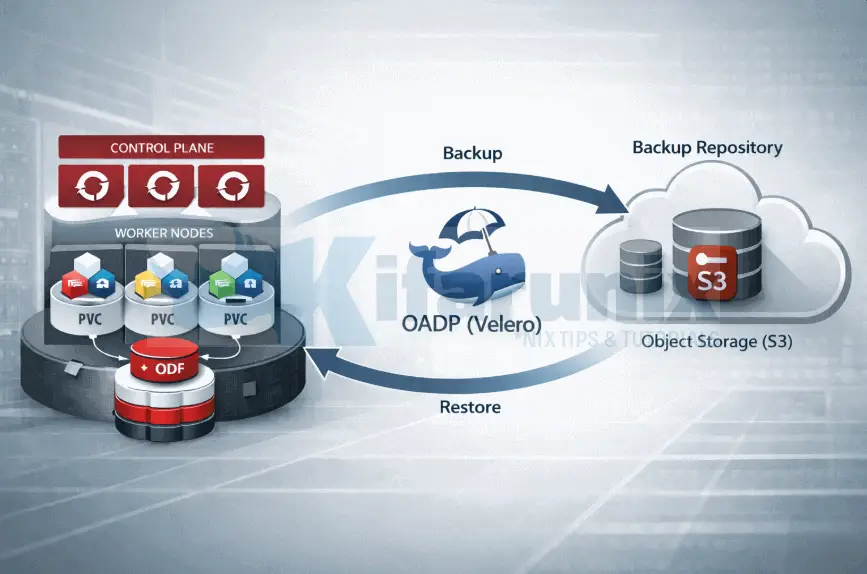
In this guide, you will learn how to restore and validate application backups in OpenShift with OADP. This is Part 3 of a three-part series on backing up and restoring applications in OpenShift 4 with OADP (Velero). If you are arriving here directly, we recommend starting with Part 1, where we installed and configured OADP, and Part 2, where we created backups and verified the data landed in object storage.
In this part, we put the backup to the test. We will delete the demo-app namespace entirely, simulating an accidental deletion or a disaster scenario, then restore it from the backup created in Part 2 and verify that the MySQL database comes back with all data intact.
Table of Contents
Restore and Validate Application Backups in OpenShift with OADP
Step 10: Verify the Scheduled Backup
Before testing a restore, confirm the scheduled backup actually ran and completed successfully. Do not assume it worked because no alerts fired.
Check that the schedule produced a backup:
oc get backup.velero.io -n openshift-adpSample output;
NAME                                   AGE
demo-app-backup-20260221-1808          13h
demo-app-daily-backup-20260221183509   12h
demo-app-daily-backup-20260222020046   4h36m
Look for a backup named demo-app-daily-backup-<timestamp> with Phase: Completed. Hence, describe the latest one to check the status:
oc describe backup.velero.io demo-app-daily-backup-20260222020046 -n openshift-adp | grep -A20 ^Status:Status:
Backup Item Operations Attempted: 1
Backup Item Operations Completed: 1
Completion Timestamp: 2026-02-22T02:01:31Z
Expiration: 2026-03-01T02:00:46Z
Format Version: 1.1.0
Hook Status:
Phase: Completed
Progress:
Items Backed Up: 26
Total Items: 26
Start Timestamp: 2026-02-22T02:00:46Z
Version: 1
Events: <none>Then confirm the DataUpload completed:
oc get datauploads.velero.io -n openshift-adpBYTES DONE must match TOTAL BYTES. If it does not, the PVC data never made it to object storage and that backup cannot be used for a restore.
NAME                                         STATUS      STARTED   BYTES DONE   TOTAL BYTES   STORAGE LOCATION   AGE     NODE
demo-app-backup-20260221-1808-cdm2t          Completed   13h       113057808    113057808     default            13h     wk-03.ocp.comfythings.com
demo-app-daily-backup-20260221183509-m4cqh   Completed   12h       113057808    113057808     default            12h     wk-03.ocp.comfythings.com
demo-app-daily-backup-20260222020046-kkhjf   Completed   4h44m     113057808    113057808     default            4h45m   wk-03.ocp.comfythings.com
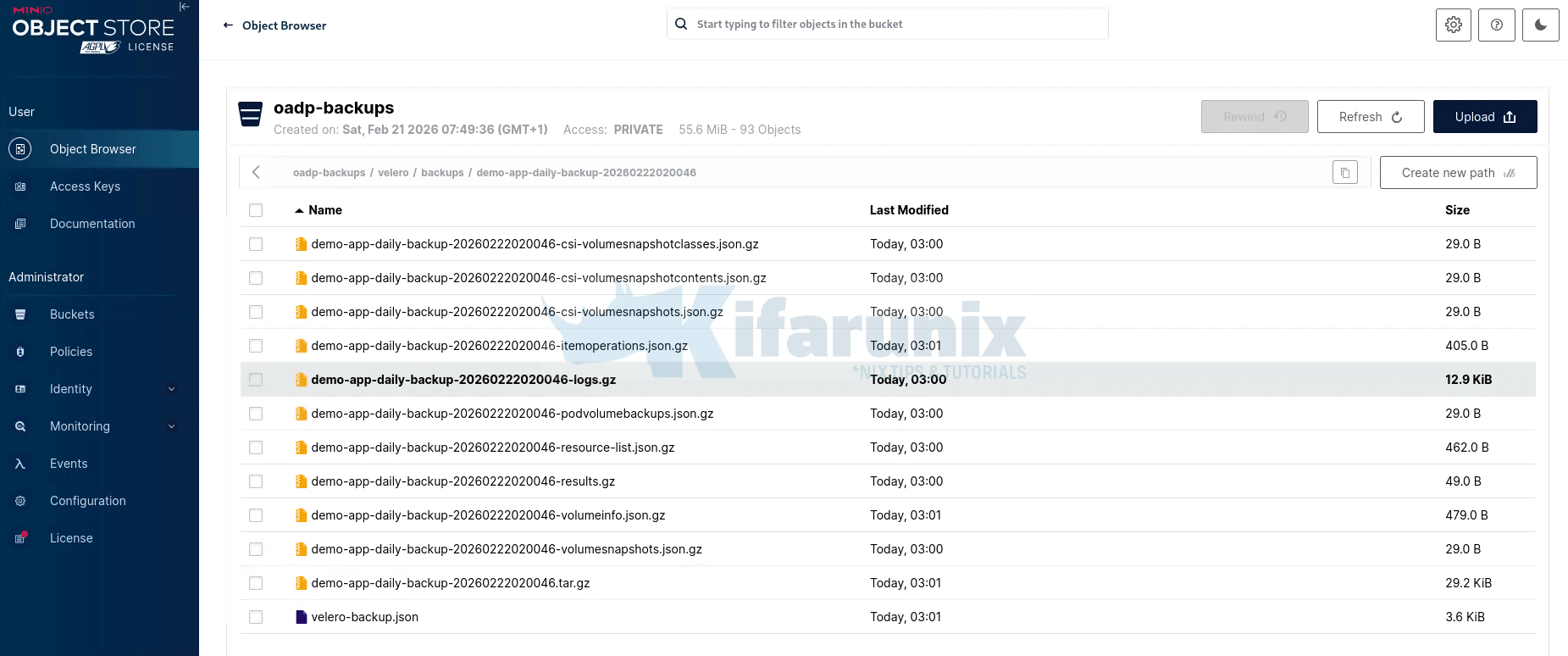
Also spot-check MinIO directly. Navigate to velero/backups/ and confirm the timestamped folder exists with the expected files.
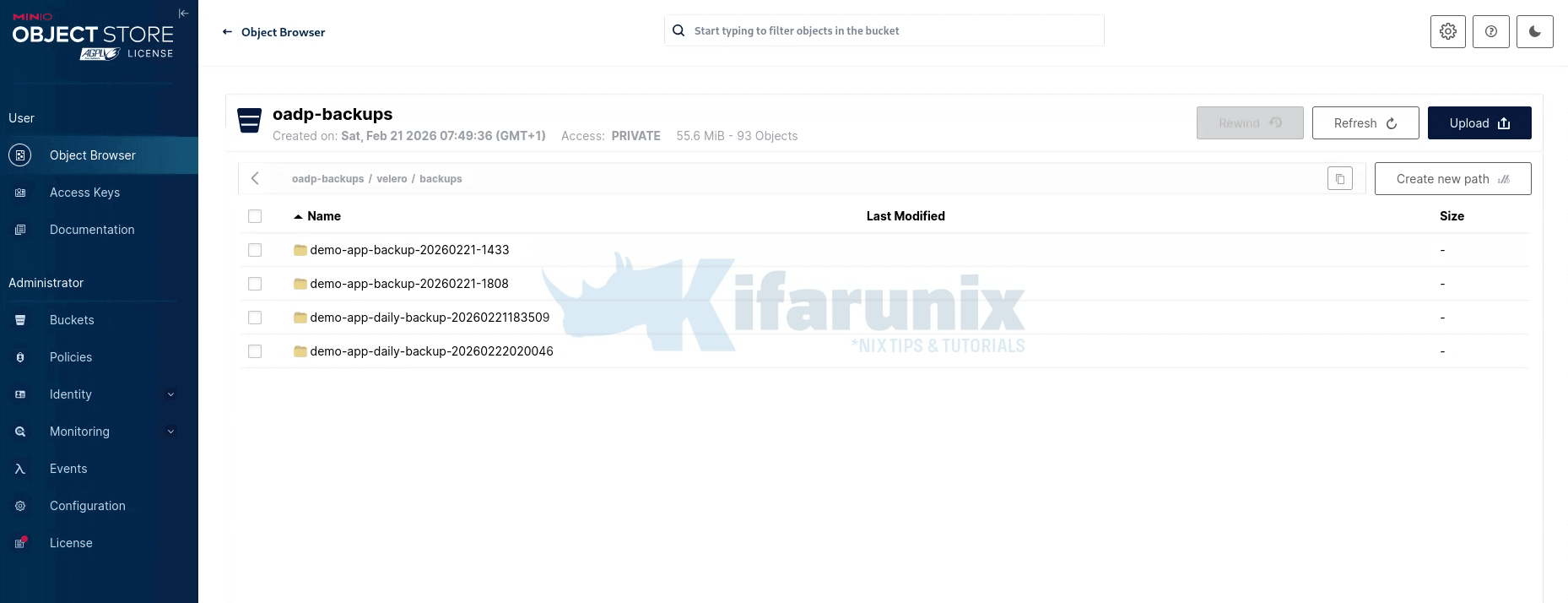
Backup data
Then check velero/kopia/demo-app/ and confirm pack files are present.
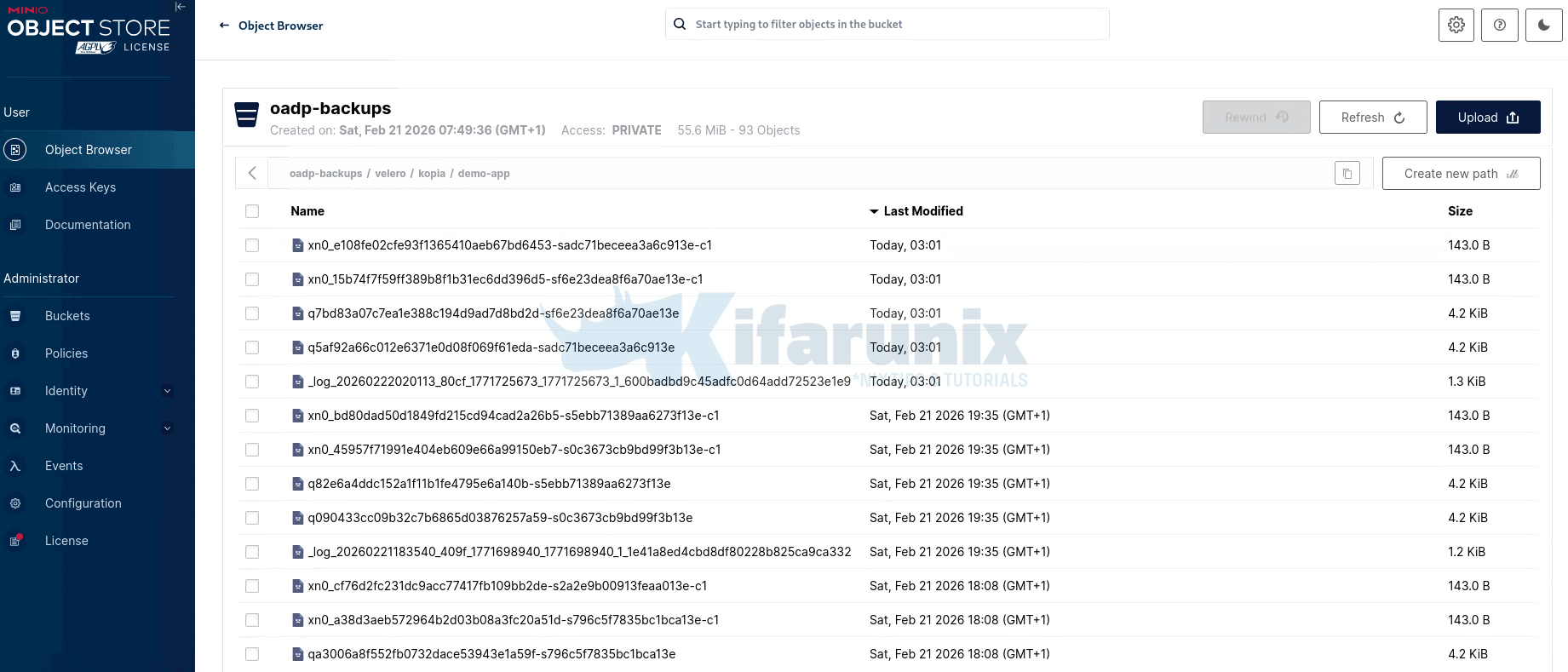
Note that after the first full backup, Kopia uploads only newly changed data chunks. If your PVC data hasn’t changed since the last backup, Kopia has no new chunks to upload, so you won’t see new pack (p*) files created in the repository. Instead, Kopia simply creates a new snapshot that references the existing stored chunks.
In short, Kopia uses content-defined chunking with block-level deduplication, meaning unchanged data is never re-uploaded, saving both time and storage.
Therefore, only once you have confirmed the backup is genuinely there should you proceed to testing the restore.
We will run two scenarios to simulate data restore here:
- First, a full namespace deletion and restore to the original namespace, which simulates accidental deletion or complete application loss.
- Second, a cross-namespace restore to a separate namespace, which is how you validate a backup without touching the running application at all.
Step 11: Simulate a Disaster and Restore to Original Namespace
A backup strategy that has never been tested is not a backup strategy. It is a document that might make you feel better right up until the moment you need it. This step is not optional. Running a restore in a controlled environment, before you ever need it in anger, is what separates a genuine recovery capability from a false sense of security.
Simulate a Disaster: Delete the namespace
To simulate a disaster, we will delete the entire demo-app namespace. This simulates complete loss of the application. Everything goes: the Deployment, the Service, the PVC definition, and the PersistentVolume that held our MySQL data.
oc delete namespace demo-appConfirm it is gone:
oc get namespace demo-appError from server (NotFound): namespaces "demo-app" not foundCreate the Restore CR targeting the Deleted Namespace
A Restore CR tells Velero which backup to recover from and what to include. It is the mirror of the Backup CR. You specify the backup by name, the namespaces to restore, and whether to recover persistent volumes. OADP will recreate the namespace, all its Kubernetes resources, and trigger Data Mover to pull the volume data back from MinIO your respective object storage.
Before initiating a restore, identify which backup you want to recover from. This decision is driven by your Recovery Point Objective (RPO), how far back in time you are willing to go.
From our verification step above, we will want to restore to our most recent backup before the disaster, demo-app-daily-backup-20260222020046.
Similarly, choose the backup that represents the recovery point you need and set it:
BACKUP_NAME="demo-app-daily-backup-20260222020046"Then proceed to creating the Restore CR using $BACKUP_NAME
cat <<EOF | oc apply -f -
apiVersion: velero.io/v1
kind: Restore
metadata:
  name: ${BACKUP_NAME}-r1
  namespace: openshift-adp
spec:
  backupName: $BACKUP_NAME
  includedNamespaces:
    - demo-app
  restorePVs: true
EOF
This CR will:
- Create a Velero
Restoreresource in theopenshift-adpnamespace - Uses the backup named
$BACKUP_NAMEas the restore source - Restores only the
demo-appnamespace - Restores associated Persistent Volumes (
restorePVs: true)
Confirm the restore was created:
oc get restore.velero.io $BACKUP_NAME-r1 -n openshift-adpNAME AGE
demo-app-daily-backup-20260222020046-r1 11sThen check the restoration status:
watch "oc -n openshift-adp get restore $BACKUP_NAME-r1 -o json | jq .status"Sample output for a successful restore:
{
  "completionTimestamp": "2026-02-22T10:18:35Z",
  "hookStatus": {},
  "phase": "Completed",
  "progress": {
    "itemsRestored": 24,
    "totalItems": 24
  },
  "restoreItemOperationsAttempted": 1,
  "restoreItemOperationsCompleted": 1,
  "startTimestamp": "2026-02-22T10:17:33Z",
  "warnings": 5
}
Describe for full details, events and any warnings:
oc describe restore.velero.io $BACKUP_NAME-r1 -n openshift-adpRestore completed.
If the restore fails, and upon describing the restore object you see an error like:
Failure Reason: found a restore with status "InProgress" during the server starting, mark it as "Failed"Then you are most likely running out of resources. The Velero pod is hitting its memory limit and getting OOMKilled mid-restore, causing it to restart. When it comes back up it finds the restore stuck in InProgress and immediately marks it Failed.
Check the limits on your Velero pod:
oc describe pod -n openshift-adp -l app.kubernetes.io/name=velero | grep -A 6 "Limits:"If memory is at 256Mi or lower, that might be your problem. Update the resource allocations in your DPA accordingly and rerun the restore.
Also check the logs:
oc logs -n openshift-adp -l app.kubernetes.io/name=velero --previous 2>/dev/null | tail -50Now, the restore is successful.
Verify that everything came back, not just the namespace, but the actual application data.
Namespace exists again:
oc get namespace demo-appNAME STATUS AGE
demo-app Active 7m6sAll resources are back:
oc get all -n demo-appNAME READY STATUS RESTARTS AGE
pod/mysql-6d9765ddd8-7dk4r 1/1 Running 0 8m59s
NAME READY UP-TO-DATE AVAILABLE AGE
deployment.apps/mysql 1/1 1 1 8m58s
NAME DESIRED CURRENT READY AGE
replicaset.apps/mysql-6d9765ddd8 1 1 1 8m59sConfirm PVC is bound:
oc get pvc -n demo-appNAME STATUS VOLUME CAPACITY ACCESS MODES STORAGECLASS VOLUMEATTRIBUTESCLASS AGE
mysql-data Bound pvc-450e733e-d296-4037-b3ca-c10706d1024b 5Gi RWO ocs-storagecluster-ceph-rbd <unset> 11mOnce the MySQL pod is Running, run the critical verification: data integrity.
MYSQL_POD=$(oc get pod -n demo-app -l app=mysql -o jsonpath='{.items[0].metadata.name}')oc exec -n demo-app $MYSQL_POD -- bash -c \
"mysql -u demouser -pdemopassword demodb -e 'SELECT * FROM customers;'"mysql: [Warning] Using a password on the command line interface can be insecure.
id name email
1 Alice Nyundo [email protected]
2 Brian Waters [email protected]
3 Carol Ben [email protected]All three rows are back, exactly as they were before the namespace was deleted. The PV data survived the complete destruction and reconstruction of the application namespace.
You may notice that the restore above completed with warnings. This is acceptable. A Completed restore that shows a non-zero warning count is normal in real clusters. Common benign warnings include skipped ClusterRoleBindings, which are outside OADP’s namespace scope by default, and resources that already exist in the target.
PartiallyFailed is the status to investigate. You can use the command below to to see which resources failed and why:
oc describe restore.velero.io $BACKUP_NAME -n openshift-adp Step 12: Cross-Namespace Restore for DR Drills
The previous restore validated disaster recovery by deleting the source namespace first. But in a production environment, you often want to validate a backup without touching the running application at all. OADP gives you two powerful options here:
- Same cluster, different namespace: restore the backup into a new namespace on the same cluster, leaving the running application completely untouched
- Different cluster entirely: point a second cluster’s OADP instance at the same MinIO backup storage location, and restore from there. This is your true cross-cluster disaster recovery and migration path, something etcd backup cannot do at all.
The namespaceMapping field in the Restore CR handles the namespace remapping in both cases. It maps the source namespace from the backup to a different target namespace on whichever cluster you are restoring to.
In this demo, we will demonstrate restoring to the same cluster but a different namespace. Before applying the manifest, get your available backups and identify the one you want to restore from:
oc get backup.velero.io -n openshift-adpNote the name of your target backup, replace the backupName value in the manifest below accordingly
BACKUP_NAME="demo-app-daily-backup-20260222020046"then apply:
cat <<EOF | oc apply -f -
apiVersion: velero.io/v1
kind: Restore
metadata:
  name: demo-app-dr-drill
  namespace: openshift-adp
spec:
  backupName: $BACKUP_NAME
  includedNamespaces:
    - demo-app
  namespaceMapping:
    demo-app: demo-app-dr-test
  restorePVs: true
EOF
This creates a full, independent replica of demo-app: all Kubernetes resources and all PV data, in a new namespace demo-app-dr-test. Your production demo-app is completely unaffected. You can query the restored database, check application endpoints, and confirm everything is consistent, all without touching production.
You can watch the restore:
watch "oc -n openshift-adp get restore demo-app-dr-drill -o json | jq .status"Sample output;
{
  "completionTimestamp": "2026-02-22T10:50:15Z",
  "hookStatus": {},
  "phase": "Completed",
  "progress": {
    "itemsRestored": 24,
    "totalItems": 24
  },
  "restoreItemOperationsAttempted": 1,
  "restoreItemOperationsCompleted": 1,
  "startTimestamp": "2026-02-22T10:49:26Z",
  "warnings": 4
}
Note: Routes after namespace restore. OADP restores Routes using the base domain of the restore cluster. Routes without an explicit spec.host, that is auto-generated routes, receive a new hostname based on the destination cluster’s wildcard domain. This is expected and correct. You would not want a restored DR copy answering on the same hostname as production.
Verify the DR copy and confirm the data:
oc get all -n demo-app-dr-testNAME READY STATUS RESTARTS AGE
pod/mysql-6d9765ddd8-7dk4r 1/1 Running 0 4m11s
NAME READY UP-TO-DATE AVAILABLE AGE
deployment.apps/mysql 1/1 1 1 4m10s
NAME DESIRED CURRENT READY AGE
replicaset.apps/mysql-6d9765ddd8 1 1 1 4m11sCheck the DB:
MYSQL_POD_DR=$(oc get pod -n demo-app-dr-test -l app=mysql -o jsonpath='{.items[0].metadata.name}')oc exec -n demo-app-dr-test $MYSQL_POD_DR -- bash -c \
"mysql -u demouser -pdemopassword demodb -e 'SELECT * FROM customers;'"mysql: [Warning] Using a password on the command line interface can be insecure.
id name email
1 Alice Nyundo [email protected]
2 Brian Waters [email protected]
3 Carol Ben [email protected]Clean up after the drill:
oc delete namespace demo-app-dr-testMake this drill part of your operational calendar. Run it monthly, after any major cluster change, and before any large maintenance window. A restore you have never practiced is a restore you cannot rely on.
Step 13: Monitor Backup Health with Prometheus Alerts
A backup strategy without monitoring is incomplete. You will not know a backup failed until the moment you need to restore and by then, your protection window may have been silently broken for days. Alerting on backup health is what closes that gap.
Velero exposes Prometheus metrics automatically via a service called openshift-adp-velero-metrics-svc on port 8085, which gets created when the DPA is configured. However, metrics are not scraped automatically. Making these metrics visible to OpenShift’s monitoring stack requires two things:
- user workload monitoring must be enabled, and
- a
ServiceMonitormust be created manually to point at the Velero metrics service.
Enable User Workload Monitoring
Velero exposes Prometheus metrics automatically. OpenShift’s built-in monitoring stack can collect them, but this requires user workload monitoring to be enabled on your cluster first, since openshift-adp is not an openshift-* core namespace. If you have not done this yet, follow our guide before proceeding:
Enable User Workload Monitoring in OpenShift 4.20
Verify the user workload monitoring pods are running:
oc get pods -n openshift-user-workload-monitoringYou should see prometheus-user-workload and thanos-ruler-user-workload pods in Running state.
Once user workload monitoring is enabled, you also need to label the openshift-adp namespace so the monitoring stack knows to scrape it:
oc label namespace openshift-adp openshift.io/cluster-monitoring="true"Verify the label is applied:
oc get namespace openshift-adp --show-labelsFor a deeper understanding of how OpenShift alerting works end to end, including Alertmanager configuration and routing rules, refer to our guides:
Confirm the Velero metrics service exists
Run the command below to check if Velero metrics service exists:
oc get svc -n openshift-adp -l app.kubernetes.io/name=veleroNAME TYPE CLUSTER-IP EXTERNAL-IP PORT(S) AGE
openshift-adp-velero-metrics-svc ClusterIP 172.30.5.161 <none> 8085/TCP 22hCreate the ServiceMonitor
A ServiceMonitor is a Custom Resource that tells the Prometheus Operator which services to scrape for metrics, how often to scrape them, and on which port and path. Without it, Prometheus has no way of knowing that the openshift-adp-velero-metrics-svc service exists or that it exposes metrics worth collecting. It must be created in the openshift-adp namespace and must select the openshift-adp-velero-metrics-svc service using the app.kubernetes.io/name=velero label:
Update the manifest below accordingly and deploy it on your cluster:
cat <<EOF | oc apply -f -
apiVersion: monitoring.coreos.com/v1
kind: ServiceMonitor
metadata:
  labels:
    app: oadp-service-monitor
  name: oadp-service-monitor
  namespace: openshift-adp
spec:
  endpoints:
    - interval: 30s
      path: /metrics
      targetPort: 8085
      scheme: http
  selector:
    matchLabels:
      app.kubernetes.io/name: "velero"
EOF
Verify the ServiceMonitor was created:
oc get servicemonitor -n openshift-adpConfirm metrics are being scraped
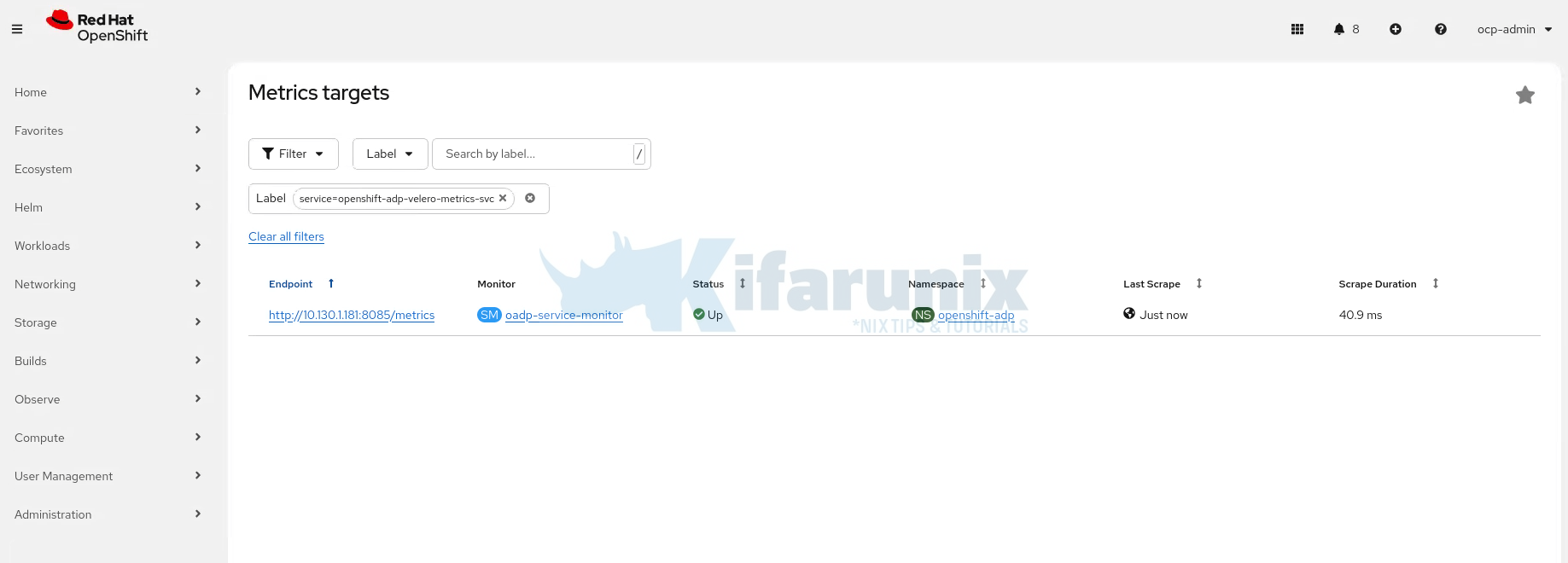
In the OpenShift web console, navigate to Observe > Targets. Use the Label filter and select: service=openshift-adp-velero-metrics-svc
You should see the oadp-service-monitor target listed in the openshift-adp namespace. Within a few minutes, the Status column should show Up, confirming that Prometheus is successfully scraping the Velero metrics endpoint.
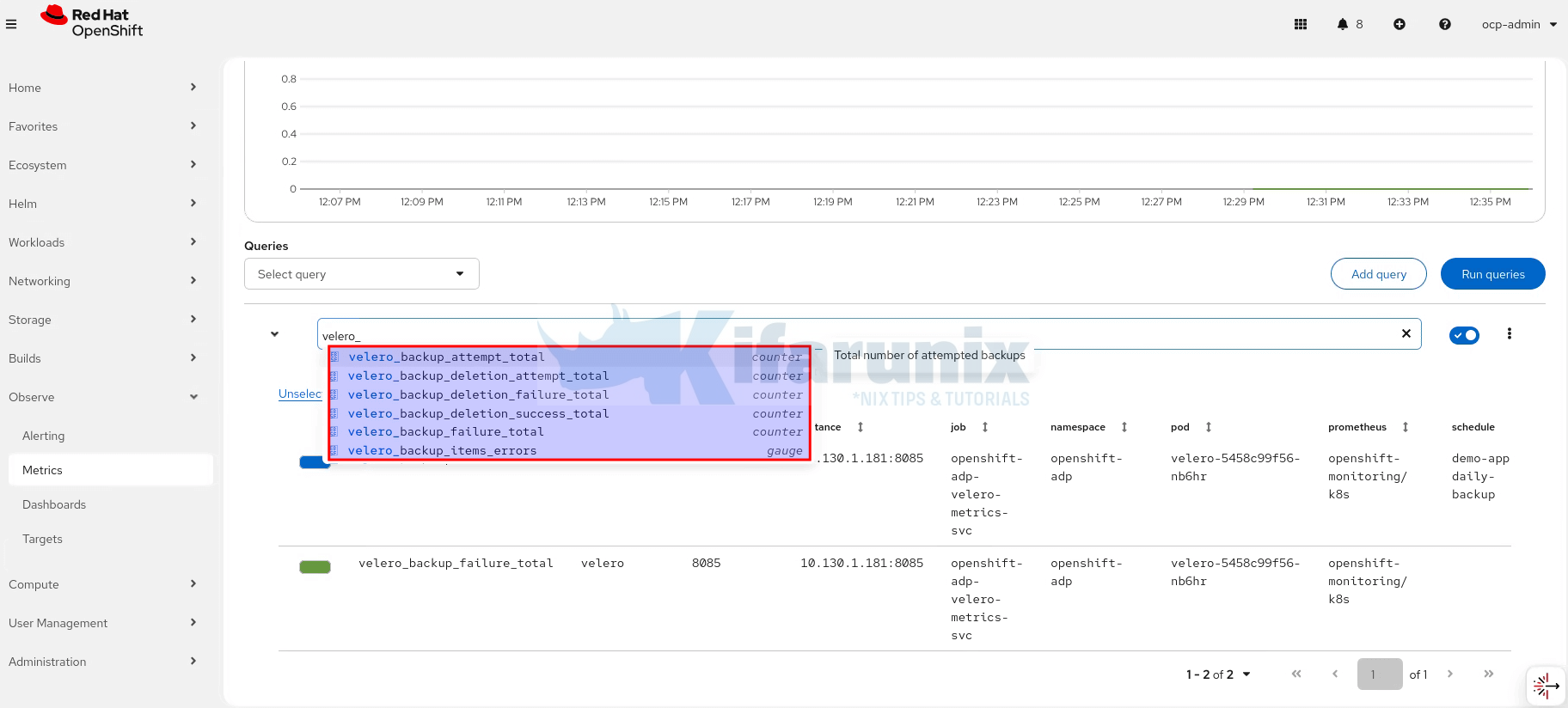
Confirm metrics are available by checking them on Observe > Metrics. You can simply type velero_ and you will see all possible expressions you can use.
Create the PrometheusRule for Alerting
With that in place, we create a PrometheusRule that alerts on a number of Velero backup conditions.
Here is our sample PrometheusRule for these alerts:
cat oadp-backup-alerts.yamlapiVersion: monitoring.coreos.com/v1
kind: PrometheusRule
metadata:
name: oadp-backup-alerts-demo
namespace: openshift-adp
labels:
openshift.io/prometheus-rule-evaluation-scope: leaf-prometheus
spec:
groups:
- name: oadp.backup.rules
rules:
# Backup Failures
- alert: OADPBackupFailed
expr: |
sum by (schedule) (
increase(velero_backup_failure_total{job="openshift-adp-velero-metrics-svc"}[2h])
) > 0
for: 5m
labels:
severity: critical
component: oadp
annotations:
summary: "OADP backup failed"
description: "A backup failure was detected in the last 2 hours for schedule {{ $labels.schedule }}. Check Velero logs: oc logs deployment/velero -n openshift-adp"
# Partial Backup Failures
- alert: OADPBackupPartiallyFailed
expr: |
sum by (schedule) (
increase(velero_backup_partial_failure_total{job="openshift-adp-velero-metrics-svc"}[2h])
) > 0
for: 5m
labels:
severity: warning
component: oadp
annotations:
summary: "OADP backup partially failed"
description: "Partial backup failure for schedule {{ $labels.schedule }}. Inspect with: oc describe backup.velero.io -n openshift-adp"
# Backup Validation Failures
- alert: OADPBackupValidationFailed
expr: |
sum by (schedule) (
increase(velero_backup_validation_failure_total{job="openshift-adp-velero-metrics-svc"}[2h])
) > 0
for: 5m
labels:
severity: warning
component: oadp
annotations:
summary: "OADP backup validation failed"
description: "Backup validation failed for schedule {{ $labels.schedule }}. Check BackupStorageLocation availability: oc get backupstoragelocation -n openshift-adp"
# Backup Overdue
- alert: OADPBackupOverdue
expr: |
(time() - max by (schedule) (
velero_backup_last_successful_timestamp{job="openshift-adp-velero-metrics-svc"}
)) > 93600
for: 5m
labels:
severity: critical
component: oadp
annotations:
summary: "OADP scheduled backup overdue"
description: "No successful backup in over 26 hours for schedule {{ $labels.schedule }}. Verify schedule and BackupStorageLocation availability."
# No Backup Ever
- alert: OADPNoBackupEver
expr: |
absent(velero_backup_last_successful_timestamp{job="openshift-adp-velero-metrics-svc"})
for: 10m
labels:
severity: critical
component: oadp
annotations:
summary: "No successful OADP backup recorded"
description: "Velero has never successfully completed a backup. Ensure OADP is configured and a backup has been run."
# Backup Storage Location Unavailable
- alert: OADPBackupStorageLocationUnavailable
expr: |
velero_backup_storage_location_available{job="openshift-adp-velero-metrics-svc"} == 0
for: 5m
labels:
severity: critical
component: oadp
annotations:
summary: "BackupStorageLocation unavailable"
description: "BackupStorageLocation {{ $labels.backup_storage_location }} is unavailable. Velero cannot write backups. Check MinIO/cloud credentials in openshift-adp."
# Backup Taking Too Long
- alert: OADPBackupTakingTooLong
expr: |
(
sum by (schedule) (
rate(velero_backup_duration_seconds_sum{job="openshift-adp-velero-metrics-svc"}[1h])
)
/
sum by (schedule) (
rate(velero_backup_duration_seconds_count{job="openshift-adp-velero-metrics-svc"}[1h])
)
) > 3600
for: 5m
labels:
severity: warning
component: oadp
annotations:
summary: "OADP backup taking too long"
description: "Rolling 1-hour average backup duration > 1 hour for schedule {{ $labels.schedule }}. Check PVC size, node-agent resources, or storage throughput."
# Volume Snapshot Failures
- alert: OADPVolumeSnapshotFailed
expr: |
sum by (schedule) (
increase(velero_volume_snapshot_failure_total{job="openshift-adp-velero-metrics-svc"}[2h])
) > 0
for: 5m
labels:
severity: critical
component: oadp
annotations:
summary: "OADP volume snapshot failed"
description: "A volume snapshot failure was detected for schedule {{ $labels.schedule }}. Verify VolumeSnapshotClass configuration and ODF health."
# Node Agent Pods Not Ready
- alert: OADPNodeAgentDown
expr: |
kube_daemonset_status_number_ready{daemonset="node-agent", namespace="openshift-adp"}
<
kube_daemonset_status_desired_number_scheduled{daemonset="node-agent", namespace="openshift-adp"}
for: 5m
labels:
severity: critical
component: oadp
annotations:
summary: "OADP Node Agent pods not ready"
description: "One or more node-agent pods in openshift-adp are not ready. PV data on those nodes will be skipped. Check pods: oc get pods -n openshift-adp -l component=velero"Where:
- OADPBackupFailed: Fires when a full backup fails in the last 2 hours (
velero_backup_failure_total); severity: critical. - OADPBackupPartiallyFailed: Fires when a backup partially fails (some resources/volumes not captured) (
velero_backup_partial_failure_total); severity: warning. - OADPBackupValidationFailed: Fires when backup validation fails before the backup runs (
velero_backup_validation_failure_total); severity: warning. - OADPBackupOverdue: Fires when no successful backup has occurred for over 26 hours for a schedule (
velero_backup_last_successful_timestamp); severity: critical. - OADPNoBackupEver: Fires when no backup has ever completed successfully (metric absent) (
velero_backup_last_successful_timestamp); severity: critical. - OADPBackupStorageLocationUnavailable: Fires when BackupStorageLocation is unreachable or unavailable (
velero_backup_storage_location_available); severity: critical. - OADPBackupTakingTooLong: Fires when rolling 1-hour average backup duration exceeds 1 hour (
velero_backup_duration_seconds_sum / velero_backup_duration_seconds_count); severity: warning. - OADPVolumeSnapshotFailed: Fires when a non-CSI volume snapshot fails (
velero_volume_snapshot_failure_total); severity: critical. - OADPNodeAgentDown: Fires when one or more Node Agent pods are not ready (
kube_daemonset_status_number_ready < kube_daemonset_status_desired_number_scheduled); severity: critical.
Let’s apply the rule;
oc apply -f oadp-backup-alerts.yamlVerify the rule is created:
oc get prometheusrule -n openshift-adpNAME AGE
oadp-backup-alerts 18sThe most accurate and professional subtitle would be:
Validating Prometheus Alerts for OADP
Creating a PrometheusRule is not enough. You need to confirm the alerts actually fire when things go wrong. This section walks through a controlled simulation that deliberately breaks two things:
- the backup storage endpoint and
- the backup schedule.
The goal is to trigger real alert conditions and confirm they surface correctly in OpenShift’s Alerting UI before you ever need them in a real incident.
Step 1: Break the BackupStorageLocation
Point the DPA to a non-existent object storage endpoint:
Get DPA:
oc get dpa -n openshift-adpNAME RECONCILED AGE
oadp-minio True 23hEdit and set an invalid endpoint:
oc edit dpa oadp-minio -n openshift-adpChange the value of s3Url:
Save and exit the file.
Confirm the BSL flips to Unavailable within 30 seconds:
oc get backupstoragelocation.velero.io -n openshift-adpExpected:
NAME      PHASE         LAST VALIDATED   AGE   DEFAULT
default   Unavailable   32s              23h   true
Step 2: Trigger a manual backup against the broken BSL:
Create a manual backup to test the alerting:
cat <<EOF | oc apply -f -
apiVersion: velero.io/v1
kind: Backup
metadata:
  name: demo-app-backup-alert-test
  namespace: openshift-adp
spec:
  includedNamespaces:
    - demo-app
  defaultVolumesToFsBackup: true
  storageLocation: default
  ttl: 1h0m0s
EOF
Watch the backup attempt fire and fail against the broken endpoint:
watch "oc get backup.velero.io demo-app-backup-alert-test \
  -n openshift-adp -o json | jq '.status'"
{
"expiration": "2026-02-22T15:41:24Z",
"formatVersion": "1.1.0",
"phase": "FailedValidation",
"validationErrors": [
"backup can't be created because BackupStorageLocation default is in Unavailable status. please create a new backup after the BSL becomes available"
],
"version": 1
}Check backups:
oc get backup.velero.io -n openshift-adpStep 3: Confirm alerts are firing
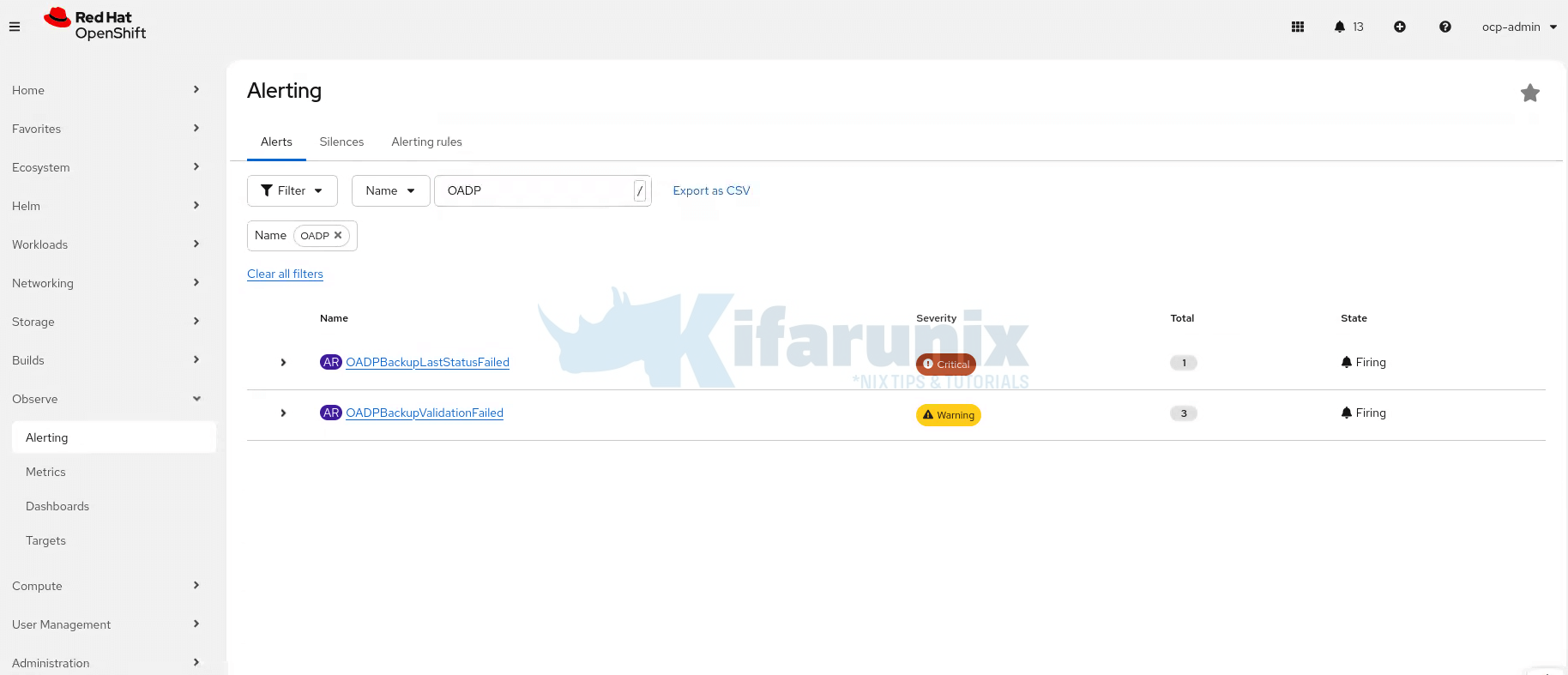
In the OpenShift web console navigate to Observe > Alerting and filter by OADP. Within 5 minutes you should see alerts:
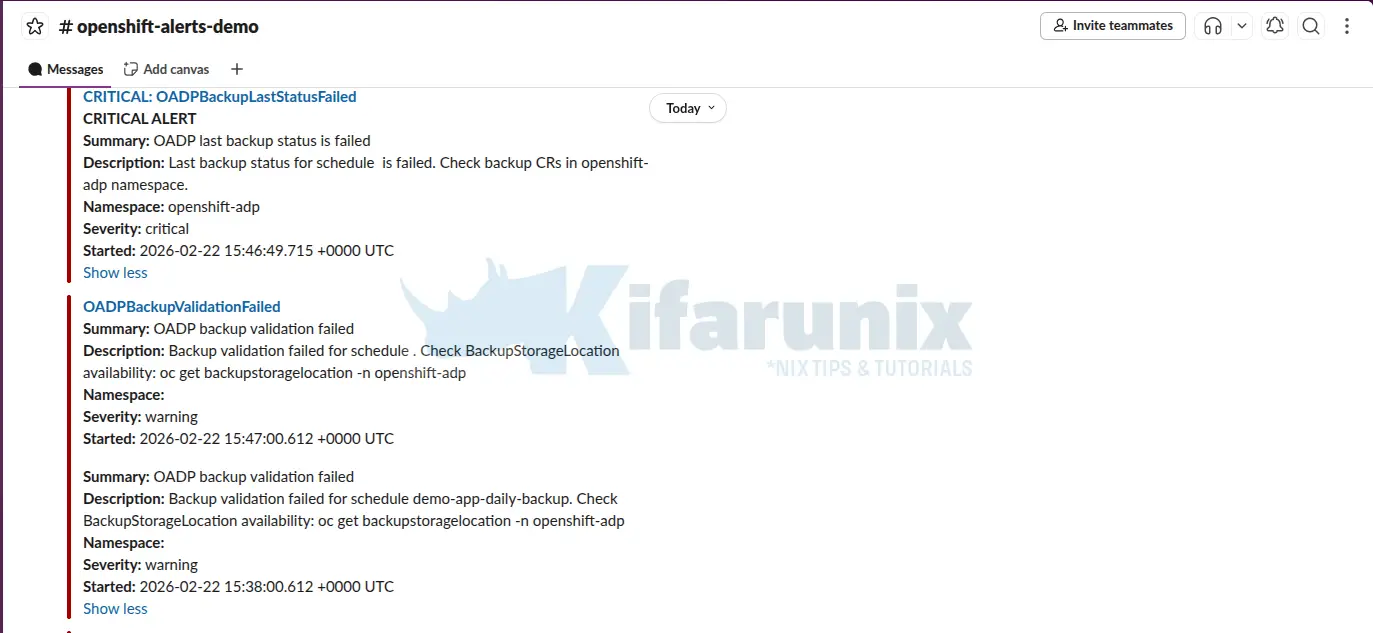
And here are the Slack channels alerts:
bash
oc get prometheusrule oadp-backup-alerts -n openshift-adp -o yaml | grep -A 3 "alert:"Step 4: Restore everything after the test
After the demo, restore the correct object storage endpoint:
oc edit dpa oadp-minio -n openshift-adpConfirm BSL is Available again
oc get bsl -n openshift-adpNAME PHASE LAST VALIDATED AGE DEFAULT
default Available 12s 27h trueOnce the BSL is back to Available and the schedule is restored, OADPBackupValidationFailed alerts will automatically resolve. No manual intervention on the alerts is needed.
Conclusion
This guide completed the full OADP backup and restore cycle on OpenShift with ODF and MinIO. Here is what you now have in place:
- A verified backup pipeline: CSI snapshots, Data Mover, Kopia deduplication, and MinIO as the final backup target
- A tested restore process: full namespace deletion and recovery with data integrity confirmed at the database level
- A DR drill workflow: cross-namespace restore that validates backups without touching production
- Prometheus alerting: real failure conditions surfaced in OpenShift’s Alerting UI before they become incidents
A backup that has never been restored is not a backup. The MySQL rows coming back intact after a full namespace deletion is the only proof that matters.
Make the DR drill a scheduled activity. Run it monthly, after OADP upgrades, and before major cluster changes. The difference between a practiced restore and an untested one shows up at the worst possible moment.