Skip to content
kifarunix.com
  • Home
  • Blog
    • HowTos
    • Containers
    • Security
    • Networking
    • Storage
    • Virtualization
    • Monitoring
  • About Us
  • Contact Us

physical volume

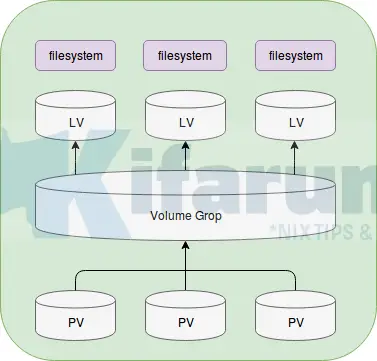
lvm arch

Create LVM Logical Volumes in Linux

In this tutorial, we are going to learn about how to create LVM logical volumes in Linux. LVM is a standard feature in most modern

Latest Posts

How to Enable User Workload Monitoring in OpenShift 4.20: Let Developers Monitor Their Apps

How to Configure Production-Ready Monitoring in OpenShift: Prometheus, Alertmanager & Persistent Storage

Configure OpenShift 4 Image Registry Persistent Storage with ODF: 2026 Step-by-Step Guide

How to Install and Configure OpenShift Data Foundation (ODF) on OpenShift 4.20: Step-by-Step Guide [2026]

How to Deploy an OpenShift Cluster Using Agent-Based Installer (Bootable ISO, KVM & Bare Metal)

Integrate Request Tracker (RT) with Active Directory for Authentication

Containers

Install and Setup Kubernetes Cluster on Ubuntu 24.04

Kubernetes Architecture: A High-level Overview of Kubernetes Cluster Components

How to Use Secrets in Kubernetes Applications

How to Check Docker Container RAM and CPU Usage

Install Fedora CoreOS on KVM Using an ISO File: A Step-by-Step Guide

Kubernetes Kustomize 101: Introduction and Basics

Security

Install Passbolt Password Manager on Rocky Linux 8

Install and setup GVM 20.08 on Debian 10

Install and Setup Lynis Security Auditing tool on Ubuntu 20.04

How to Install IBM QRadar CE v7.3.1 on VirtualBox

6 Tools That Can Help Protect Your Sensitive Business Information

Setup Secure SSH Access on Linux Servers using Teleport

Monitoring

How to Monitor OpenVPN Connections using openvpn-monitor tool

Logstash: Write Specific Events to Specific Index

How to Monitor Remote Linux Hosts and Services with Icinga 2 on Ubuntu 18.04

Backup and Restore Elasticsearch Index Data

How to Setup Multinode Elasticsearch 9 Cluster

Install Zabbix Agent on Windows Systems

© 2026 kifarunix.com

Home Advertise with us Privacy Policy