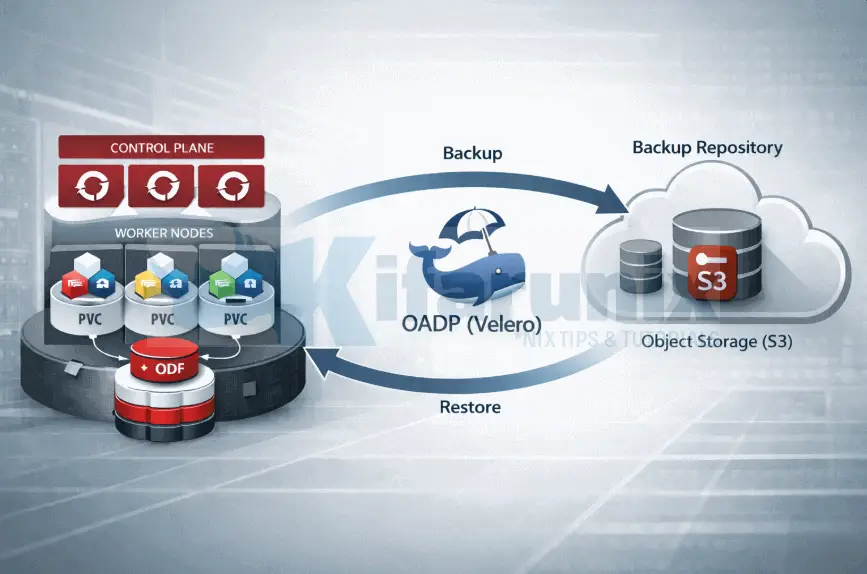
In this guide, we will cover how to backup applications and persistent volumes in OpenShift with OADP. This is Part 2 of a three-part series on backing up and restoring applications in OpenShift 4 with OADP (Velero). If you are just getting started, we recommend reading Part 1 first, where we covered installing the OADP Operator, preparing MinIO as the backup target, configuring ODF for CSI snapshots, and verifying the deployment.
Table of Contents
Backup Applications and Persistent Volumes in OpenShift with OADP
In this part, we deploy a test MySQL application with a persistent volume, write real data to it, and create our first on-demand backup. We also walk through scheduling automated backups with TTL-based retention, and verify that the backup data landed correctly in object storage, both the Kubernetes manifests and the Kopia repository holding the actual PVC contents.
Step 7: Deploy a Test Application with a Persistent Volume
To demonstrate OADP backup and restore, we will deploy a MySQL database in our demo-app project. To verify end-to-end functionality, we will write real rows to the database, back up the namespace including its PersistentVolume, and later restore it to confirm the data survives.
Let’s create a demo project:
oc new-project demo-appCreate the PersistentVolumeClaim for MySQL’s data directory:
cat <<EOF | oc apply -f -
apiVersion: v1
kind: PersistentVolumeClaim
metadata:
  name: mysql-data
  namespace: demo-app
spec:
  accessModes:
    - ReadWriteOnce
  resources:
    requests:
      storage: 5Gi
EOF
Next, deploy MySQL using a Red Hat certified image from the registry:
cat <<EOF | oc apply -f -
apiVersion: apps/v1
kind: Deployment
metadata:
  name: mysql
  namespace: demo-app
spec:
  replicas: 1
  selector:
    matchLabels:
      app: mysql
  template:
    metadata:
      labels:
        app: mysql
    spec:
      containers:
        - name: mysql
          image: registry.redhat.io/rhel9/mysql-80:latest
          env:
            - name: MYSQL_ROOT_PASSWORD
              value: "r00tpassword"
            - name: MYSQL_DATABASE
              value: "demodb"
            - name: MYSQL_USER
              value: "demouser"
            - name: MYSQL_PASSWORD
              value: "demopassword"
          ports:
            - containerPort: 3306
          volumeMounts:
            - name: mysql-storage
              mountPath: /var/lib/mysql
      volumes:
        - name: mysql-storage
          persistentVolumeClaim:
            claimName: mysql-data
EOF
Wait for the pod to start:
oc get pods -n demo-appNAME READY STATUS RESTARTS AGE
mysql-6d9765ddd8-2jglz 1/1 Running 0 5mThe PVC is bound:
oc get pvc -n demo-appNAME STATUS VOLUME CAPACITY ACCESS MODES STORAGECLASS VOLUMEATTRIBUTESCLASS AGE
mysql-data Bound pvc-95221139-c6ab-4b70-b859-aa75164cff03 5Gi RWO ocs-storagecluster-ceph-rbd <unset> 6m3sThe PVC was provisioned by ocs-storagecluster-ceph-rbd, ODF’s block storage StorageClass. This is the same driver our ocs-rbd-snapclass-velero VolumeSnapshotClass targets, meaning OADP has everything it needs to snapshot this volume.
Let’s write test rows to the database:
MYSQL_POD=$(oc get pod -n demo-app -l app=mysql -o jsonpath='{.items[0].metadata.name}')Give it a few for the pod to fully initialize then run:
oc exec -n demo-app $MYSQL_POD -- bash -c \
  "mysql -u demouser -pdemopassword demodb -e \
  \"CREATE TABLE IF NOT EXISTS customers (
      id INT AUTO_INCREMENT PRIMARY KEY,
      name VARCHAR(100),
      email VARCHAR(100)
    );
    INSERT INTO customers (name, email) VALUES
      ('Alice Nyundo',  '[email protected]'),
      ('Brian Waters', '[email protected]'),
      ('Carol Ben',  '[email protected]');\""
Confirm the rows are present:
oc exec -n demo-app $MYSQL_POD -- bash -c \
  "mysql -u demouser -pdemopassword demodb -e 'SELECT * FROM customers;'"
id name email
1 Alice Nyundo [email protected]
2 Brian Waters [email protected]
3 Carol Ben [email protected]Three rows confirmed in the PVC. Ready to back up.
Step 8: Create an On-Demand Backup
A backup is triggered by creating a Backup CR in the openshift-adp namespace. Velero reads this CR, collects all Kubernetes resources in the specified namespace, and for each PVC, it finds a labeled VolumeSnapshotClass and instructs the CSI driver to take a snapshot. Data Mover then reads the snapshot via a temporary PVC and uploads it to MinIO via Kopia. The result is a complete backup: all Kubernetes manifests plus actual volume data, stored in the oadp-backups bucket.
So, let’s create a sample Backup CR:
BACKUP_NAME="demo-app-backup-$(date +%Y%m%d-%H%M)"cat <<EOF | oc apply -f -
apiVersion: velero.io/v1
kind: Backup
metadata:
name: $BACKUP_NAME
namespace: openshift-adp
spec:
includedNamespaces:
- demo-app
storageLocation: default
ttl: 168h0m0s
defaultSnapshotMoveData: true
excludedResources:
- events
- events.events.k8s.io
EOFA few things to note:
includedNamespaces: scopes the backup todemo-apponly. Omitting this field backs up all namespaces, which is rarely what you want for application-level backups.storageLocation: default: references the BSL we created in the DPA. Velero will write all backup data to the MinIO bucket configured there.ttl: 168h0m0s: backup retention period. After 7 days Velero automatically deletes the backup object and its data from object storage. Adjust to match your recovery point objectives.defaultSnapshotMoveData: true: Even though this parameter is already set globally in the DPA, we still need it here. The first backup that runs initializes the Kopia repository in the target object storage and locks the maintenance ownership to the identity used at that moment. If this flag is missing on the first backup, the repository is initialized without Data Mover context, causing subsequent maintenance jobs to fail withmaintenance must be run by designated user.excludedResources: events are ephemeral, high-volume objects that serve no purpose in a backup. Every scheduling decision, probe result, and reconciliation loop generates events. Including them bloats the archive with data that is worthless after the fact and can significantly increase backup size on busy clusters.
Similarly, you need to exclude Operators from application backups for restore to succeed cleanly. If your namespace contains OLM-managed resources, verify first:
oc get csv,subscription,operatorgroup -n demo-appIf that returns resources, add clusterserviceversions, subscriptions, and operatorgroups to excludedResources. OLM manages those objects, and restoring them alongside operator-owned resources creates reconciliation conflicts. In our demo-app namespace there are no Operators, so no action is needed.
Check the backup status:
oc get backup.velero.io $BACKUP_NAME -n openshift-adpThe fully qualified resource name backup.velero.io is intentional. OpenShift clusters running additional operators such as NooBaa or CloudNativePG also register a CRD named backup, creating a name collision. When you run oc get backup, the CLI resolves to whichever CRD it finds first, which may not be Velero’s. Using backup.velero.io makes the target unambiguous regardless of what else is installed on the cluster.
Sample output;
NAME                            AGE
demo-app-backup-20260221-1422   5m22s
Completed with zero errors. A PartiallyFailed status means some items were skipped or errored — investigate with oc describe backup before relying on it for restore.
While the backup runs, you can watch the CSI snapshot lifecycle in a second terminal. This confirms ODF is performing the actual snapshot work:
oc get volumesnapshot -n demo-app -wThe command may return empty results by the time you are executing it because the backup might have completed.
The VolumeSnapshot objects Velero creates are transient, they exist only long enough for Data Mover to complete the upload, then are cleaned up automatically. On a small PVC the entire window is a matter of seconds. Empty results here are correct behavior, not an error.
If you manage to catch it while the backup is running, READYTOUSE: true confirms ODF created the Ceph snapshot successfully. If this stays false, the issue is between Velero’s CSI plugin and the ODF driver, verify the VolumeSnapshotClass carries the velero.io/csi-volumesnapshot-class: "true" label.
You can simply just watch;
watch "oc get backup.velero.io $BACKUP_NAME -n openshift-adp -o json | jq .status"Final state:
{
  "backupItemOperationsAttempted": 1,
  "backupItemOperationsCompleted": 1,
  "completionTimestamp": "2026-02-22T09:54:42Z",
  "expiration": "2026-03-01T09:52:14Z",
  "formatVersion": "1.1.0",
  "hookStatus": {},
  "phase": "Completed",
  "progress": {
    "itemsBackedUp": 24,
    "totalItems": 24
  },
  "startTimestamp": "2026-02-22T09:52:14Z",
  "version": 1
}
To inspect the full details of what was captured:
oc describe backup.velero.io $BACKUP_NAME -n openshift-adp...
Status:
Backup Item Operations Attempted: 1
Backup Item Operations Completed: 1
Completion Timestamp: 2026-02-21T17:09:18Z
Expiration: 2026-03-23T17:08:32Z
Format Version: 1.1.0
Phase: Completed
Progress:
Items Backed Up: 24
Total Items: 24
Start Timestamp: 2026-02-21T17:08:32ZThe Status section shows Phase: Completed, 24 of 24 items backed up, one operation attempted and one completed. The single operation corresponds to the DataUpload for the PVC, attempted and completed confirms Data Mover ran successfully.
For full volume details including CSI snapshot result and bytes transferred:
oc exec -n openshift-adp deployment/velero -- /velero backup describe $BACKUP_NAME --detailsConfirm the DataUpload:
oc get datauploads.velero.io -n openshift-adpNAME STATUS STARTED BYTES DONE TOTAL BYTES STORAGE LOCATION AGE NODE
demo-app-backup-20260221-1808-cdm2t Completed 32m 113057808 113057808 default 32m wk-03.ocp.comfythings.comBYTES DONE matching TOTAL BYTES is the definitive confirmation that the entire PVC was transferred to MinIO.
Verifying the Backup in MinIO
You can confirm the backup is properly stored in object storage by browsing the MinIO console or your respective object storage. To do this, navigate to the respective bucket, then to the velero/backups/<backup-name> directory. Here, you’ll find a set of metadata files written by Velero during the backup process.
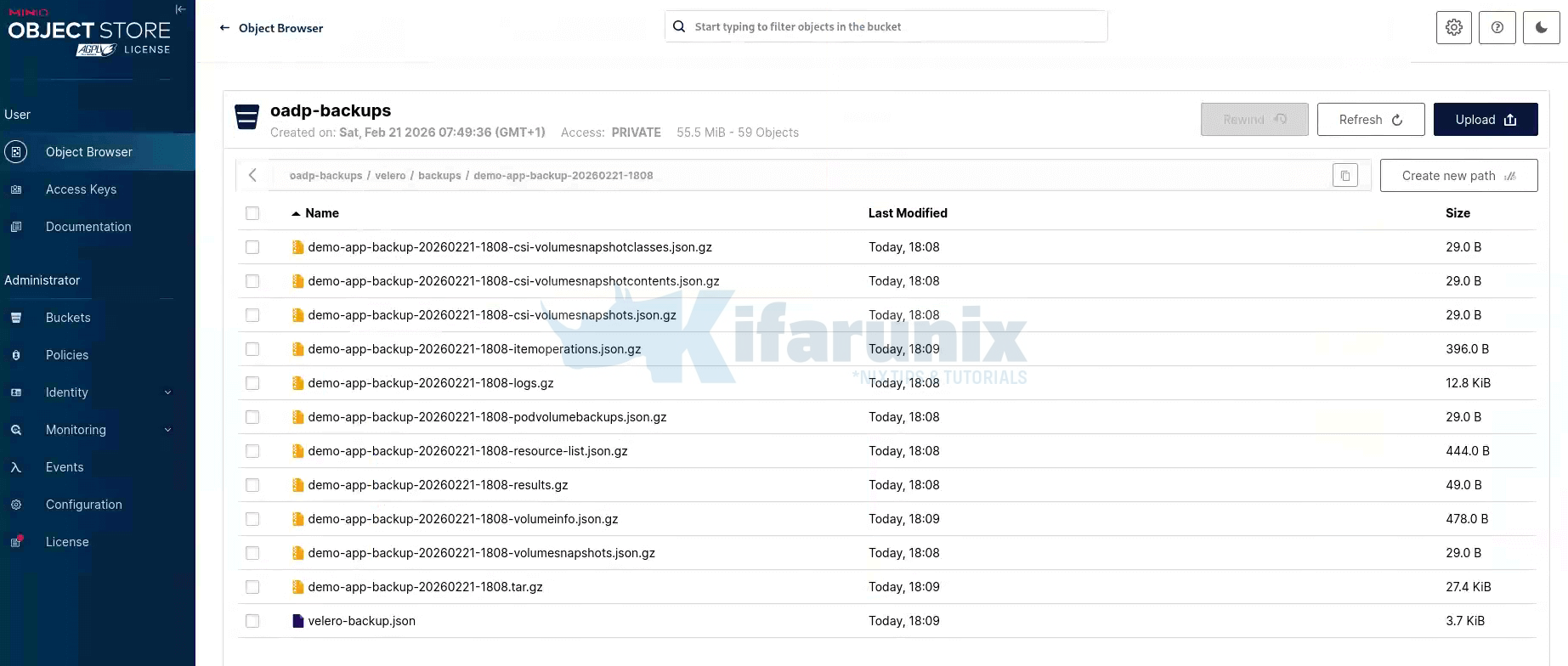
MinIO object browser showing oadp-backups/velero/backups/demo-app-backup-20260221-1808. Each file in this directory provides important information about the backup:
- resource-list.json.gz: This file catalogs all the Kubernetes objects captured in the backup.
- volumeinfo.json.gz: Records details about the CSI snapshot taken during the backup.
- itemoperations.json.gz: Contains information about the DataUpload operations performed during the backup.
- logs.gz: The full Velero backup log, which is useful for debugging if needed.
- .tar.gz: Contains the actual archive of serialized Kubernetes manifests.
In addition to these files, the PVC data is stored separately under velero/kopia/demo-app/. This is where Kopia stores the deduplicated block data for persistent volumes. If you browse this location, you’ll see the Kopia repository structure, including maintenance logs written during each backup interval.
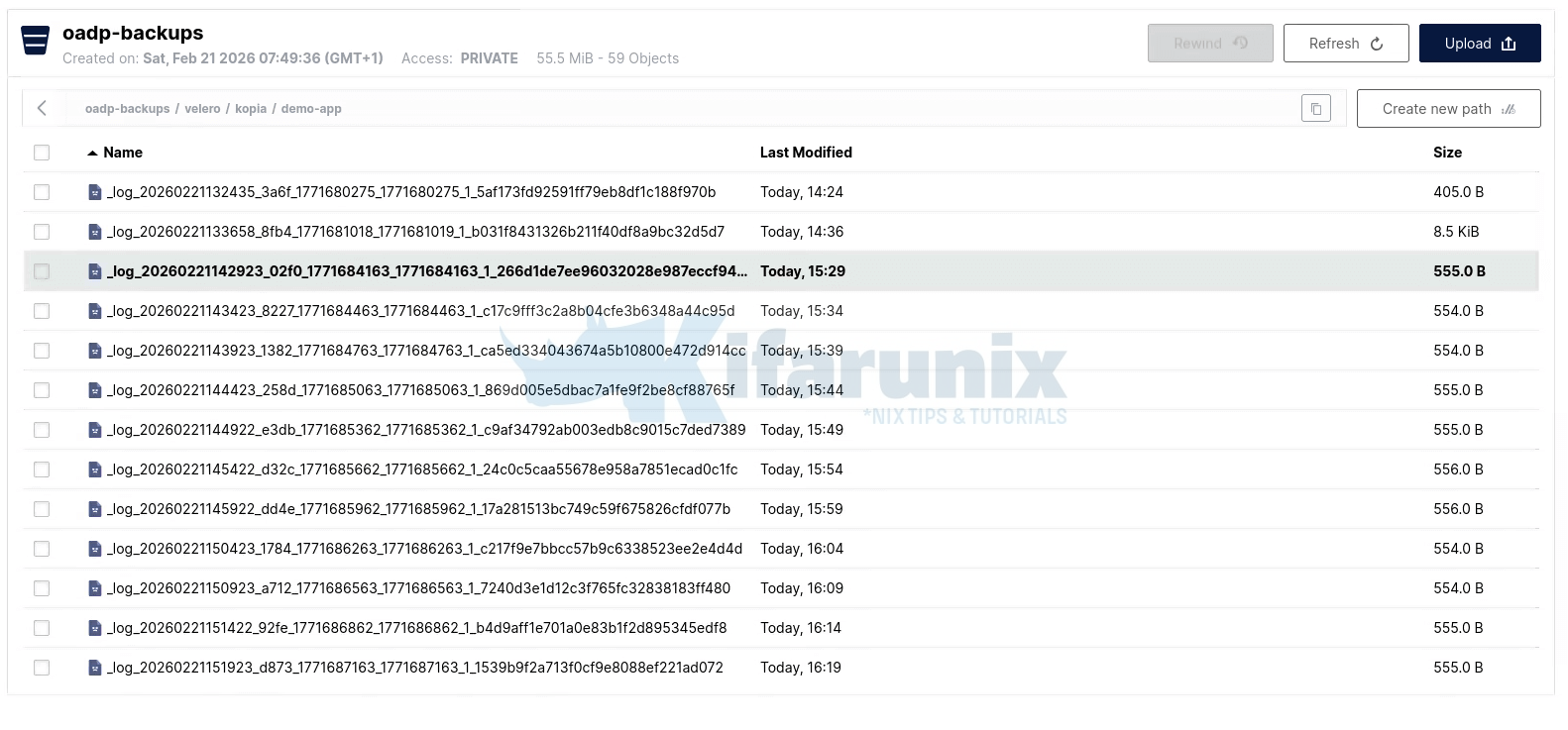
MinIO object browser showing oadp-backups/velero/kopia/ demo-app with full repository contents. Browsing this location reveals the full Kopia repository structure:
kopia.repositoryandkopia.blobcfgare written once at initialization and define the repository format, encryption settings, and blob storage configuration.p*files are pack files containing the actual deduplicated PVC data blocks. In this backup we have three pack files totalling roughly 55 MiB which together represent the full 113 MiB PVC after Kopia compression. This is where your MySQL data actually lives.q*files are index files that map content-addressed hashes to their locations within pack files. Kopia uses these to resolve any given block of data back to the correct pack file during a restore.xn0_*files are epoch snapshot manifests, lightweight pointers recording what content existed at each point in time. Multiplexn0_*files accumulate as backups run._log_*files are write-ahead maintenance logs written by the Kopia maintenance cycle running inside node-agent.
Two distinct locations in the same bucket:
- Velero Metadata: Stored under
velero/backups/for Kubernetes objects and backup logs. - Kopia Data: Stored under
velero/kopia/for PVC data.
Step 9: Schedule Automated Backups
In OADP, you can automate backups using a Schedule CR. A Schedule CR tells Velero to run backups at specified intervals using a standard cron expression. Each run creates a new Backup CR named with a timestamp suffix, meaning scheduled backups are fully inspectable objects. You can oc describe any of them, check their status, and use any of them as a restore source.
Here is our sample Schedule CR that runs daily at 02:00:
cat <<EOF | oc apply -f -
apiVersion: velero.io/v1
kind: Schedule
metadata:
  name: demo-app-daily-backup
  namespace: openshift-adp
spec:
  schedule: "0 2 * * *"
  template:
    includedNamespaces:
      - demo-app
    storageLocation: default
    ttl: 168h0m0s
    excludedResources:
      - events
      - events.events.k8s.io
EOF
ttl: 168h0m0ssets a 7-day rolling retention window. As new backups are created, Velero automatically expires and deletes backups older than 7 days from MinIO. Without a TTL the bucket grows indefinitely. Size your TTL based on your RPO requirements and available storage; a 30-day TTL at daily cadence means up to 30 backup archives held simultaneously.
Confirm the schedule is enabled:
oc get schedule.velero.io -n openshift-adpNAME STATUS SCHEDULE LASTBACKUP AGE PAUSED
demo-app-daily-backup Enabled 0 2 * * * 87sYou can also check as follows;
oc exec -n openshift-adp deployment/velero -- /velero schedule getNAME STATUS CREATED SCHEDULE BACKUP TTL LAST BACKUP SELECTOR PAUSED
demo-app-daily-backup Enabled 2026-02-21 18:17:46 +0000 UTC 0 2 * * * 168h0m0s n/a false To immediately trigger a run without waiting for the next cron window, useful for pre-maintenance snapshots:
oc exec -n openshift-adp deployment/velero -- /velero backup create --from-schedule demo-app-daily-backupSample output;
Defaulted container "velero" out of: velero, openshift-velero-plugin (init), velero-plugin-for-aws (init)
Creating backup from schedule, all other filters are ignored.
time="2026-02-21T18:35:09Z" level=info msg="No Schedule.template.metadata.labels set - using Schedule.labels for backup object" backup=openshift-adp/demo-app-daily-backup-20260221183509 labels="map[]"
Backup request "demo-app-daily-backup-20260221183509" submitted successfully.
Run `velero backup describe demo-app-daily-backup-20260221183509` or `velero backup logs demo-app-daily-backup-20260221183509` for more details.
You can check the status:
oc describe backup.velero.io demo-app-daily-backup-20260221183509 -n openshift-adpSample output (Completed already, -:))
...
Status:
  Backup Item Operations Attempted:  1
  Backup Item Operations Completed:  1
  Completion Timestamp:              2026-02-21T18:35:58Z
  Expiration:                        2026-02-28T18:35:09Z
  Format Version:                    1.1.0
  Hook Status:
  Phase:  Completed
  Progress:
    Items Backed Up:  24
    Total Items:      24
  Start Timestamp:    2026-02-21T18:35:09Z
  Version:            1
Events:               <none>
Continue to Part 3: How to Restore and Validate Application Backups in OpenShift with OADP.
Conclusion
At this point you have a working backup strategy for your application. You created an on-demand backup, confirmed the Kubernetes manifests and PVC data landed in MinIO, scheduled daily automated backups with a rolling retention window, and verified you can trigger an immediate run without waiting for the cron window.
The DataUpload showing BYTES DONE matching TOTAL BYTES is the key confirmation that the full pipeline worked end to end; CSI snapshot, Data Mover, Kopia upload, MinIO storage. Everything is there and accounted for.
A backup is only as good as the restore it enables. In our next guide, we will put that to the test. We will delete the demo-app namespace entirely and restore it from the backup we just create, verifying that the MySQL database comes back up with all three customer rows intact, exactly as they were at backup time.