Skip to content
kifarunix.com
  • Home
  • Blog
    • HowTos
    • Containers
    • Security
    • Networking
    • Storage
    • Virtualization
    • Monitoring
  • About Us
  • Contact Us

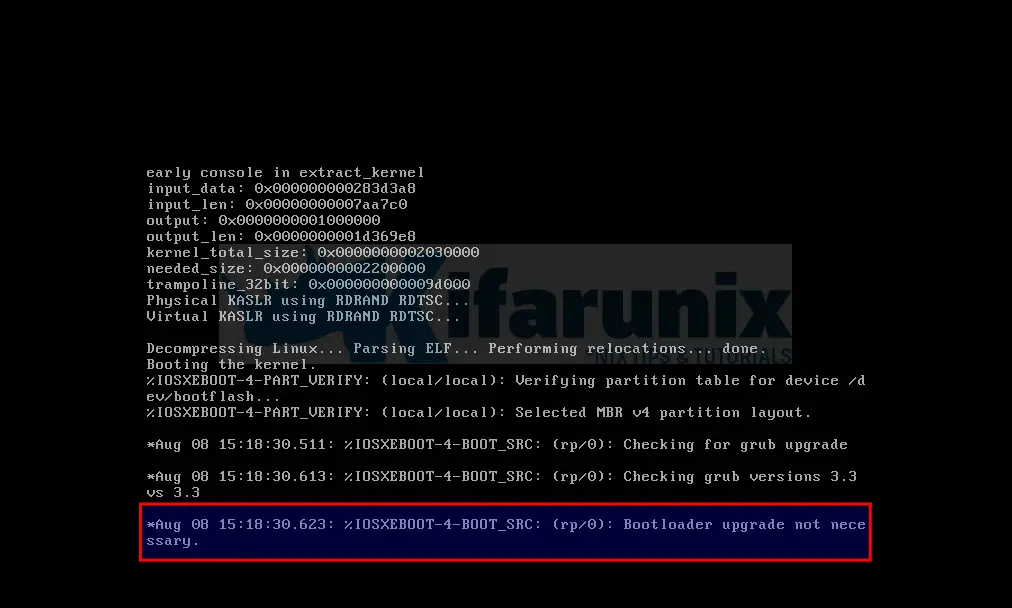
cisco edge 8000v Bootloader upgrade not necessary

How to fix Cisco Catalyst 8000v Edge Stuck on Bootloader upgrade not Necessary

Cisco Catalyst 8000v Edge Stuck on Bootloader upgrade not Necessary

How to fix Cisco Catalyst 8000v Edge Stuck on Bootloader upgrade not Necessary? Well, in one way or another, you might have encountered an a

Latest Posts

How to Configure Production-Ready Monitoring in OpenShift: Prometheus, Alertmanager & Persistent Storage

Configure OpenShift 4 Image Registry Persistent Storage with ODF: 2026 Step-by-Step Guide

How to Install and Configure OpenShift Data Foundation (ODF) on OpenShift 4.20: Step-by-Step Guide [2026]

How to Deploy an OpenShift Cluster Using Agent-Based Installer (Bootable ISO, KVM & Bare Metal)

Integrate Request Tracker (RT) with Active Directory for Authentication

How to Enable Self-Service Password Reset in Request Tracker (RT)

Containers

Install OpenStack on Ubuntu 24.04 using Kolla Ansible

Kubernetes Kustomize 101: Introduction and Basics

Deploy ELK Stack 8 Cluster on Docker using Ansible

Connect to Remote Docker Environment on Docker Desktop

Install Portainer on Ubuntu 22.04

Install and Use Docker on Debian 10 Buster

Security

How to Install and Configure Maltrail on Ubuntu 18.04

Install and Configure Snort 3 on Ubuntu 22.04

How to Protect From Identity Theft Online: A Detailed Guide for 2022

How to Scan a Remote Host using Nessus Vulnerability Scanner

Visualize ClamAV Scan Logs on ELK Stack Kibana

ExpressVPN – Easy to Use VPN

Monitoring

Easily Configure Elasticsearch HTTPS Connection

Deploy Nagios as a Docker Container

Install Nagios NRPE Agents on Debian 11/Debian 10

How to Debug Logstash Grok Filters

Install and Setup OSSEC agent on Ubuntu 18.04/CentOS 7

Monitor Windows Systems using Elastic Osquery Manager

© 2026 kifarunix.com

Home Advertise with us Privacy Policy